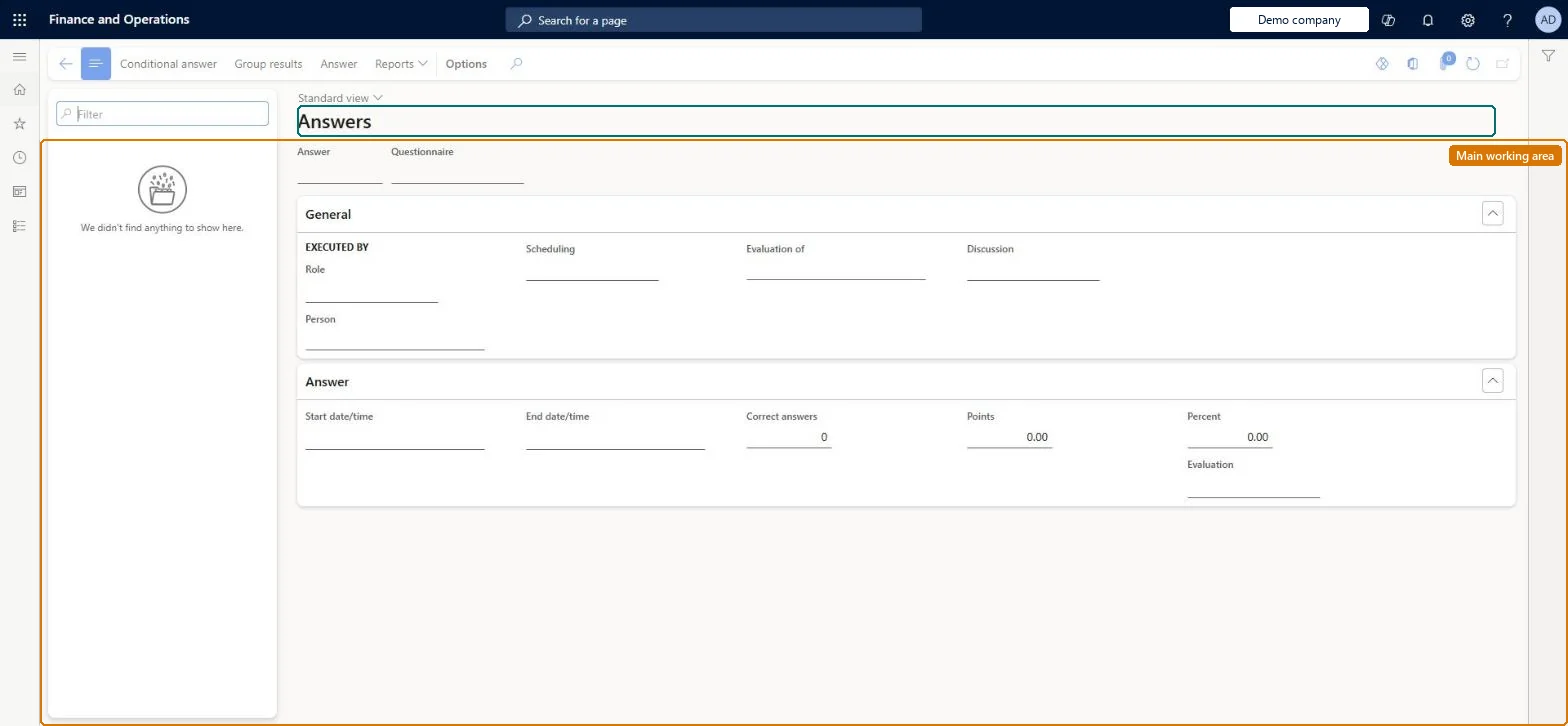
Use this page to view the details of completed answer sessions, including answers, points earned, results per result group and the question hierarchy used, and to print the Results, Answer and Incorrect answers reports.
Purchasing agent, Purchasing Agent - Public Sector, Product design manager and 13 more roles
Business process
Configure and manage surveys
Menu item
KMKnowledgeCollectorUserResults
Main table
KMVirtualNetworkAnswerTable
Data entity
None for this page's own settings
Setup steps
1 on this page
Show what matters for
SETUP GUIDEHow to set it up8 sections. Choose a role to highlight what matters to you.
Everyone
1What it is and why
What it is
An inquiry page that lists completed answer sessions, where an answer session is one user's response to a questionnaire.
What you do here
Use this page to view the details of completed answer sessions, including answers, points earned, results per result group and the question hierarchy used, and to print the Results, Answer and Incorrect answers reports.
Example
For example, after BEAT's safety test the HR administrator opens a respondent's session on Answers: 8 of 10 correct, 16 points, 80 percent, and prints the Incorrect answers report for the two wrong answers.
The page in Dynamics 365. page title tab to open what to set or check
About the examples: Examples and screenshots in this guide use BEAT, a demo company in a Dynamics 365 test environment. Use your own company's codes and values instead of copying them.
Setup steps on this page
Review an answer session
Use this page to view the details of completed answer sessions, including answers, points earned, results per result group and the question hierarchy used, and to print the Results, Answer and Incorrect answers reports.
Steps from Microsoft
Go to Questionnaire > View and analyze results > Answers.
Filter on the questionnaire or person and select an answer session.
Read Correct answers, Points, Percent and Evaluation, then select Answer, Conditional answer or Group results for the detail.
Use Reports to print the Results report, the Answer report or the Incorrect answers report for the session.
The evaluation of the result, set up on the questionnaire.Microsoft Learn
Common errors and fixes
Message
What to do
The Results report, Answer report or Incorrect answers report can't be printed from Answers
The Results report needs result groups and Results page on the questionnaire; the Answer and Incorrect answers reports need Answer report on the questionnaire. Set them on Questionnaires. Microsoft Learn
Test checklist
Open Answers and select a completed session.
Check the answers, points earned and result-group responses.
Print the Results report (only when the questionnaire uses result groups and Results page).
Print the Answer and Incorrect answers reports (only when Answer report is selected on the questionnaire).
Filter on the questionnaire first, then open the session and its Group results.The page lists sessions of every questionnaire; without a filter, sessions of tests and surveys are mixed.
No Feature management feature is needed for questionnaires; Microsoft Learn describes them without one. Questionnaires belong to the Human resources area, and in this system the same pages are also granted through procurement (vendor and RFQ questionnaires), sales and marketing (campaigns, telemarketing) and case management duties, as the Security section shows. The HR administrator, trainers and evaluators read results here.
Completed answer sessions of all questionnaires; opened from a questionnaire or a person, the list is filtered to that questionnaire or person. Microsoft Learn
Can it be undone
Reversible: The inquiry changes no data.
If you change it later
None on data. The reports offered depend on the questionnaire: Results page and result groups for the Results report, Answer report for the Answer and Incorrect answers reports. Microsoft Learn
Technical architect
6Technical
Menu item
KMKnowledgeCollectorUserResultsChecked in Dynamics 365
Form
KMKnowledgeCollectorUserResultsChecked in Dynamics 365
Table
KMVirtualNetworkAnswerTableShown as “PLAN A QUESTIONNAIRE” in Record infoKey field: kmVirtualNetworkAnswerTableIdChecked in Dynamics 365
Data entities
KMAnswersByPersonEntityPerson answers to questionnaire (each person's answers: questionnaire, question, answer text and comment; not the session's points, percent or evaluation) Microsoft data model
To use itHuman resource assistant HcmHumanResourceAssistantMarketing manager CRMMarketingManagerPurchasing manager TradePurchasingManagerSales manager TradeSalesManagerHuman resource manager HcmHumanResourceManagerGive people one of these roles. On this system, 15 roles can open this page.Checked in Dynamics 365
Actions on the page
(Action Pane without tabs): Conditional answer, Group results, Answer, ReportsChecked in Dynamics 365
KMAnswersByPersonEntity (Person answers to questionnaire): shared by all companies; exports the answers per person, for example to archive them before Delete results.Load order: Answer sessions are transactions and normally stay where they were answered. Person answers to questionnaire is in BEAT's Person search template at level 700.Load first: Questionnaires, People (global address book)Checked in Dynamics 365