About the examples: Examples and screenshots in this guide use BEAT, a demo company in a Dynamics 365 test environment. Use your own company's codes and values instead of copying them.
When to run it
When to run it
When you evaluate one person's answers, for example an applicant's test or an employee's assessment.
How often
On demand.
What the output shows
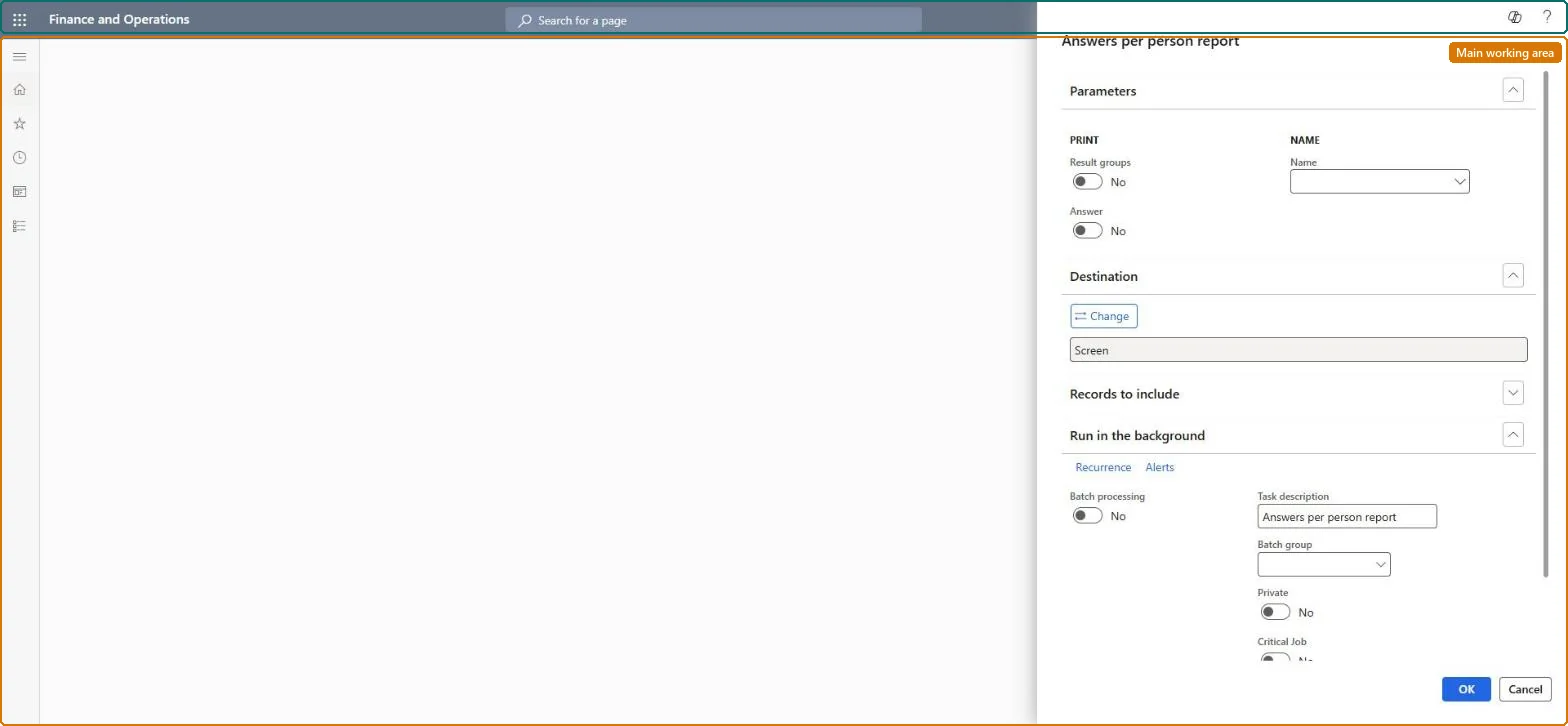
One respondent's questionnaire results, with result group summaries and answers when selected. Unlike Answers per questionnaire, it is organized by person. An empty report usually means the person has no completed answer session.
Prints a summary for each result group for each questionnaire.Microsoft Learn
Yes
Answer
Prints the question and answer text with points per answer; when cleared, prints only the answer session status.Microsoft Learn
Yes
Name
The worker, contact or applicant whose responses are printed.Microsoft Learn
Common errors and fixes
Message
What to do
Fewer answers print than were given
Only completed answer sessions are printed; sessions that were cancelled or are still planned don't appear. Microsoft Learn
A result group shows no points
Result groups only count closed-ended questions (input type Check box, Alternative button or Combo box) whose answer group has Points on its answers. Microsoft Learn
Select the person under Name and turn on Result groups; add Answer for an interview pack.The report is organized by person, so it shows one respondent's results across questionnaires.
No Feature management feature is needed for questionnaires; Microsoft Learn describes them without one. Questionnaires belong to the Human resources area, and in this system the same pages are also granted through procurement (vendor and RFQ questionnaires), sales and marketing (campaigns, telemarketing) and case management duties, as the Security section shows. The survey owner, trainer or recruiter prints it.
Prints one person's questionnaire results, with result-group summaries and, if selected, the questions, answers and points. Microsoft Learn
Can it be undone
Reversible: The report changes no data.
If you change it later
None on data. It reads answer sessions, so run it before Delete results removes them. Microsoft Learn
Technical architect
6Technical
Menu item
KMKnowledgeCollectorResultByVirNetIdChecked in Dynamics 365
Form
SysOperationTemplateFormChecked in Dynamics 365
Roles to set it up and use it
To use itHuman resource assistant HcmHumanResourceAssistantMarketing manager CRMMarketingManagerPurchasing manager TradePurchasingManagerSales manager TradeSalesManagerHuman resource manager HcmHumanResourceManagerGive people one of these roles. On this system, 7 roles can run this page.Checked in Dynamics 365
Load order: The Answers per person report has no data entity in Data management, so it can't be loaded from a file or a configuration template. It is a report: it reads answer sessions and result groups and holds no data of its own, so there is nothing to migrate.Checked in Dynamics 365