Purchasing agent, Purchasing Agent - Public Sector, Product design manager and 18 more roles
Business process
Configure and manage surveys
Menu item
KMQuestionnaireList
Main table
KMList
Setup steps
1 on this page
Show what matters for
PAGE GUIDEWhat the page does and how to use it8 sections. Choose a role to highlight what matters to you.
Everyone
1What it is and why
What it is
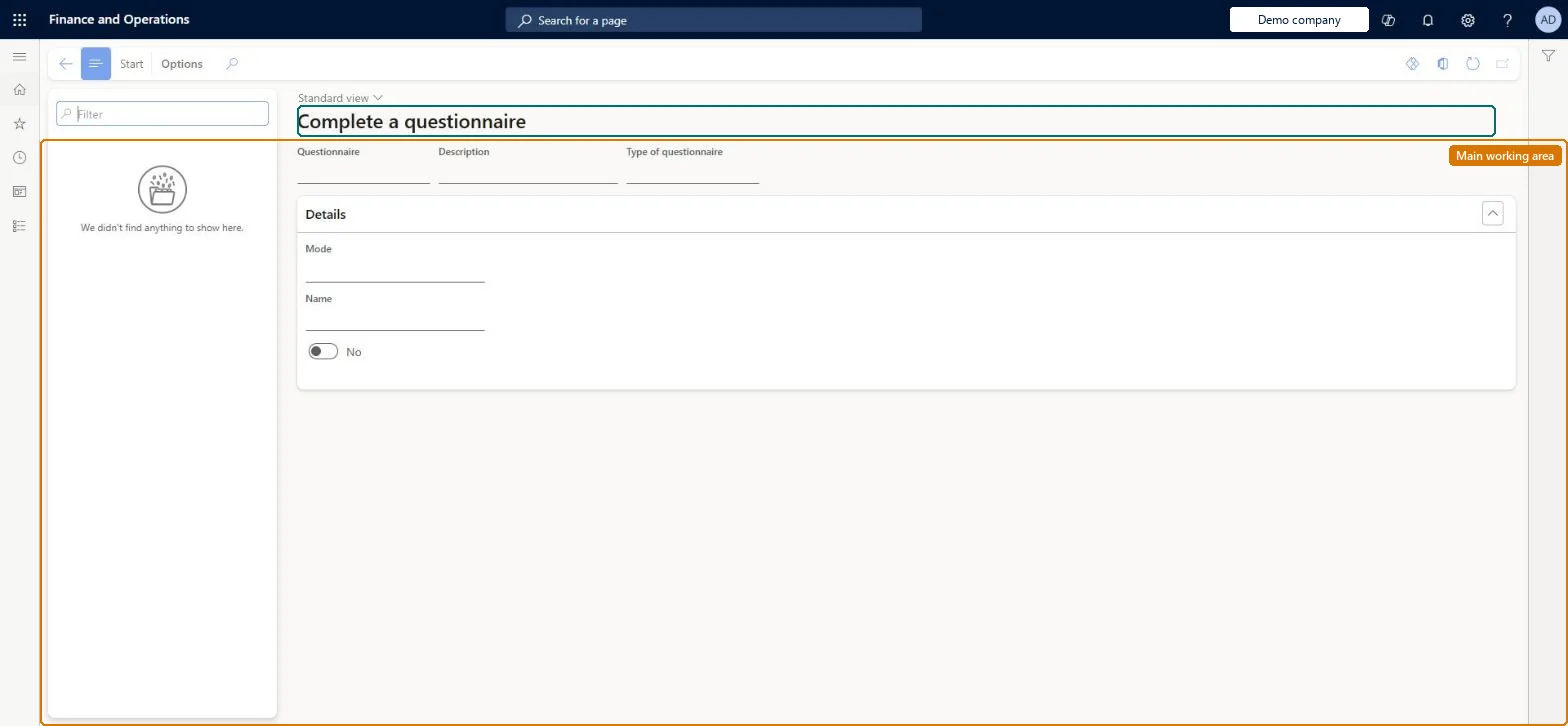
A page where a respondent sees the questionnaires available to them and answers one.
What you do here
Use this page to start and complete a questionnaire that has been made available to you, moving through the questions and ending the session to save your answers.
Example
For example, a BEAT employee opens the active cafeteria feedback questionnaire, selects Start, answers the 6 questions with Forward and selects End; the answers then show on Answers.
The page in Dynamics 365. page title tab to open what to set or check
About the examples: Examples and screenshots in this guide use BEAT, a demo company in a Dynamics 365 test environment. Use your own company's codes and values instead of copying them.
Setup steps on this page
Test-answer a questionnaire before release
Use this page to start and complete a questionnaire that has been made available to you, moving through the questions and ending the session to save your answers.
Steps from Microsoft
Go to Questionnaire > Distribute > Complete a questionnaire.
Select a questionnaire, and then select Start.
Type or select your answer, and then select Forward to go to the next question.
Use Back to return to a previous question, or Overview to see all questions.
On the last question, select End to save your answers.
A respondent doesn't see the questionnaire on Complete a questionnaire
Check that Active is set on the questionnaire. If User rights names a questionnaire group, the respondent must be a member of that group. Microsoft Learn
A respondent's answers to a timed questionnaire weren't saved
With Total time set, answers are saved only if all mandatory questions were answered before the time ran out. Give more time or fewer mandatory questions. Microsoft Learn
Test checklist
Make a test questionnaire Active.
Open Complete a questionnaire and check the questionnaire is listed.
Answer all questions and end the session.
Open Answers and check the new session with the respondent and answers.
Check the same questionnaire is also reachable from Questionnaires to complete in Employee self-service.
Complete every new questionnaire yourself once, including End, before you set it Active or start a schedule.Learn advises testing by completing the questionnaire yourself; Validate checks the structure but not the respondent's experience.
No Feature management feature is needed for questionnaires; Microsoft Learn describes them without one. Questionnaires belong to the Human resources area, and in this system the same pages are also granted through procurement (vendor and RFQ questionnaires), sales and marketing (campaigns, telemarketing) and case management duties, as the Security section shows. Every respondent uses it, or Questionnaires to complete in Employee self-service.
Shows the signed-in person the questionnaires open to them: Active ones (filtered by questionnaire groups) and their own planned answer sessions. Microsoft Learn
Can it be undone
Hard to reverse: A completed session is stored as an answer session. For a planned answer session the person can answer only once; Active questionnaires can be answered again as a new session. Microsoft Learn
If you change it later
For a timed questionnaire, answers are not saved if the time runs out before all mandatory questions are answered. Microsoft Learn
Technical architect
6Technical
Menu item
KMQuestionnaireListChecked in Dynamics 365
Form
KMQuestionnaireListChecked in Dynamics 365
Table
KMListShown as “KMLIST” in Record infoChecked in Dynamics 365
Who can open it
PrivilegesMaintain questionnaires KMQuestionnaireListMaintainView a list of questionnaires KMQuestionnaireListViewKMQuestionnaireResponseMaintainComplete questionnaires KMQuestionnaireSelection_Win32DutiesEnable case management CaseCaseManagementEnableMaintain employee cases CaseEmployeeCasesMaintainInquire into questionnaire process HcmQuestionnaireProcessInquireMaintain questionnaire transactions HcmQuestionnaireTransactionMaintainView and complete questionnaires KMQuestionnaireResponseEnableMaintain campaigns smmCampaignsMaintainMaintain telemarketing smmTelemarketingMaintainMaintain vendor questionnaires VendVendorQuestionnaireMaintain22 security rolesProduct design manager BOMProductDesignManagerCollections manager CollectionLetterCollectionsManagerMarketing coordinator CRMMarketingCoordinatorMarketing manager CRMMarketingManagerGuestContractor HcmContractorSelf-service contractor HcmContractorSelfServiceEmployee HCMEmployeeSelf-service employee HCMEmployeeSelfServiceHuman resource assistant HcmHumanResourceAssistantHuman resource manager HcmHumanResourceManagerPending worker HcmPendingWorkerTraining manager HcmTrainingManagerProject manager ProjProjectManagerProcess engineering manager RouteProcessEngineeringManagerService delivery manager SMAServiceDeliveryManagerCustomer service manager TradeCustomerServiceManagerPurchasing manager TradePurchasingManagerSales manager TradeSalesManagerPurchasing agent VendPurchasingAgentPurchasing Agent - Public Sector VendPurchasingAgent_PSNand 1 moreChecked in Dynamics 365
Roles to set it up and use it
To set it up or change itHuman resource assistant HcmHumanResourceAssistantPurchasing manager TradePurchasingManagerMarketing coordinator CRMMarketingCoordinatorMarketing manager CRMMarketingManagerCustomer service manager TradeCustomerServiceManagerTo use itTraining manager HcmTrainingManagerGuest Pending worker HcmPendingWorkerSelf-service contractor HcmContractorSelfServiceSelf-service employee HCMEmployeeSelfServiceGive people one of these roles. On this system, 21 roles can open this page.Checked in Dynamics 365
Actions on the page
(Action Pane without tabs): StartChecked in Dynamics 365
Load order: Answer sessions entered here has no data entity in Data management, so it can't be loaded from a file or a configuration template. Answers are transactions; they stay in the old environment. Person answers to questionnaire (KMAnswersByPersonEntity) can export them for an archive.Checked in Dynamics 365