Accounts payable manager, Auditor, Purchasing manager and 1 more role
Business process
Maintain inventory levels
Menu item
PdsComdPricingTemplate
Main table
PdsComdPricingTemplate
Data entity
PdsCommodityPricingTemplateEntity
Setup steps
1 on this page
Show what matters for
SETUP GUIDEHow to set it up8 sections. Choose a role to highlight what matters to you.
Everyone
1What it is and why
What it is
A setup page where you create pricing templates that, with their quantity and margin templates, set the pricing rules for commodity price and margin calculations.
What you do here
Use this page to define the cost multiplier and margin for formula items, item groups and customers when new sales prices are calculated.
Example
For example, a company can set up a pricing template so that the sales price of apple sauce is based on a 45 percent margin and a cost multiplier of 1.25 for all quantities.
The page in Dynamics 365. page title tab to open what to set or check
About the examples: Examples and screenshots in this guide use BEAT, a demo company in a Dynamics 365 test environment. Use your own company's codes and values instead of copying them.
Step by step, with screenshots
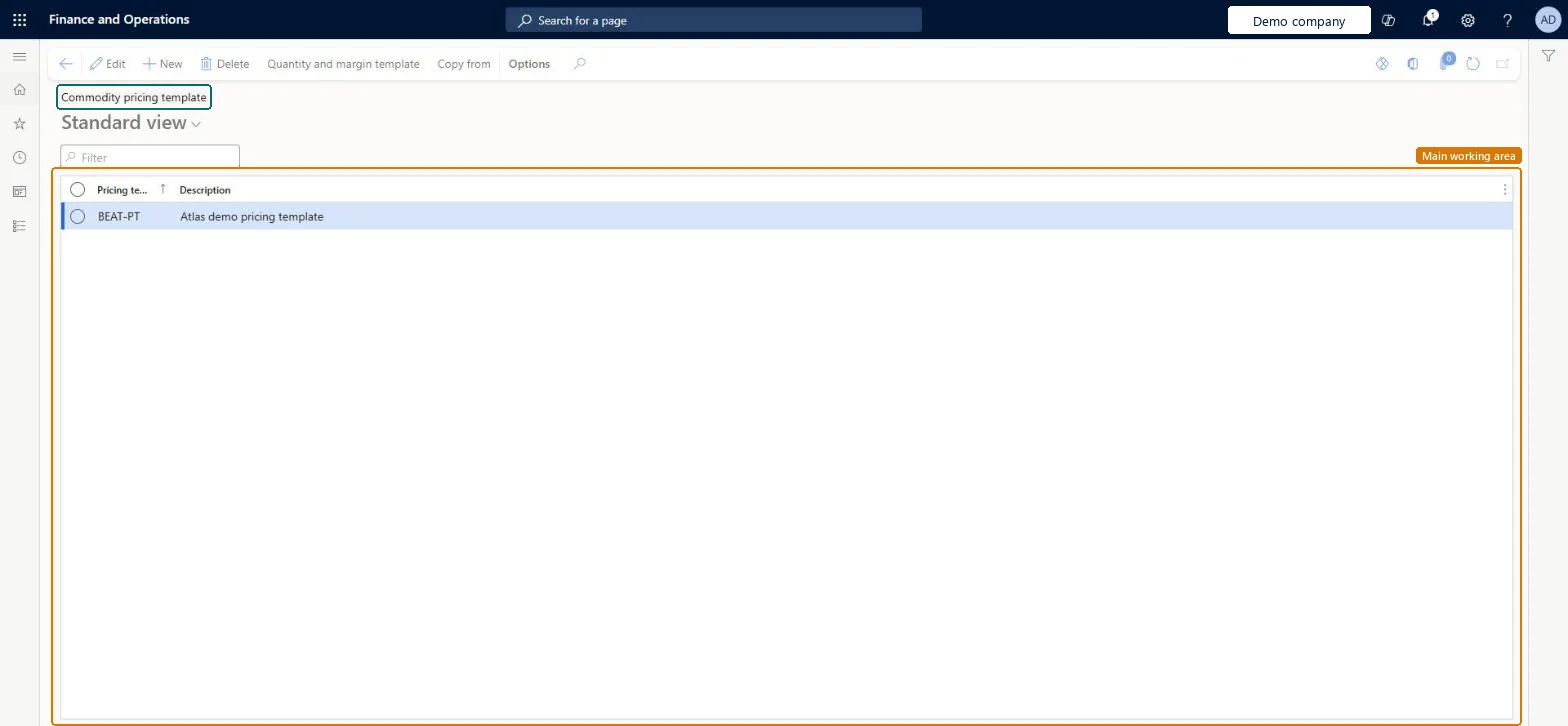
Set up Pricing template1 screen
Use this page to define the cost multiplier and margin for formula items, item groups and customers when new sales prices are calculated.
Screen 1
Create a commodity pricing template
Go to Inventory management > Setup > Commodity pricing > Pricing template
Select New
Enter the pricing template code and description
Select Save
Select Quantity and margin template to add the cost multiplier and margin by quantity
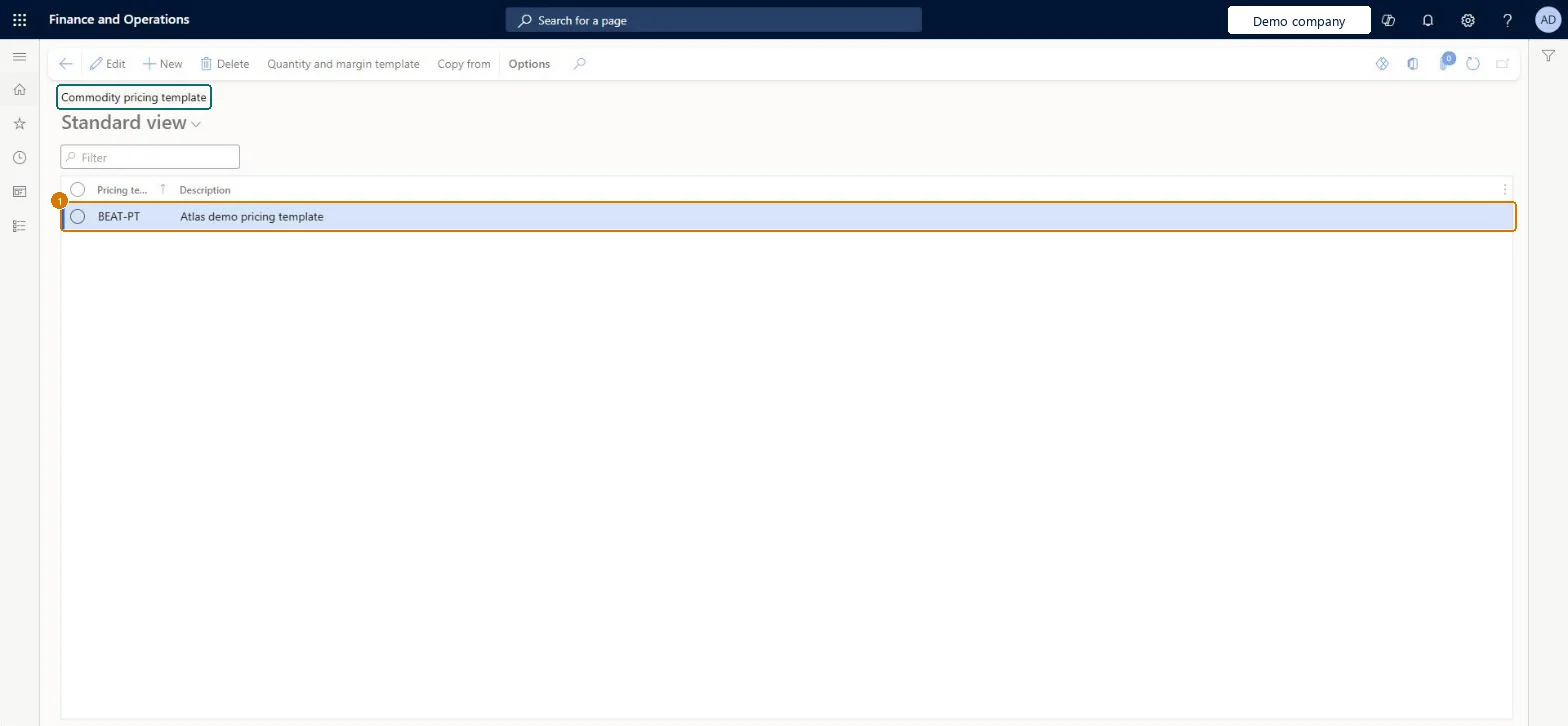
1Pricing template
BEAT-PT
Description
Pricing template
Show the full screen page title tab to open what to set or check
Steps from Microsoft
Go to Inventory management > Setup > Commodity pricing > Pricing template.
Select New, and enter the Pricing template and a Description.
Select Save.
Select Quantity and margin template, and then select New.
Enter the Item relation and the Site.
Set the Cost multiplier and the Margin percentage.
On the Dimension FastTab, enter the Warehouse if needed, and then select Save.
All formula items, one item group or one formula item; only items with the Formula production type can be used.Microsoft Learn
Customer Relation
All customers, a customer group or one customer; it's copied to the trade agreement journal that the calculation creates.Microsoft Learn
From and To Quantity
The sales quantity range that the line applies to.Microsoft Learn
Cost Multiplier
A multiplier applied to the total production cost of the formula item before the margin is calculated.Microsoft Learn
Margin amount or percentage
A fixed margin, or a percentage of the multiplied cost.Microsoft Learn
Pricing template
COMMODITY
PricingTemplateId
Description
A description of the pricing template.Checked in Dynamics 365
Pricing template
Description
Test checklist
Create a pricing template with a quantity and margin line for one formula item, a customer relation, a From and To Quantity range, a Cost Multiplier and a margin percentage.
Enter a Pricing calculation for the commodity raw material with a cost and a date range.
Run Create price and margin data with that pricing template and check the Pricing update page shows a new cost and sales price for the formula item.
Create the trade agreement from Pricing update, post it, and check a new sales order line for that customer and quantity picks up the new price within the date range.
One pricing template per pricing policy, with quantity and margin lines by item relation (all formula items, item group or formula item) and customer relation; set the main one as the default Pricing template on the Commodity pricing tab of Inventory and warehouse management parametersThe pricing template, with its quantity and margin templates, defines the pricing criteria used in the formula calculations and new price determination, and the parameter default is the template used when you generate a pricing and margin update.
Adding items that aren't formula items to the quantity and margin lines. Only items whose production type is Formula can be used, so other items never get a calculated sales price.
Reversible: The template only drives the next price and margin calculation. Trade agreements created from the Pricing update page must still be posted by a user, and once posted they stay valid for the dates of the pricing calculation used.
Technical architect
6Technical
Menu item
PdsComdPricingTemplateChecked in Dynamics 365
Form
PdsComdPricingTemplateChecked in Dynamics 365
Table
PdsComdPricingTemplateShown as “Commodity pricing template” in Record infoKey field: PricingTemplateIdChecked in Dynamics 365
PrivilegesMaintain commodity pricing templates PdsComdPricingTemplateMaintainView commodity pricing templates PdsComdPricingTemplateViewDutiesCommodity pricing PdsComdPricingMaintainInquire into purchase order to invoice policies PurchOrderToInvoicePoliciesInquire4 security rolesAuditor AuditPolicyManagerPurchasing manager TradePurchasingManagerSales manager TradeSalesManagerAccounts payable manager VendInvoiceAccountsPayableManagerChecked in Dynamics 365
Roles to set it up and use it
To set it up or change itSales manager TradeSalesManagerPurchasing manager TradePurchasingManagerTo use itAccounts payable manager VendInvoiceAccountsPayableManagerAuditor AuditPolicyManagerGive people one of these roles. On this system, 4 roles can open this page.Checked in Dynamics 365
Actions on the page
Options: Personalize, Page options, ShareChecked in Dynamics 365
PdsCommodityPricingTemplateEntity (Commodity pricing templates): loaded for each company, in Microsoft's default template 300 - Inventory.Load order: Microsoft's default template 300 - Inventory loads Commodity pricing templates at execution unit 1, level 30, sequence 10. Lower levels load first, and entities at the same level load in sequence order.Load first: the default templates at lower levels (System setup to General ledger)Microsoft Learn
Checked in a working Dynamics 365 system, version 10.0.49: the menu item, form, table and security, the page, the demo records and the values in the screenshots.
To cite this step: IM-SETUP-440, Set up Pricing template. Beyond ERP Atlas Hub, 2026-11-11. https://www.beyonderp.cloud/atlas/step/IM-SETUP-440