Create test groups in Dynamics 365 Supply Chain Management
Menu item
InventTestGroup
Main table
InventTestGroup
Data entity
InventQualityTestGroupEntity
Setup steps
1 on this page
Show what matters for
SETUP GUIDEHow to set it up8 sections. Choose a role to highlight what matters to you.
Everyone
1What it is and why
What it is
A setup page where you create test groups and assign the individual tests that belong to each group.
What you do here
Use this page to set the default tests, sampling and acceptable quality level that apply when an item is tested on a quality order.
Example
For example, a manufacturer defines a test group for each variation of its quality guidelines and assigns one to each rule that creates quality orders.
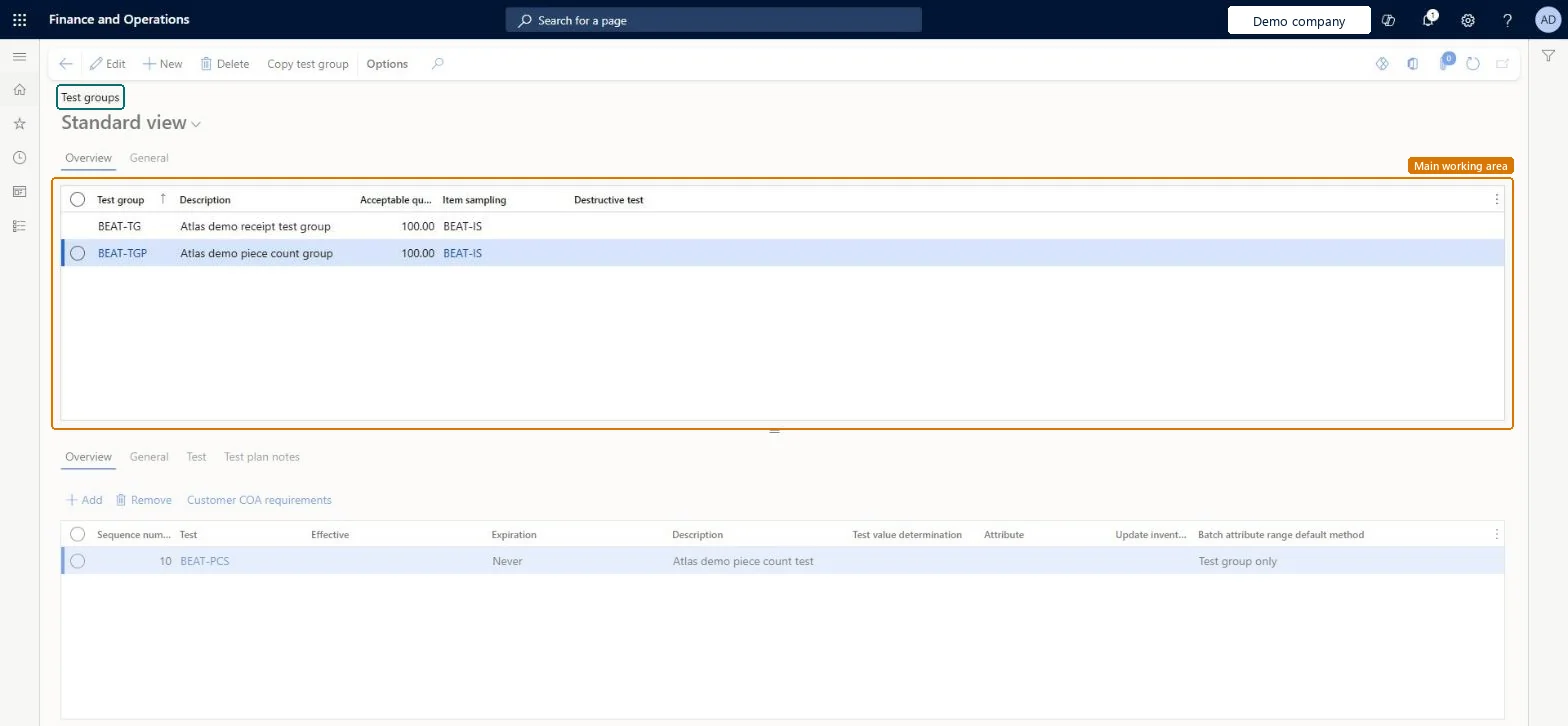
The page in Dynamics 365. page title tab to open what to set or check
About the examples: Examples and screenshots in this guide use BEAT, a demo company in a Dynamics 365 test environment. Use your own company's codes and values instead of copying them.
Step by step, with screenshots
Set up Test groups1 screen
Use this page to set the default tests, sampling and acceptable quality level that apply when an item is tested on a quality order.
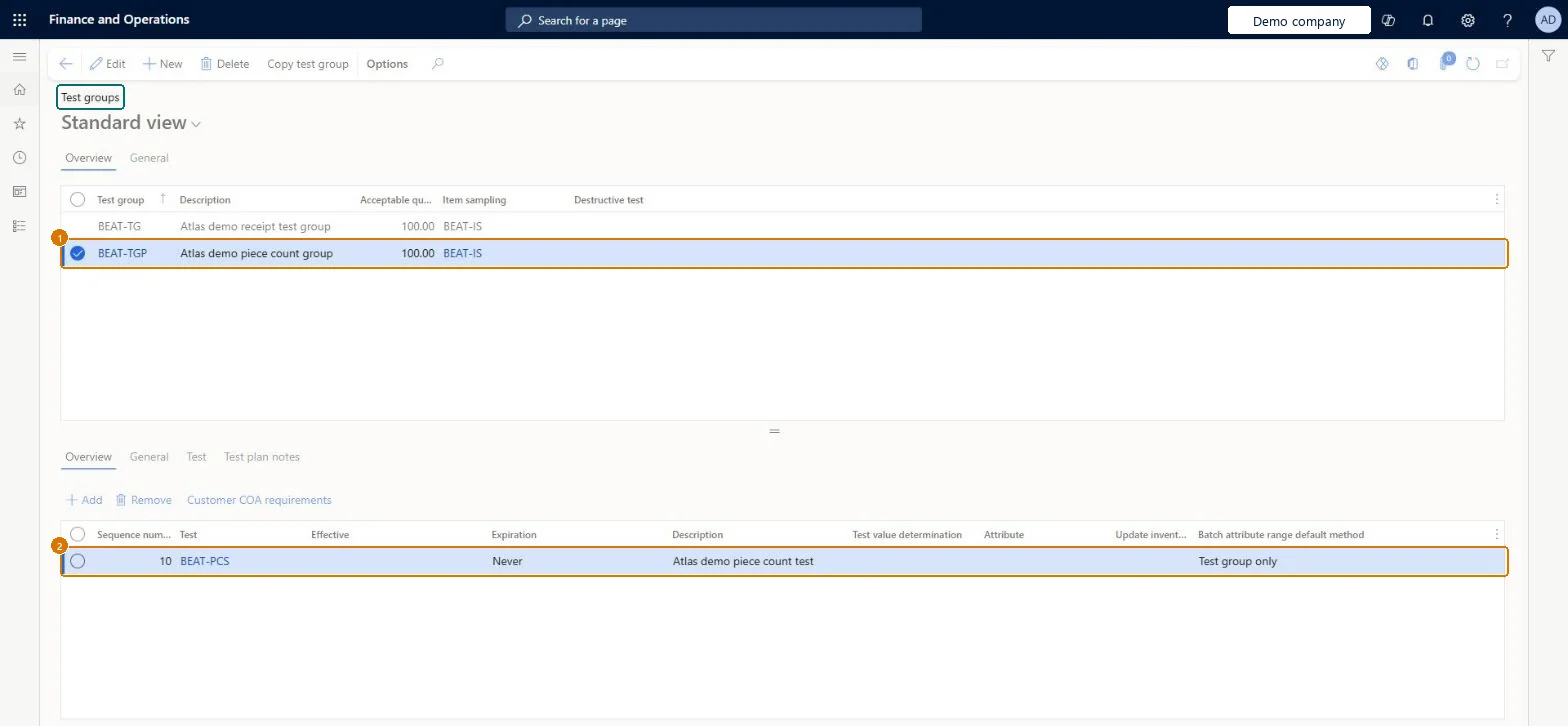
Screen 1
Create a test group
Go to Inventory management > Setup > Quality control > Test groups
Make sure the item sampling and tests exist (here demo item sampling BEAT-IS and test BEAT-PCS)
Select New
Enter the test group code and a description
Enter the acceptable quality level and select the item sampling
Select Save
In the lower grid, select Add, enter a sequence number and select the test
On the Test tab, enter the standard value and the lower and upper limits
Select Save
1Test group
BEAT-TGP
2Test
BEAT-PCS
Description
Piece count group
Acceptable quality level
100
Item sampling
BEAT-IS
Sequence number
10
page title tab to open what to set or check
Steps from Microsoft
Go to Inventory management > Setup > Quality control > Test groups.
On the Action Pane, select New.
Enter the Test group ID and a Description.
In the Acceptable quality level field, enter the percentage of results that must pass.
Optionally, select an Item sampling and mark the group as Destructive if tested items are destroyed.
On the General tab, set the batch disposition and inventory status updates for passed and failed quality orders.
In the lower part of the page, select Add to add a test.
Enter a Sequence number and select the Test, then set its Effective and Expiration dates.
On the Test tab, set the variable and default outcome, or the Standard, Min and Max values.
Number tests in steps of 10 (10, 20, 30); use Test value determination = Manual for qualitative testsGaps let you insert tests later without re-creating lines; qualitative tests accept only Manual.
Selecting Average, Minimum or Maximum on a qualitative test gives an error when the group is saved. Also, Update inventory batch attribute on the group only carries to tests added afterwards.Test: Test group drives pass/fail and inventory status
PrivilegesMaintain test groups InventTestGroupMaintainView test groups InventTestGroupViewDutiesInquire into quality control policies InventQualityControlPoliciesInquireEnable quality control process InventQualityControlProcessEnable2 security rolesQuality control manager InventQualityControlManagerWarehouse planner WHSWarehousePlannerChecked in Dynamics 365
Roles to set it up and use it
To set it up or change itQuality control manager InventQualityControlManagerTo use itWarehouse planner WHSWarehousePlannerGive people one of these roles. On this system, 2 roles can open this page.Checked in Dynamics 365
Actions on the page
Options: Personalize, Page options, ShareChecked in Dynamics 365
InventQualityTestGroupEntity (Test groups): loaded for each company, in Microsoft's default template 395 - Quality management.Load order: Microsoft's default template 395 - Quality management loads Test groups at execution unit 1, level 40, sequence 10. Lower levels load first, and entities at the same level load in sequence order.Load first: Batch dispositions, Inventory status, Item sampling, the default templates at lower levels (System setup to dependency bands 30 to 90)Microsoft Learn
Checked in a working Dynamics 365 system, version 10.0.49: the menu item, form, table and security, the page, the demo records and the values in the screenshots.
To cite this step: IM-QC-040, Set up Test groups. Beyond ERP Atlas Hub, 2026-11-11. https://www.beyonderp.cloud/atlas/step/IM-QC-040