BeyondERP.Newsletter
Menu

Job page · Inventory management

Quality orders

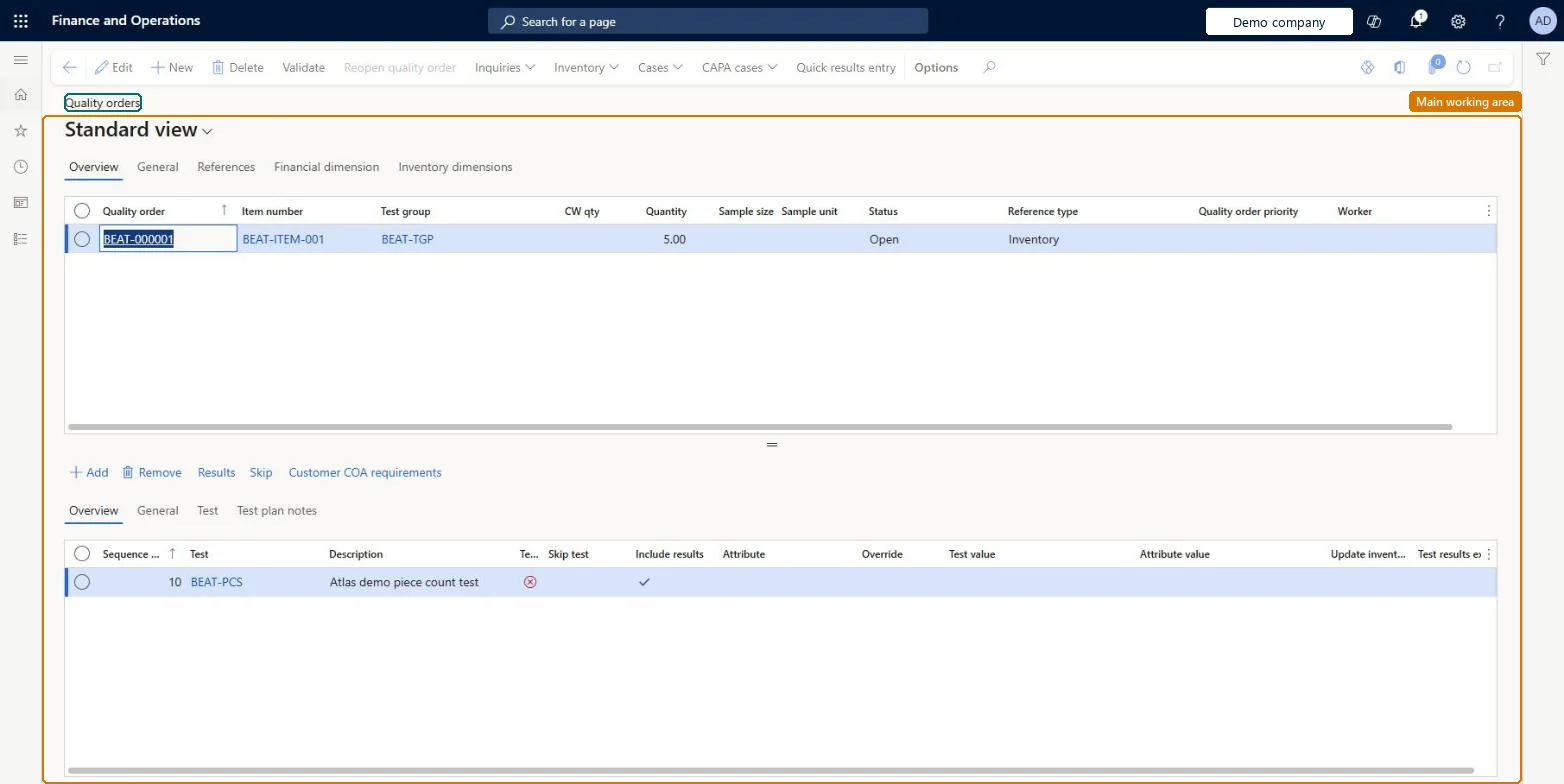
A list page where you create and view quality orders, which track inspections and test results for specific inventory.

Business process
Manage inventory quality
Menu item
InventQualityOrderTable
Show what matters for
PAGE GUIDEWhat the page does and how to use it7 sections. Choose a role to highlight what matters to you.
Everyone

1What it is and why

What it isA list page where you create and view quality orders, which track inspections and test results for specific inventory.
What you do hereUse this page to create quality orders by hand or review generated ones, record test results and validate the outcome.
ExampleFor example, a Purchase quality order is often used to inspect incoming goods before they're put into inventory or consumed in production.
Quality orders page in Dynamics 365
The page in Dynamics 365. page title tab to open what to set or check
Functional consultant · Solution architect

2Where it fits

Business processManage inventory quality
Menu pathInventory management › Periodic tasks › Quality management › Quality orders
Set up firstTest groups Microsoft Learn Quality associations Microsoft Learn
Related pagesInventory blocking Microsoft Learn Quarantine orders Microsoft Learn
End user · Functional consultant

3How to do it

About the examples: Examples and screenshots in this guide use BEAT, a demo company in a Dynamics 365 test environment. Use your own company's codes and values instead of copying them.

When to run it

When to run itWhen inventory must be inspected, either by hand or because a quality association generated a quality order.
How oftenOn demand, for each inspection.
What the output showsA quality order with its tests, recorded results and validation outcome. A quantity blocked longer than expected usually belongs to an order that wasn't validated.

Source: Microsoft Learn

Steps from Microsoft

  1. Go to Inventory management > Periodic tasks > Quality management > Quality orders.
  2. Select New, and in Reference type select the source of the inventory, such as Inventory, Sales, Purchase, Production or Quarantine, with the reference details it asks for.
  3. In Test group, select the tests to perform.
  4. In Quantity, enter the quantity to test and add inventory dimensions. This is the quantity that gets blocked, whatever the sampling plan sends for inspection.
  5. Select Results to record the test results, then select Validate to validate the order.

Source: Microsoft Learn

Fields on the page

FieldWhat it means
Reference typeThe source of the inventory being tested, such as Inventory, Sales, Purchase, Production or Quarantine.Microsoft Learn
Test groupThe group of tests to perform.Microsoft Learn
QuantityThe quantity of items to test.Microsoft Learn

Test checklist

  1. The quality order blocks the quantity entered.
  2. Results are recorded for each test in the test group.
  3. After validation the order shows its outcome.

Source: Microsoft Learn

Solution architect

4Design impact

Can it be undonePartly: Change the results before you validate the order; validation records the outcome. Microsoft Learn
If you change it laterThe quantity on the quality order is the quantity that gets blocked, whatever the sampling plan sends for inspection. Microsoft Learn
Technical architect

5Technical

Menu itemInventQualityOrderTable
Roles to set it up and use itTo set it up or change itQuality control clerk InventQualityControlClerkTo use itQuality control manager InventQualityControlManagerWarehouse manager WMSWarehouseManagerMaterials manager InventMaterialsManagerShipping clerk InventShippingClerkPurchasing manager TradePurchasingManagerGive people one of these roles. On this system, 7 roles can open this page.Checked in Dynamics 365
Developer

6Developer

Open it by URLhttps://<your-environment>/?mi=InventQualityOrderTable
Everyone

7Sources