Create item samplings in Dynamics 365 Supply Chain Management
Menu item
InventItemSampling
Main table
InventItemSampling
Data entity
InventQualitySamplingEntity
Setup steps
1 on this page
Show what matters for
PAGE GUIDEWhat the page does and how to use it8 sections. Choose a role to highlight what matters to you.
Everyone
1What it is and why
What it is
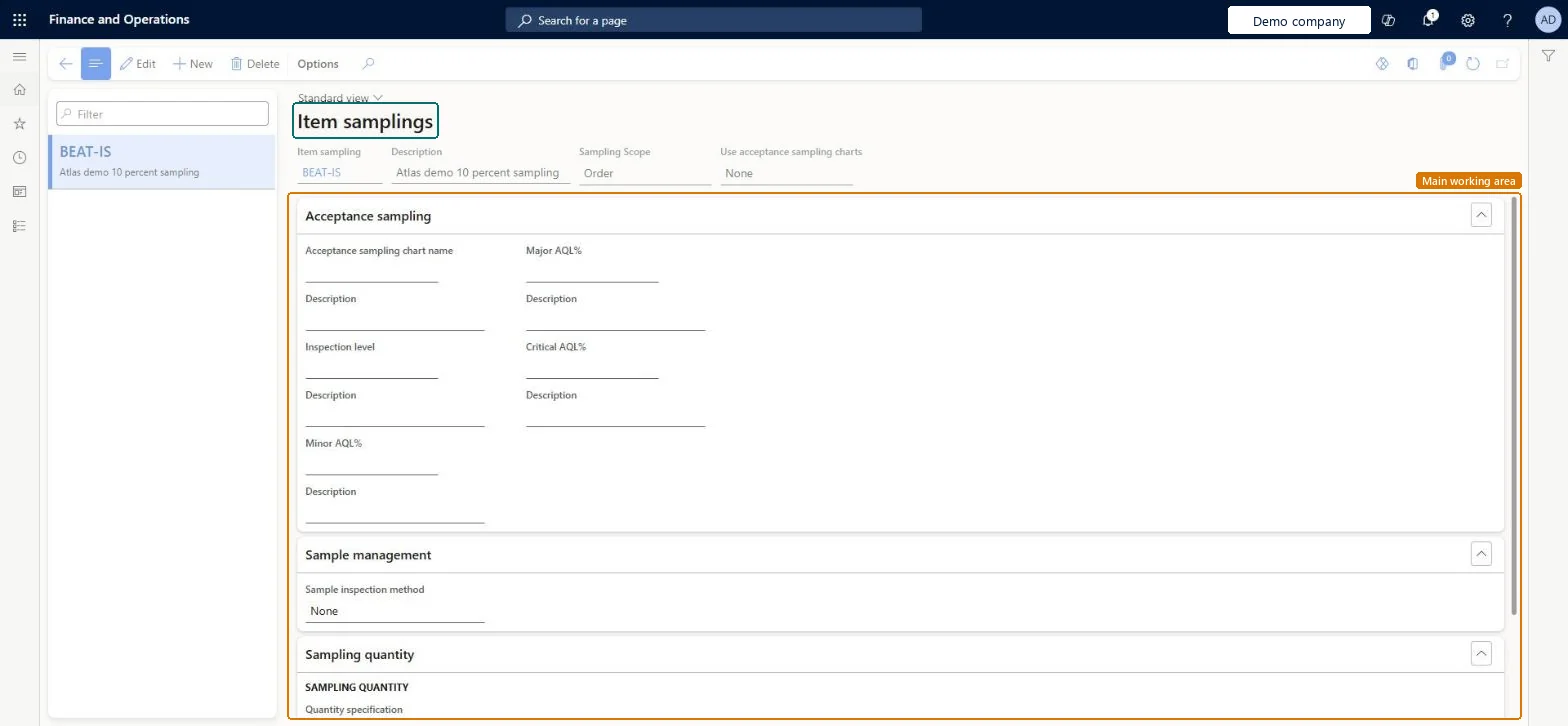
A setup page where you define how much of the physical inventory must be inspected for quality orders.
What you do here
Use this page to base sampling on a fixed quantity, a percentage or a full license plate, and to choose whether the whole lot is blocked when a test fails.
The page in Dynamics 365. page title tab to open what to set or check
About the examples: Examples and screenshots in this guide use BEAT, a demo company in a Dynamics 365 test environment. Use your own company's codes and values instead of copying them.
Step by step, with screenshots
Set up Item sampling1 screen
Use this page to base sampling on a fixed quantity, a percentage or a full license plate, and to choose whether the whole lot is blocked when a test fails.
Screen 1
Create an item sampling
Go to Inventory management > Setup > Quality control > Item sampling
Select New
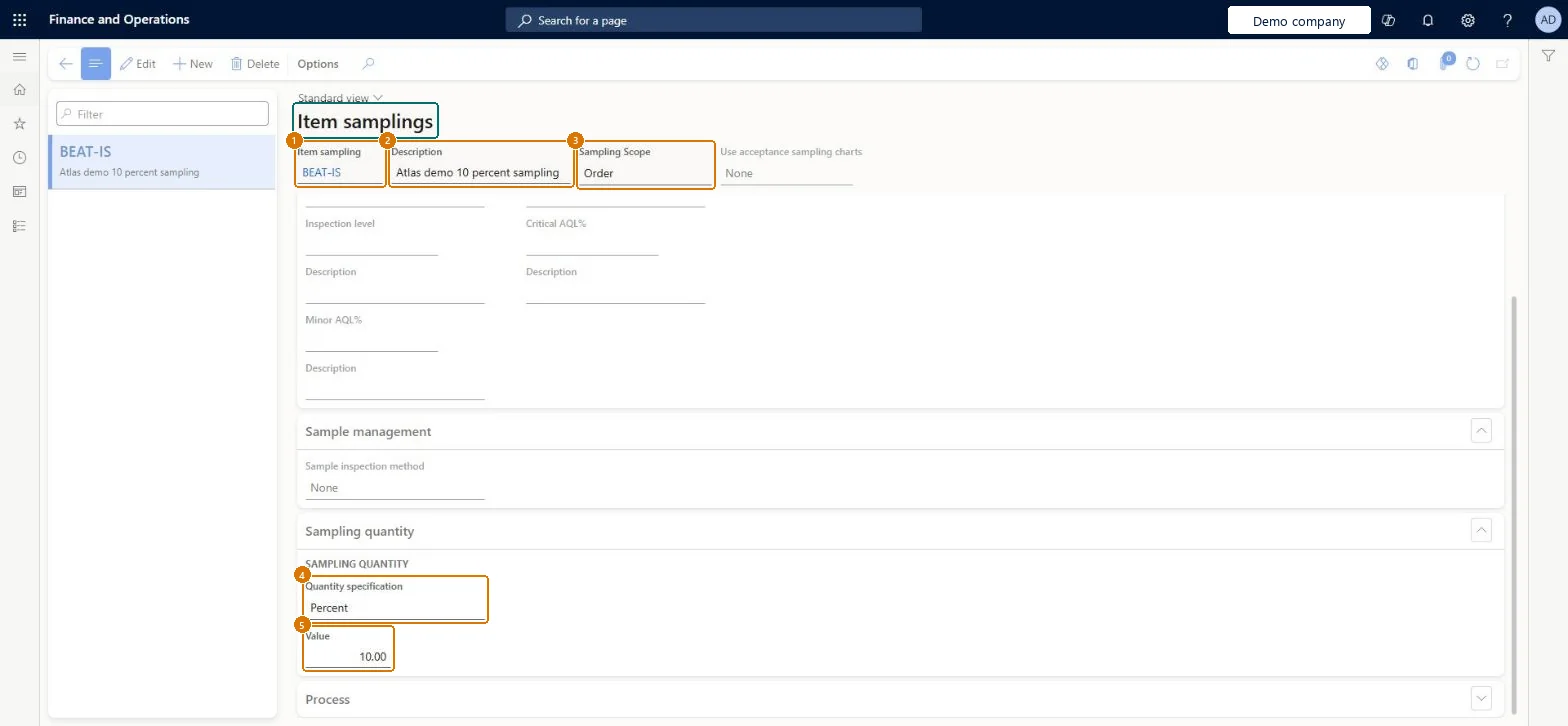
Enter the item sampling code and a description
Choose the sampling scope, for example Order
Under Sampling quantity, choose the quantity specification: Quantity, Percent or Full LP, and enter the value
Optionally, under Process, choose whether the full lot is blocked while it is tested
Select Save
1Item sampling
BEAT-IS
2Description
10 percent sampling
3Sampling Scope
Order
4Quantity specification
Percent
5Value
10
Show the full screen page title tab to open what to set or check
Steps from Microsoft
Go to Inventory management > Setup > Quality control > Item sampling.
Select New.
Enter the Item sampling name and a Description.
Select the Sampling scope and whether to Use acceptance sampling charts.
If needed, fill in the Acceptance sampling or Sample management FastTab.
On the Sampling quantity FastTab, enter a Value.
On the Process FastTab, set Full blocking and the dimensions to fill in on quality orders.
PrivilegesMaintain item sampling InventItemSamplingMaintainView item sampling InventItemSamplingViewDutiesInquire into quality control policies InventQualityControlPoliciesInquireEnable quality control process InventQualityControlProcessEnable2 security rolesQuality control manager InventQualityControlManagerWarehouse planner WHSWarehousePlannerChecked in Dynamics 365
Roles to set it up and use it
To set it up or change itQuality control manager InventQualityControlManagerTo use itWarehouse planner WHSWarehousePlannerGive people one of these roles. On this system, 2 roles can open this page.Checked in Dynamics 365
Actions on the page
Options: Personalize, Page options, ShareChecked in Dynamics 365
InventQualitySamplingEntity (Item sampling): loaded for each company, in Microsoft's default template 395 - Quality management.Load order: Microsoft's default template 395 - Quality management loads Item sampling at execution unit 1, level 30, sequence 10. Lower levels load first, and entities at the same level load in sequence order.Load first: the default templates at lower levels (System setup to General ledger)Microsoft Learn
Checked in a working Dynamics 365 system, version 10.0.49: the menu item, form, table and security, the page, the demo records and the values in the screenshots.