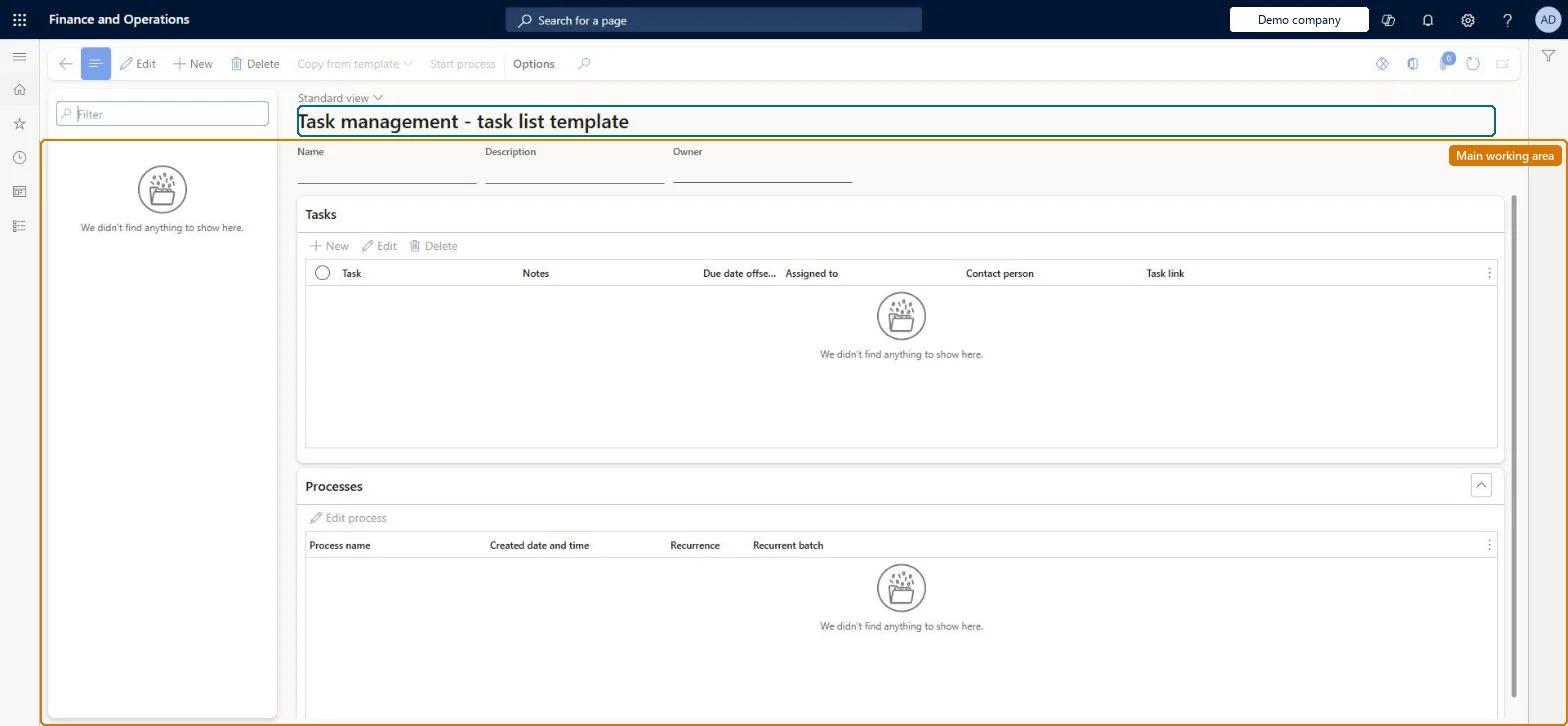
A setup page where you create task lists, add tasks to them (with due-date offsets, notes, contact person and task links), and start the process that assigns a list to stores or employees, once or on a recurring schedule.
Retail catalog manager, Retail merchandising manager, Retail operations manager and 6 more roles
Business process
Manage store operations
Menu item
RetailTaskManagementTemplateListPageRedirect
Main table
BusinessProcessTemplateH
Show what matters for
PAGE GUIDEWhat the page does and how to use it7 sections. Choose a role to highlight what matters to you.
Everyone
1What it is and why
What it is
A setup page where you create task lists, add tasks to them (with due-date offsets, notes, contact person and task links), and start the process that assigns a list to stores or employees, once or on a recurring schedule.
What you do here
Use this page to define reusable task lists and their tasks, then select Start process to assign a list to selected stores or workers with a target date, optionally with a recurrence.
Example
For example, create a Holiday season preparation list and start a process that assigns it to all 20 stores in the East region with a target date.
The page in Dynamics 365. page title tab to open what to set or check
About the examples: Examples and screenshots in this guide use BEAT, a demo company in a Dynamics 365 test environment. Use your own company's codes and values instead of copying them.
When to run it
When to run it
When you need stores or workers to carry out a set of tasks, once or on a recurring schedule, such as a closing checklist.
How often
On demand for one-off lists; recurring lists start themselves on their schedule.
What the output shows
A reusable task list and, after Start process, a task list process for each selected store or worker. Assignments made while creating the list are copied into every started list, so assign tasks after the list is started for each store.
Go to Retail and Commerce > Task management > Task management administration.
Select New and enter the Name, Description and Owner of the task list, then select Save.
On the Tasks FastTab, select New for each task and enter its Name, Due data offset from target date, Notes, Contact person and Task link.
Select the task list and then Start process. On the General tab, enter the Process name and Target date, or set Recurrence to Yes with a Recurrence target date offset in days.
On the Stores or Workers tab, select who gets the list, select OK, and then open Task management processes to see the started list.
For recurring lists, days added to each recurrence date to get the target date.Microsoft Learn
Solution architect
4Design impact
Can it be undone
Yes, by changing the list: Edit or delete the task list; lists already started for stores are separate processes. Microsoft Learn
If you change it later
Assigning tasks while creating the list is discouraged; assign them after the list is started for individual stores, otherwise the assignment is copied into every instantiated list. Microsoft Learn
Technical architect
5Technical
Menu item
RetailTaskManagementTemplateListPageRedirectChecked in Dynamics 365
Form
BusinessProcessGenericTemplateListPageChecked in Dynamics 365
Table
BusinessProcessTemplateHShown as “BUSINESS PROCESS TEMPLATE” in Record infoChecked in Dynamics 365
Who can open it
PrivilegesMaintain task management process RetailTaskManagementMaintainView task management process RetailTaskManagementViewDutiesMaintain task management process RetailTaskManagementMaintainView task management process RetailTaskManagementView9 security rolesRetail catalog manager RetailCatalogManagerRetail merchandising manager RetailMerchandisingManagerRetail operations manager RetailOperationsManagerRetail service RetailServiceRetail store IT RetailStoreITRetail store manager RetailStoreManagerRetail task manager RetailTaskManagerRetail warehouse clerk RetailWarehouseClerkRetail warehouse manager RetailWarehouseManagerChecked in Dynamics 365
Roles to set it up and use it
To use itRetail service RetailServiceRetail operations manager RetailOperationsManagerRetail store manager RetailStoreManagerRetail merchandising manager RetailMerchandisingManagerInformation technology manager SysServerITManagerGive people one of these roles. On this system, 10 roles can run this page.Checked in Dynamics 365
Actions on the page
(Action Pane without tabs): Copy from template, Start processChecked in Dynamics 365