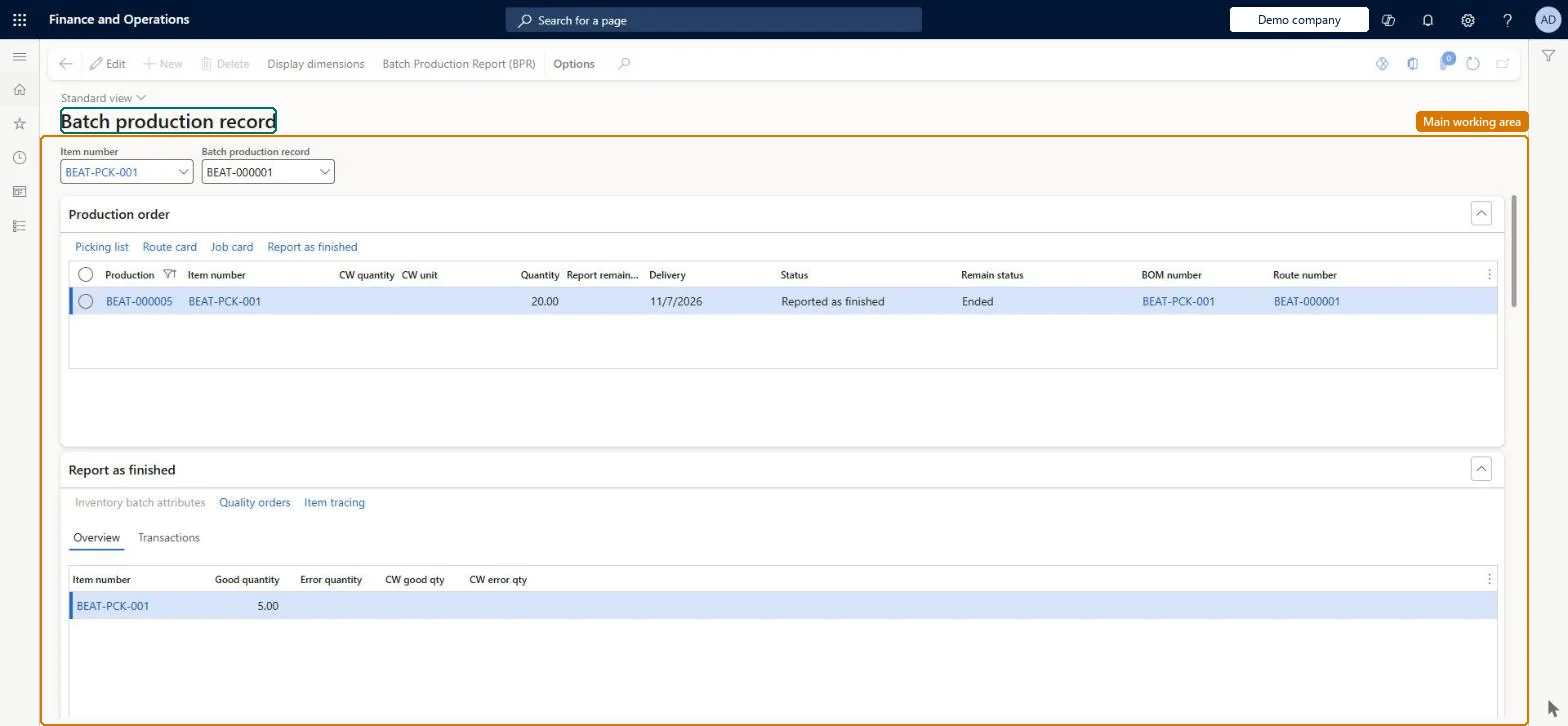
An inquiry page that assembles the batch production record (BPR) for a batch or production order: the BOM or formula version actually used, estimated versus actual ingredient quantities, substitutions, batch attributes and the quality orders raised.
Production controlInquiries and reportsElectronic batch records
QMSBatchProdRecord
Used by
Product designer, Materials manager, Quality control manager and 4 more roles
Business process
Review batch production record inquiry and report in Dynamics 365 Supply Chain Management
Menu item
QMSBatchProdRecord
Main table
ProdTable
Data entity
ProdBatchOrderHeaderEntity
Show what matters for
PAGE GUIDEWhat the page does and how to use it7 sections. Choose a role to highlight what matters to you.
Everyone
1What it is and why
What it is
An inquiry page that assembles the batch production record (BPR) for a batch or production order: the BOM or formula version actually used, estimated versus actual ingredient quantities, substitutions, batch attributes and the quality orders raised.
What you do here
Use this page to query, for an item or a BPR ID, what was actually consumed and produced, with the picking list, route card, job card and report-as-finished details, and to open batch attributes, vendor batch details and quality orders for each line.
Example
For example, during an audit a quality manager selects the BPR ID for a batch order and shows the inspector the exact ingredient lots used against the quantities that were planned.
The page in Dynamics 365. page title tab to open what to set or check
About the examples: Examples and screenshots in this guide use BEAT, a demo company in a Dynamics 365 test environment. Use your own company's codes and values instead of copying them.
Steps from Microsoft
Go to Production control > Inquiries and reports > Electronic batch records > Batch production record.
At the top of the page, select the Item number or the Batch production record ID.
Review the Production order, Report as finished, BOM/formula, Picking list, Route, Route card and Job card FastTabs.
Use Inventory batch attributes, Vendor batch details or Quality orders on a line to see its details.
To print, select Batch production report (BPR) on the Action Pane.
Turning on electronic batch records locks approved BOMs, formulas and routes against editing, so approvals must be removed before changes and re-applied afterwards. Microsoft Learn
Technical architect
5Technical
Menu item
QMSBatchProdRecordChecked in Dynamics 365
Form
QMSBatchProdRecordChecked in Dynamics 365
Table
ProdTableShown as “PRODUCTION ORDERS” in Record infoKey field: ProdIdChecked in Dynamics 365
PrivilegesView electronic batch records QMSElectronicBatchRecordViewDutiesInquire into electronic batch records QMSElectronicBatchRecordInquire7 security rolesProduct designer BOMProductDesignerMaterials manager InventMaterialsManagerQuality control manager InventQualityControlManagerShop supervisor JmgShopSupervisorProduction manager ProdProductionManagerProduction planner ReqProductionPlannerProcess engineer RouteProcessEngineerChecked in Dynamics 365
Roles to set it up and use it
To use itProduction manager ProdProductionManagerShop supervisor JmgShopSupervisorProduction planner ReqProductionPlannerProcess engineer RouteProcessEngineerMaterials manager InventMaterialsManagerGive people one of these roles. On this system, 7 roles can open this page.Checked in Dynamics 365
Actions on the page
(Action Pane without tabs): Display dimensions, Batch Production Report (BPR)Checked in Dynamics 365