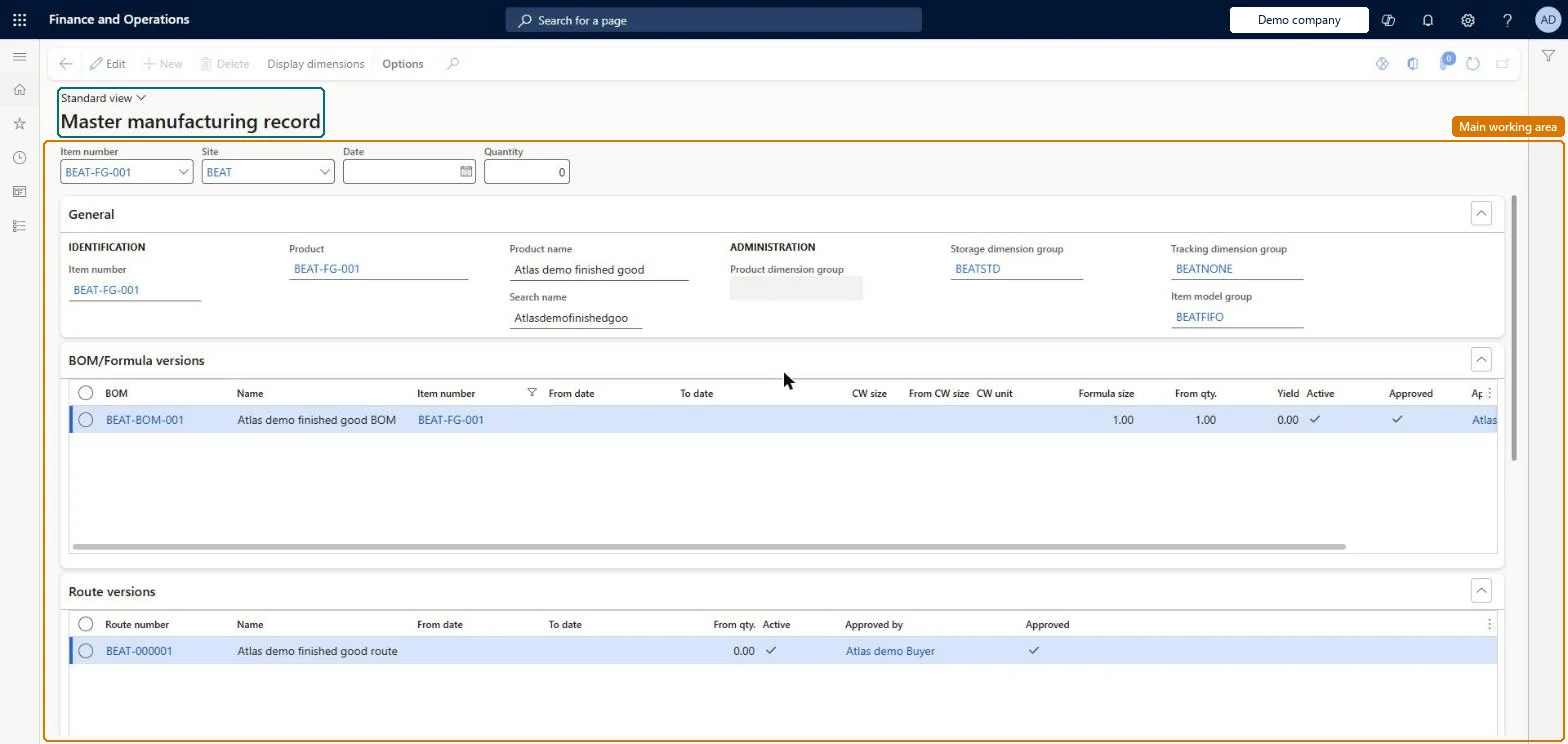
An inquiry page that assembles the master manufacturing record (MMR) for an item: every approved BOM or formula version and route version, the quality associations that generate quality orders, and the inventory batch attributes with their target values and ranges.
Production controlInquiries and reportsElectronic batch records
QMSMasterMfgRecord
Used by
Product designer, Materials manager, Quality control manager and 4 more roles
Business process
Analyze production quality results
Menu item
QMSMasterMfgRecord
Main table
InventTable
Data entity
EcoResReleasedProductV2Entity
Show what matters for
PAGE GUIDEWhat the page does and how to use it7 sections. Choose a role to highlight what matters to you.
Everyone
1What it is and why
What it is
An inquiry page that assembles the master manufacturing record (MMR) for an item: every approved BOM or formula version and route version, the quality associations that generate quality orders, and the inventory batch attributes with their target values and ranges.
What you do here
Use this page to show, for an item and optionally a site, date and quantity, all the approved ways the item may be produced and all the characteristics that may be measured on it or its ingredients.
Example
For example, before a regulatory inspection a quality manager runs the MMR query for a formula item to list the approved formula and route versions and the quality tests tied to them.
The page in Dynamics 365. page title tab to open what to set or check
About the examples: Examples and screenshots in this guide use BEAT, a demo company in a Dynamics 365 test environment. Use your own company's codes and values instead of copying them.
Steps from Microsoft
Go to Production control > Inquiries and reports > Electronic batch records > Master manufacturing record.
Select the Item number.
Optionally select a Site, a from Date and a from Quantity to narrow the versions.
Review the General, BOM/formula versions, Route versions, Quality associations and Inventory batch attributes FastTabs.
Select Details on a quality association to open it.
The query is read-only, but because it lists only approved versions, removing or adding approval on a BOM, formula or route changes what the MMR shows. Microsoft Learn
Technical architect
5Technical
Menu item
QMSMasterMfgRecordChecked in Dynamics 365
Form
QMSMasterMfgRecordChecked in Dynamics 365
Table
InventTableShown as “ITEMS” in Record infoKey field: ItemIdChecked in Dynamics 365
PrivilegesView electronic batch records QMSElectronicBatchRecordViewDutiesInquire into electronic batch records QMSElectronicBatchRecordInquire7 security rolesProduct designer BOMProductDesignerMaterials manager InventMaterialsManagerQuality control manager InventQualityControlManagerShop supervisor JmgShopSupervisorProduction manager ProdProductionManagerProduction planner ReqProductionPlannerProcess engineer RouteProcessEngineerChecked in Dynamics 365
Roles to set it up and use it
To use itProduction manager ProdProductionManagerShop supervisor JmgShopSupervisorProduction planner ReqProductionPlannerProcess engineer RouteProcessEngineerMaterials manager InventMaterialsManagerGive people one of these roles. On this system, 7 roles can open this page.Checked in Dynamics 365
Actions on the page
(Action Pane without tabs): Display dimensionsChecked in Dynamics 365