BeyondERP.Newsletter
Menu

Setup page · Production control

Production control parameters

A setup page holding the company-wide parameters that control how production orders are created, estimated, scheduled, consumed, reported and posted to the ledger.

Used by
Production manager, Process engineering manager
Business process
Develop production processes
Menu item
ProdParameters
Main table
ProdParameters
Data entity
ProdProductionControlParametersEntity
Setup steps
1 on this page
Show what matters for
PAGE GUIDEWhat the page does and how to use it8 sections. Choose a role to highlight what matters to you.
Everyone

1What it is and why

What it isA setup page holding the company-wide parameters that control how production orders are created, estimated, scheduled, consumed, reported and posted to the ledger.
What you do hereUse this page to define how production orders are created, estimated, scheduled, and consumed, which feedback and journals are used, and how cost accounting is done.
ExampleFor example, set Block removal of approval and Block editing to Yes under Routes so that approved routes cannot be changed afterwards.
Production control parameters page in Dynamics 365
The page in Dynamics 365. page title tab to open what to set or check
Functional consultant · Solution architect

2Where it fits

End user · Functional consultant

3How to do it

About the examples: Examples and screenshots in this guide use BEAT, a demo company in a Dynamics 365 test environment. Use your own company's codes and values instead of copying them.

Setup steps on this page

Set up Production control parameters

Use this page to define how production orders are created, estimated, scheduled, and consumed, which feedback and journals are used, and how cost accounting is done.

Steps from Microsoft

  1. Go to Production control > Setup > Production control parameters.
  2. Set the Block removal of approval slider to Yes under the Routes group.
  3. Set the Block editing slider to Yes under the Routes group.
  4. Select Save.
  5. Close all pages.

Source: Microsoft Learn

Fields on the page

FieldWhat it meansTable column
Ledger postingThe default level of ledger posting (item and resource, item and category, or production groups) given to new production orders.Microsoft Learn ProdPostingType
Post picking list in ledgerWhether posting a picking list journal also posts to the general ledger.Microsoft Learn PostPickList
Picking list / Route card / Job card / Report as finishedThe default journal names used for each production journal type.Microsoft Learn
Automatic BOM consumptionWhether material consumption is posted automatically (by flushing principle, always, or never) when a production order is updated.Microsoft Learn
Automatic route consumptionWhether route time is consumed automatically (route group dependent, always, or never).Microsoft Learn
Parameter usageWhether the company parameters or site-specific parameters apply.Microsoft Learn ProdParamInventDimLookup
Price calculationWhether the estimated cost price of a production order is calculated at estimation.Microsoft Learn SpecifyCalc
ReservationWhen items are reserved automatically for production orders.Microsoft Learn ItemReservation

Test checklist

  1. Set Ledger posting, Post picking list in ledger and Post report as finished in ledger
  2. Create and start a production order and post its picking list
  3. Check the voucher uses Estimated cost of materials consumed and its WIP account
  4. End the order and check the estimates are reversed and actual costs posted

Source: Microsoft Learn

Functional consultant

4Setup decisions

Setup stepRecommended value and whyDecision, common mistake and test
Set up Production control parametersLedger posting = Item and resource when operating costs are assigned to resources; Item and category when the focus is process efficiency and activity timeLearn calls Item and resource the most detailed option, for organisations that assign operating costs to resources; Item and category is a more summarised option based on cost categories.At what level does production post to the ledger?Turning on Post picking list in ledger or Post report as finished in ledger without Post physical inventory on the item model group and the posting profile accounts. No WIP voucher is created.Test: Production order posts WIP to the expected accounts

Number sequences

ReferenceShared or per companyNote
Route numberPer companyBEAT uses number sequence Rout_3. Checked in Dynamics 365
ProductionPer companyBEAT uses number sequence Prod_13. Checked in Dynamics 365
JournalPer companyBEAT uses number sequence Prod_17. Checked in Dynamics 365
VoucherPer companyBEAT uses number sequence Prod_21. Checked in Dynamics 365
Job identificationPer companyBEAT uses number sequence Prod_25. Checked in Dynamics 365
Costing voucherPer companyBEAT uses number sequence Prod_29. Checked in Dynamics 365
BatchPer companyBEAT uses number sequence Prod_33. Checked in Dynamics 365
Consolidated batch orderPer companyBEAT uses number sequence Prod_37. Checked in Dynamics 365
Batch production recordPer companyBEAT uses number sequence Prod_41. Checked in Dynamics 365
Solution architect

5Design impact

Shared or per companyPer company: each legal entity has its own records. Microsoft data model
Can it be undoneHard to reverse: Parameters can be changed and many can be overridden per site, but switching the Ledger posting level changes where accounts come from. Set up all accounts for the new level first; posted vouchers are not changed. Microsoft Learn
If you change it laterChanged defaults apply to production orders created afterwards; existing orders keep the values they were created with. Microsoft Learn
Technical architect

6Technical

Menu itemProdParameters Checked in Dynamics 365
FormProdParameters Checked in Dynamics 365
TableProdParametersShown as “PRODUCTION PARAMETERS” in Record infoChecked in Dynamics 365
Data entitiesProdProductionControlParametersEntityProduction control parameters Microsoft data model
Who can open itPrivilegesMaintain production parameters ProdParametersMaintainView production parameters ProdParametersViewDutiesInquire into production policies ProdProductionPoliciesInquireEnable production process ProdProductionProcessEnable
2 security rolesProduction manager ProdProductionManagerProcess engineering manager RouteProcessEngineeringManager
Checked in Dynamics 365
Roles to set it up and use itTo set it up or change itProduction manager ProdProductionManagerProcess engineering manager RouteProcessEngineeringManagerGive people one of these roles. On this system, 2 roles can open this page.Checked in Dynamics 365
Developer

7Developer

Open it by URLhttps://<your-environment>/?mi=ProdParameters
Integrate withProdProductionControlParametersEntity data entity Microsoft data model
Data migrationProdProductionControlParametersEntity (Production control parameters): loaded for each company, in Microsoft's default template 410 - Production control.Load order: Microsoft's default template 410 - Production control loads Production control parameters at execution unit 1, level 410, sequence 70. Lower levels load first, and entities at the same level load in sequence order.Load first: the default templates at lower levels (System setup to Transportation management)Microsoft Learn
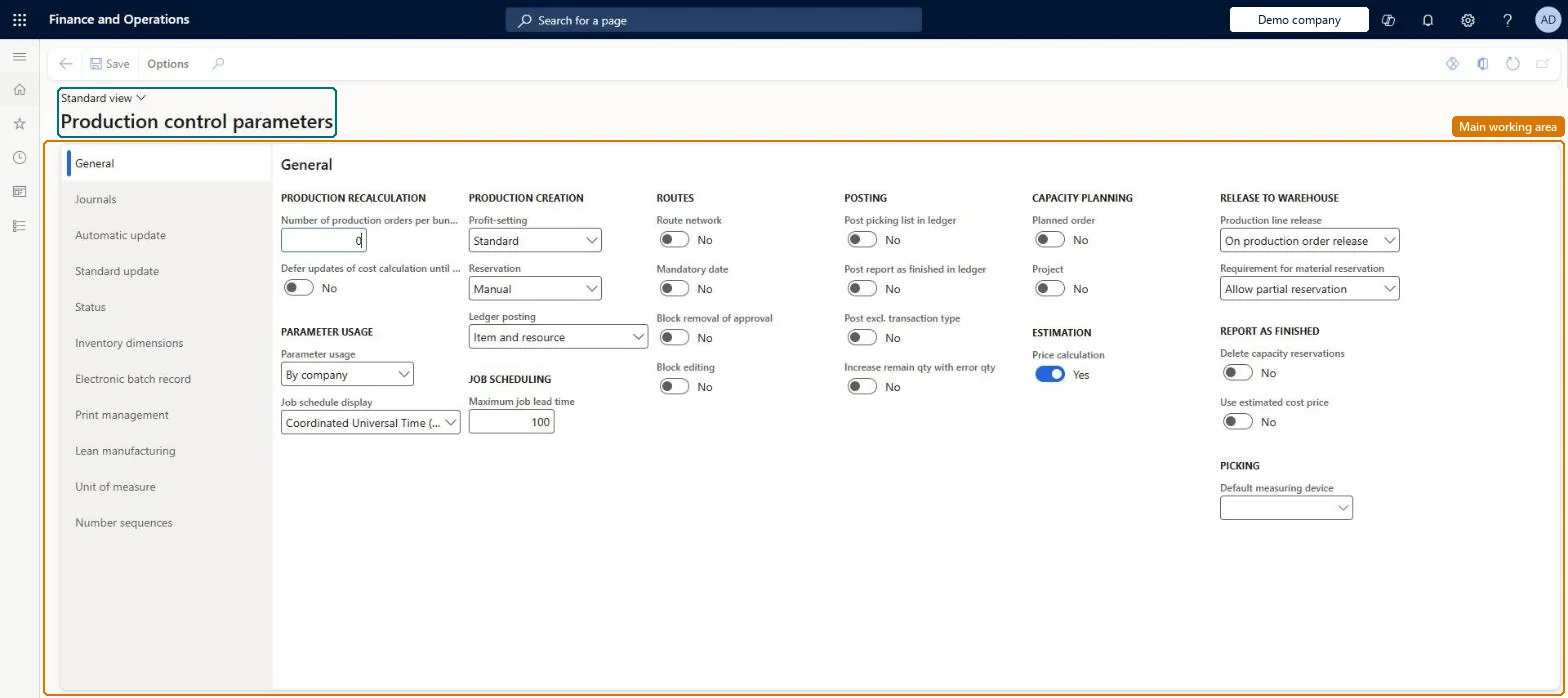
Table definitionProdParameters columns and relations Microsoft data model
Everyone

8Sources