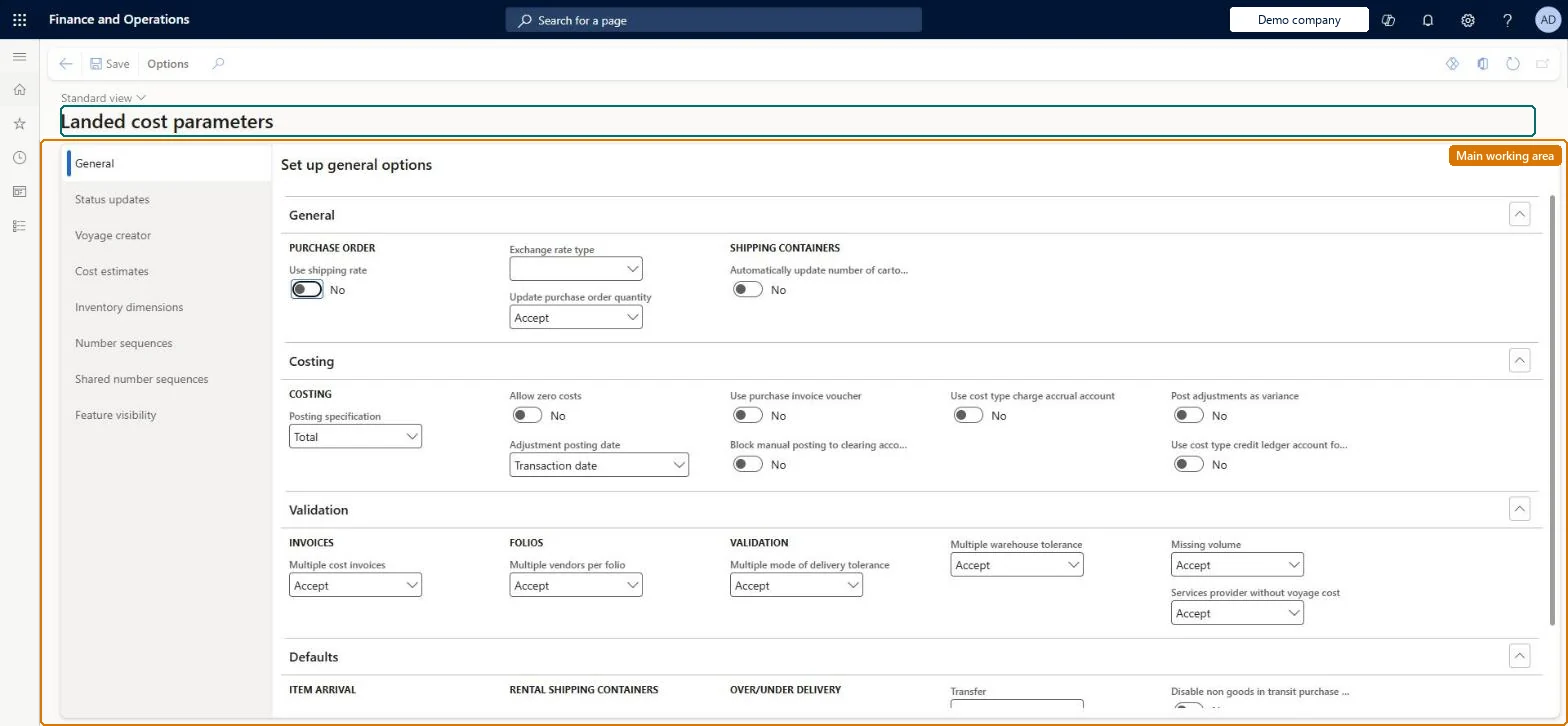
A setup page, shared across legal entities, that holds the module-wide settings for Landed cost: posting and costing behaviour, validation tolerances, defaults, the special voyage statuses, voyage creator options, inventory dimensions, number sequences and feature visibility.
PAGE GUIDEWhat the page does and how to use it8 sections. Choose a role to highlight what matters to you.
Everyone
1What it is and why
What it is
A setup page, shared across legal entities, that holds the module-wide settings for Landed cost: posting and costing behaviour, validation tolerances, defaults, the special voyage statuses, voyage creator options, inventory dimensions, number sequences and feature visibility.
What you do here
Use this page to configure how the Landed cost module posts estimated and actual costs, which voyage statuses drive status updates, which number sequences it uses, and whether Landed cost fields appear on common pages such as purchase orders and released products.
Example
For example, an administrator sets Use purchase invoice voucher to Yes so cost accruals share the purchase invoice voucher, selects the four special statuses on the Status updates tab, and turns on Feature visibility so Landed cost fields show on purchase orders.
The page in Dynamics 365. page title tab to open what to set or check
About the examples: Examples and screenshots in this guide use BEAT, a demo company in a Dynamics 365 test environment. Use your own company's codes and values instead of copying them.
Setup steps on this page
Set up Landed cost parameters
Use this page to configure how the Landed cost module posts estimated and actual costs, which voyage statuses drive status updates, which number sequences it uses, and whether Landed cost fields appear on common pages such as purchase orders and released products.
Steps from Microsoft
Go to Landed cost > Setup > Landed cost parameters.
On the General tab, set the General, Costing, Validation and Defaults FastTab fields.
On the Status updates tab, select the Costed, In transit, Ready for costing and Pre-costed voyage statuses.
On the Voyage creator tab, set the Voyage Editor options, tolerances and folio creation rules.
On the Cost estimates tab, select the Default costing version.
On the Inventory dimensions tab, choose which dimensions show by default on each Landed cost page.
On the Number sequences and Shared number sequences tabs, select a number sequence code for each reference.
On the Feature visibility tab, set Activate to Yes to show Landed cost features on common pages.
Map the four special statuses (Costed, In transit, Ready for costing, Pre-costed) on Status updates; set Services provider without voyage cost to Warning; set Missing volume to Warning or Error when volume drives apportionment; set Block manual posting to clearing account to Yes; set Activate on Feature visibility to YesLearn recommends Warning for service providers without voyage cost, Warning or Error for missing volume where volumes apportion costs, and Yes on Block manual posting so the voyage and clearing account settle correctly; Landed cost fields on common pages only show when Activate is Yes.
BEAT uses number sequence Land_4. Checked in Dynamics 365
Goods in transit number
Per company
BEAT uses number sequence Land_8. Checked in Dynamics 365
Cost estimate number
Per company
BEAT uses number sequence Land_12. Checked in Dynamics 365
Costs accrual voucher
Per company
BEAT uses number sequence Land_16. Checked in Dynamics 365
Packing slip
Per company
BEAT uses number sequence Land_20. Checked in Dynamics 365
Over/under transaction number
Per company
BEAT uses number sequence Land_24. Checked in Dynamics 365
Auto cost number
Per company
BEAT uses number sequence Land_28. Checked in Dynamics 365
Over/under purchase order
Per company
BEAT uses number sequence Land_32. Checked in Dynamics 365
Solution architect
5Design impact
Can it be undone
Reversible: Parameters can be changed at any time and apply to later voyages and postings. Because they are shared across legal entities, every change affects all companies that use Landed cost; setting Activate to No hides Landed cost fields on common pages but leaves the module available. Microsoft Learn
If you change it later
The settings are shared by every legal entity, so a change here alters posting, validation and default behaviour for all companies that use Landed cost; hiding feature visibility removes Landed cost fields from common pages but leaves the module itself available. Microsoft Learn
Technical architect
6Technical
Menu item
ITMParametersChecked in Dynamics 365
Form
ITMParametersChecked in Dynamics 365
Table
ITMParametersShown as “LANDED COST PARAMETERS” in Record infoChecked in Dynamics 365
Data entities
ITMInboundTransportationManagementParametersEntityLanded cost parameters Checked in Dynamics 365InventDimSetupGridEntityProject inventory dimensions for item consumption Checked in Dynamics 365
To set it up or change itLanded cost manager ITMManagerGive people one of these roles. On this system, 1 role can open this page.Checked in Dynamics 365
Developer
7Developer
Open it by URL
https://<your-environment>/?mi=ITMParameters
Integrate with
ITMInboundTransportationManagementParametersEntity data entity Checked in Dynamics 365