Rate transportation loads in Dynamics 365 Supply Chain Management
Menu item
ITMUpdateItemCostEstimate
Show what matters for
PAGE GUIDEWhat the page does and how to use it7 sections. Choose a role to highlight what matters to you.
Everyone
1What it is and why
What it is
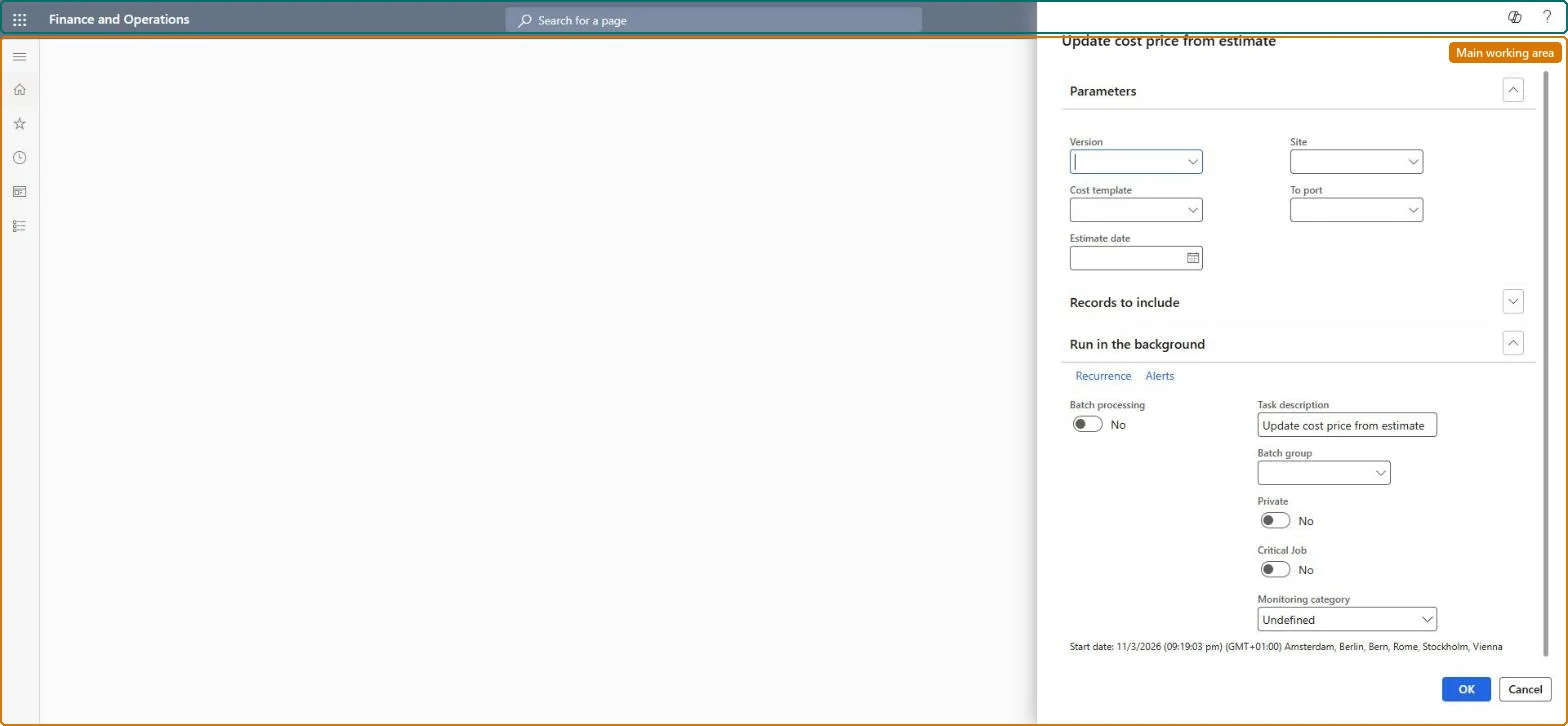
A periodic-task dialog that updates the standard cost price of items from all cost estimates that match the filters you set, in one run.
What you do here
Use this page to push estimated landed costs into item standard cost prices for many estimates at once, instead of selecting Update standard cost on each estimate.
Example
For example, at the start of a financial year a cost accountant runs the task for the new costing version so that every current estimate updates the standard cost of its items.
The page in Dynamics 365. page title tab to open what to set or check
About the examples: Examples and screenshots in this guide use BEAT, a demo company in a Dynamics 365 test environment. Use your own company's codes and values instead of copying them.
When to run it
When to run it
After you have reviewed and recalculated the cost estimates and want their landed costs in the standard cost of the items.
How often
On demand, each time a set of estimates is ready to become standard cost.
Batch settings
Run it in the background when the filters match many estimates, so all item prices are updated in one run without blocking your session.
What the output shows
Updated cost prices in the selected costing version for every item on the matching estimates, the same as selecting Update standard cost on each estimate. An item whose price didn't change usually had an estimate outside the filters, or is missing gross dimensions or a vendor From port.
Go to Landed cost > Periodic tasks > Item cost price update.
In the Update cost price from estimate dialog box, set Version to the costing version that should receive the new prices. The default costing version for this task is set on the Landed cost parameters page.
Narrow the run with Site, Cost template, To port and Estimate date, so only the matching estimates update item prices.
Before you run it, make sure each product has Gross depth, Gross width and Gross height and each vendor has a From port. Without them the task doesn't run successfully.
If many estimates match, schedule the task on Run in the background, then select OK.
Review the new prices in the costing version. An item with several dimensions that weren't on the estimate gets a pending price for each combination.
No: The task has no reverse. Prices it writes to the costing version stay there until you change them, so narrow the filters before you run it. Microsoft Learn
If you change it later
Running the task changes the standard cost of every item on every matching estimate in the chosen costing version, so a wide filter can re-price many items at once. Microsoft Learn
Technical architect
5Technical
Menu item
ITMUpdateItemCostEstimateChecked in Dynamics 365
Form
SysOperationTemplateFormChecked in Dynamics 365
Roles to set it up and use it
To use itLanded cost agent ITMAgentGive people one of these roles. On this system, 1 role can run this page.Checked in Dynamics 365