PAGE GUIDEWhat the page does and how to use it8 sections. Choose a role to highlight what matters to you.
Everyone
1What it is and why
What it is
A setup page where you define how and when quality samples are taken for a specific item.
What you do here
Use this page to link sample types, retention periods, item sampling policies, test groups and sample procedures to products so that quality control is consistent.
Example
For example, in a continuous sampling setup you create a sample association for a batch-controlled product before producing it.
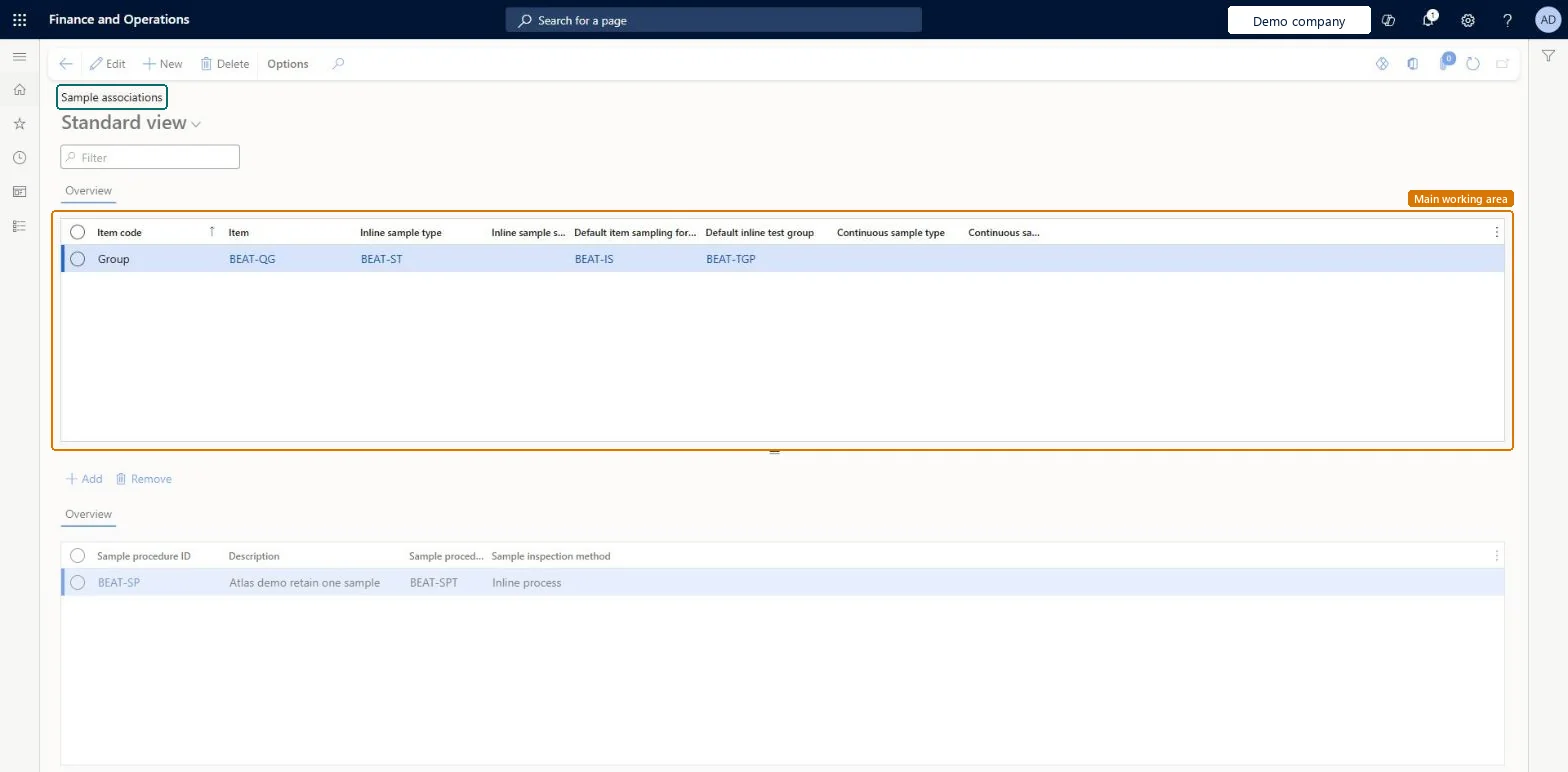
The page in Dynamics 365. page title tab to open what to set or check
About the examples: Examples and screenshots in this guide use BEAT, a demo company in a Dynamics 365 test environment. Use your own company's codes and values instead of copying them.
Step by step, with screenshots
Set up Sample associations1 screen
Use this page to link sample types, retention periods, item sampling policies, test groups and sample procedures to products so that quality control is consistent.
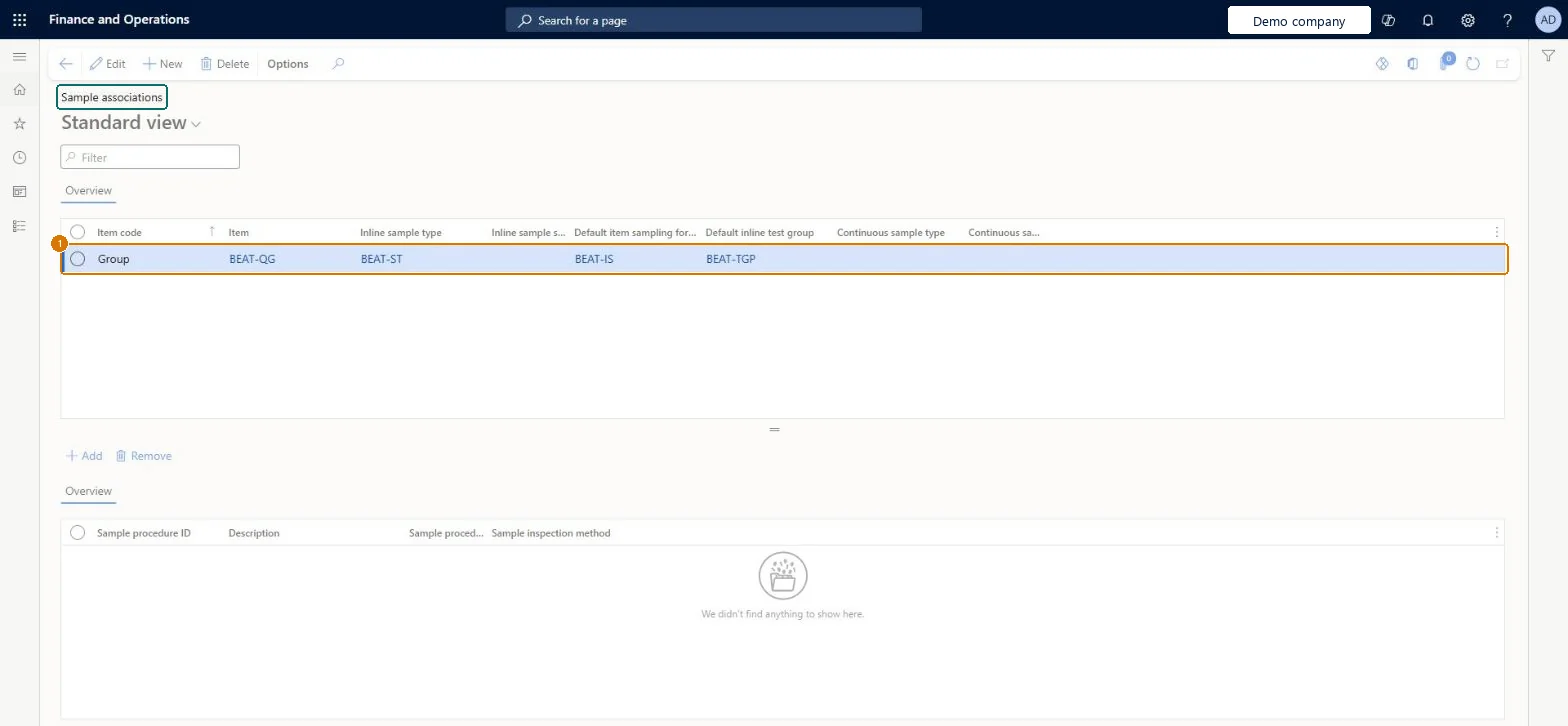
Screen 1
Create a sample association
Go to Inventory management > Setup > Sample management > Sample associations
Make sure the sample type, item sampling and test group exist (here demo sample type BEAT-ST, created on Sample types, item sampling BEAT-IS and test group BEAT-TGP)
Select New
Choose the item code: Table for one batch-controlled item, Group for a quality group, or All
Select the item or quality group (here demo quality group BEAT-QG)
Select an inline sample type, a continuous sample type, or both, and the retention periods
Select the default item sampling and inline test group
Select Save
Under the lower grid, select Add to attach sample procedures
1Item
BEAT-QG
Item code
Group
Inline sample type
BEAT-ST
Default item sampling for inline
BEAT-IS
Default inline test group
BEAT-TGP
Show the full screen page title tab to open what to set or check
Steps from Microsoft
Go to Inventory management > Setup > Sample management > Sample associations.
Select New to create a sample association, or select an existing one to edit.
In the Item code field, choose Table, Group or All, and then select the Item if needed.
Set the inline sample type, the number of days to keep inline samples, and the default item sampling and test group for inline samples.
Set the continuous sample type and the number of days to keep continuous samples.
In the bottom section, add the sample procedures that workers should follow for this association.
One association per item or item group (Item code Table or Group) with the inline and continuous sample types, scrap days, default item sampling, default inline test group and proceduresThe association defines how and when samples are taken for an item, and its defaults prefill the inline sampling dialog on the production order.
Expecting continuous samples without a quality association: continuous sampling needs a Production / Report as finished / After quality association, while inline samples don't.
Feature management and licence
Feature to turn on
Advanced quality management (Mandatory, on by default)Sample management (Must be on)
Reversible: Associations can be edited or deleted. The default item sampling and test group only prefill the create dialog and can be changed there. Microsoft Learn
Technical architect
6Technical
Menu item
QMSSampleAssociationChecked in Dynamics 365
Form
QMSSampleAssociationChecked in Dynamics 365
Table
QMSSampleAssociationShown as “Sample associations” in Record infoChecked in Dynamics 365
Data entities
QMSSampleAssociationEntityQuality sample associations Checked in Dynamics 365
Who can open it
PrivilegesMaintain sample associations QMSSampleAssociationMaintainView sample associations QMSSampleAssociationViewDutiesInquire into quality control master InventQualityControlMasterInquireEnable quality control process InventQualityControlProcessEnable2 security rolesQuality control clerk InventQualityControlClerkQuality control manager InventQualityControlManagerChecked in Dynamics 365
Roles to set it up and use it
To set it up or change itQuality control manager InventQualityControlManagerTo use itQuality control clerk InventQualityControlClerkGive people one of these roles. On this system, 2 roles can open this page.Checked in Dynamics 365
Actions on the page
Options: Personalize, Page options, ShareChecked in Dynamics 365
Checked in a working Dynamics 365 system, version 10.0.49: the menu item, form, table and security, the page, the demo records and the values in the screenshots.