Setup page · Accounts payable
Payment fee
The page where vendor payment fees are defined; a fee is added to a vendor payment automatically when a set of conditions applies.
- Used by
- Accounts payable clerk, Accounts payable manager, Auditor and 7 more roles
- Business process
- Define accounts payable policies
- Menu item
VendPaymFee- Main table
VendPaymFee- Data entity
VendorPaymentFeeEntity- Setup steps
- 1 on this page
Show what matters for
Everyone
1What it is and why
| What it is | The page where vendor payment fees are defined; a fee is added to a vendor payment automatically when a set of conditions applies. |
|---|---|
| What you do here | Used to set up fees that are either charged to the vendor (posted through the vendor posting profile) or expensed to a main account when the Charge field is set to Ledger. |
| Example | A vendor charges 3 percent of the payment total when you pay by credit card, so a fee is added to those payments. |
Functional consultant · Solution architect
2Where it fits
| Business process | Develop procurement and sourcing strategy › Define accounts payable policies |
|---|---|
| Menu path | Accounts payable › Payment setup › Payment fee |
| Set up first | Methods of payment Microsoft Learn ↗Vendor posting profiles Microsoft Learn ↗ |
| Used next by | Vendor payment journal Microsoft Learn ↗ |
| Related pages | Terms of payment Microsoft Learn ↗Cash discounts Microsoft Learn ↗Payment schedules Microsoft Learn ↗Payment days Microsoft Learn ↗Methods of payment Microsoft Learn ↗ |
End user · Functional consultant
3How to do it
Step by step, with screenshots
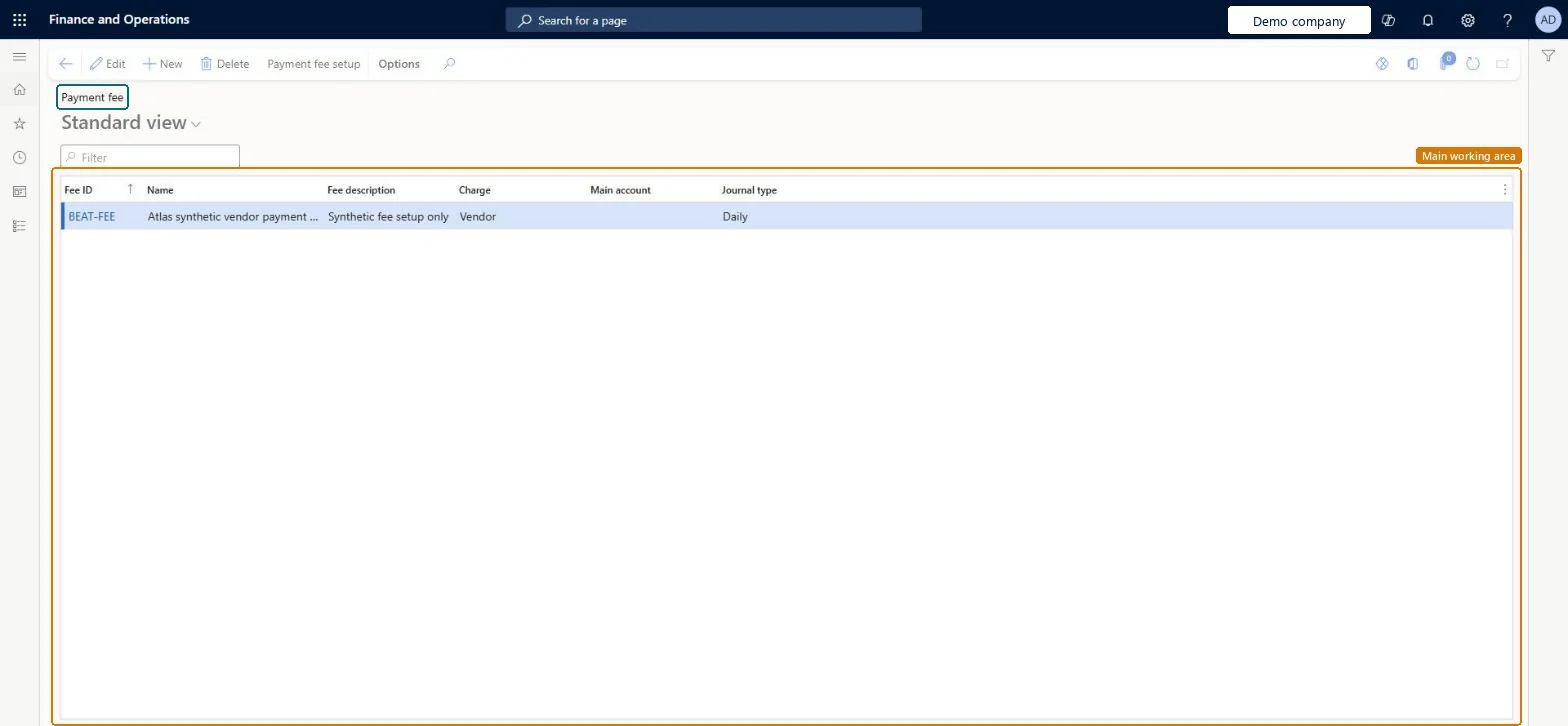
Set up Payment fee1 screen
Create and maintain the payment fees that are associated with vendors.
Screen 1
Set the payment fee amount
Go to Accounts payable > Payment setup > Payment fee, Payment fee setup for BEAT-FEE
- Select the BEAT-FEE payment fee and open its Payment fee setup
- On the Overview tab, select New
- Fill in the fee row
1Method of payment BEAT-CASH Payment currency USD Percentage/Amount Amount Fee amount 1.00 Fee currency USD 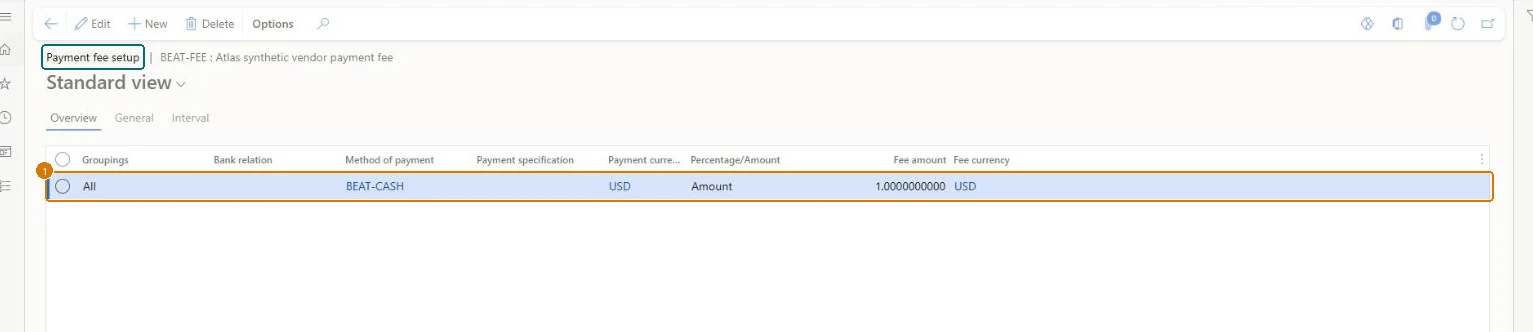
Show the full screen
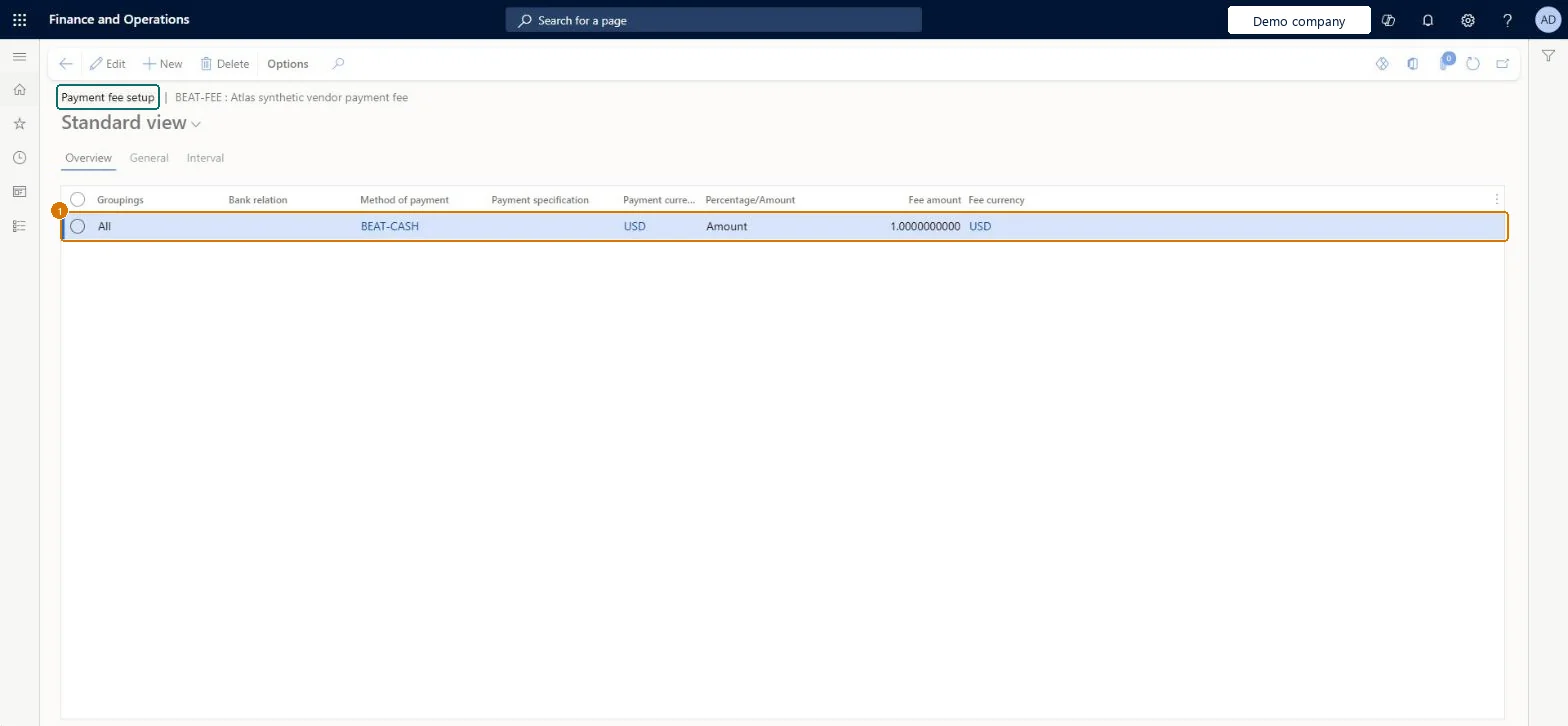
page title tab to open what to set or check
Microsoft's steps
- Go to Accounts payable > Payment setup > Payment fee.
- Select New and enter a Fee ID, a Name and a Fee description.
- In the Charge field, choose Vendor if the vendor pays the fee, or Ledger if your organization expenses it.
- For Ledger, enter the main account the fee is expensed to.
- Select the journal the fee can be used on, such as the vendor disbursement journal, and save.
- Select Payment fee setup and choose a single bank account, a bank group, or all bank accounts.
- Select the method of payment and, for electronic payments, the payment specification.
- Choose whether the fee is a percentage, an amount or an interval, enter the value, and select the Fee currency.
Source: Microsoft Learn ↗
Field guide
| Field | What it means | Worked example | Table column |
|---|---|---|---|
| Fee ID | A name that shows when the fee is used, such as for electronic funds transfers.Microsoft Learn ↗ | — | FeeId |
| Charge | Who bears the fee: Ledger when your organization expenses it, Vendor when it is charged to the vendor.Microsoft Learn ↗ | — | — |
| Main account | The account the fee is posted to; only needed when Charge is Ledger.Microsoft Learn ↗ | — | — |
| Fee currency | The currency the fee is charged in.Microsoft Learn ↗ | USD | — |
| Method of payment | — | BEAT-CASH | — |
| Payment currency | — | USD | — |
| Percentage/Amount | — | Amount | — |
| Fee amount | — | 1.00 | — |
Functional consultant
4Setup decisions
| Setup step | Recommended value and why | Decision · common mistake · test |
|---|---|---|
| Set up Payment fee | — | — |
Solution architect
5Design impact
| Shared or per company | Per company: each legal entity has its own records. Microsoft data model ↗ |
|---|---|
| Can it be undone | — |
| Feature or country | — |
| If you change it later | — |
Technical architect
6Technical
| Menu item | VendPaymFee Checked in Dynamics 365 |
|---|---|
| Form | VendPaymFee Checked in Dynamics 365 |
| Table | VendPaymFeeShown as “Vendor payment fee” in Record infoChecked in Dynamics 365 |
| Data entities | VendorPaymentFeeEntityVendor payment fee Microsoft data model ↗ |
| Who can open it | PrivilegesMaintain vendor payment fees VendPaymFeeMaintainView vendor payment fees VendPaymFeeViewDutiesInquire into invoice and payment policies VendInvoiceInvoicePaymentPoliciesInquirEnable invoice and payment process VendInvoiceInvoicePaymentProcessEnableInquire into vendor invoice status VendInvoiceVendorInvoiceStatusInquire10 security rolesAuditorAuditPolicyManagerChief financial officer CompanyChiefFinancialOfficerAccountant LedgerAccountantAccounting manager LedgerAccountingManagerAccounting supervisor LedgerAccountingSupervisorFinancial controller LedgerFinancialControllerAccounts payable centralized payments clerk PaymAccountsPayableCentralPaymClerkAccounts payable payments clerk PaymAccountsPayablePaymentsClerkAccounts payable clerk VendInvoiceAccountsPayableClerkAccounts payable manager VendInvoiceAccountsPayableManager |
| Actions on the page | Buttons: Payment fee setupChecked in Dynamics 365 |
Developer
7Developer
| Open it directly | https://<your-environment>/?mi=VendPaymFee |
|---|---|
| Integrate with | VendorPaymentFeeEntity data entity Microsoft data model ↗ |
| Table definition | VendPaymFee columns and relations Microsoft data model ↗ |
Everyone
8Sources and checks
- learn.microsoft.com/dynamics365/finance/general-ledger/accts-payble-posting
- learn.microsoft.com/dynamics365/finance/accounts-payable/accounts-payable-overview#optional-setup-pages-for-accounts-payable
- learn.microsoft.com/dynamics365/finance/accounts-payable/tasks/define-vendor-payment-fees
- learn.microsoft.com/common-data-model/schema/core/operationscommon/tables/finance/bank/group/vendpaymfee
- learn.microsoft.com/dynamics365/finance/general-ledger/accts-payble-posting
- learn.microsoft.com/dynamics365/finance/accounts-payable/accounts-payable-overview
- Checked in a working Dynamics 365 system, version 10.0.49: the menu item, form, table and security, the page, the demo records and the values in the screenshots.