BeyondERP.Newsletter
Menu

Setup step on the Cross docking templates page · Warehouse management

Set up Cross docking templates

Use this page to set the warehouses, planning rules and supply sources that apply to planned cross docking.

Used by
Warehouse planner, Warehouse manager
Business process
Manage warehouse operations
Menu item
WHSCrossDockingTemplate
Main table
WHSCrossDockTemplate
Data entity
WHSCrossDockingTemplateV2Entity
Setup steps
1 on this page
Show what matters for
SETUP GUIDEHow to set it up8 sections. Choose a role to highlight what matters to you.
Everyone

1What it is and why

What it isA setup page where you define cross docking templates, which set the supply sources and the other requirements for cross docking.
What you do hereUse this page to set the warehouses, planning rules and supply sources that apply to planned cross docking.
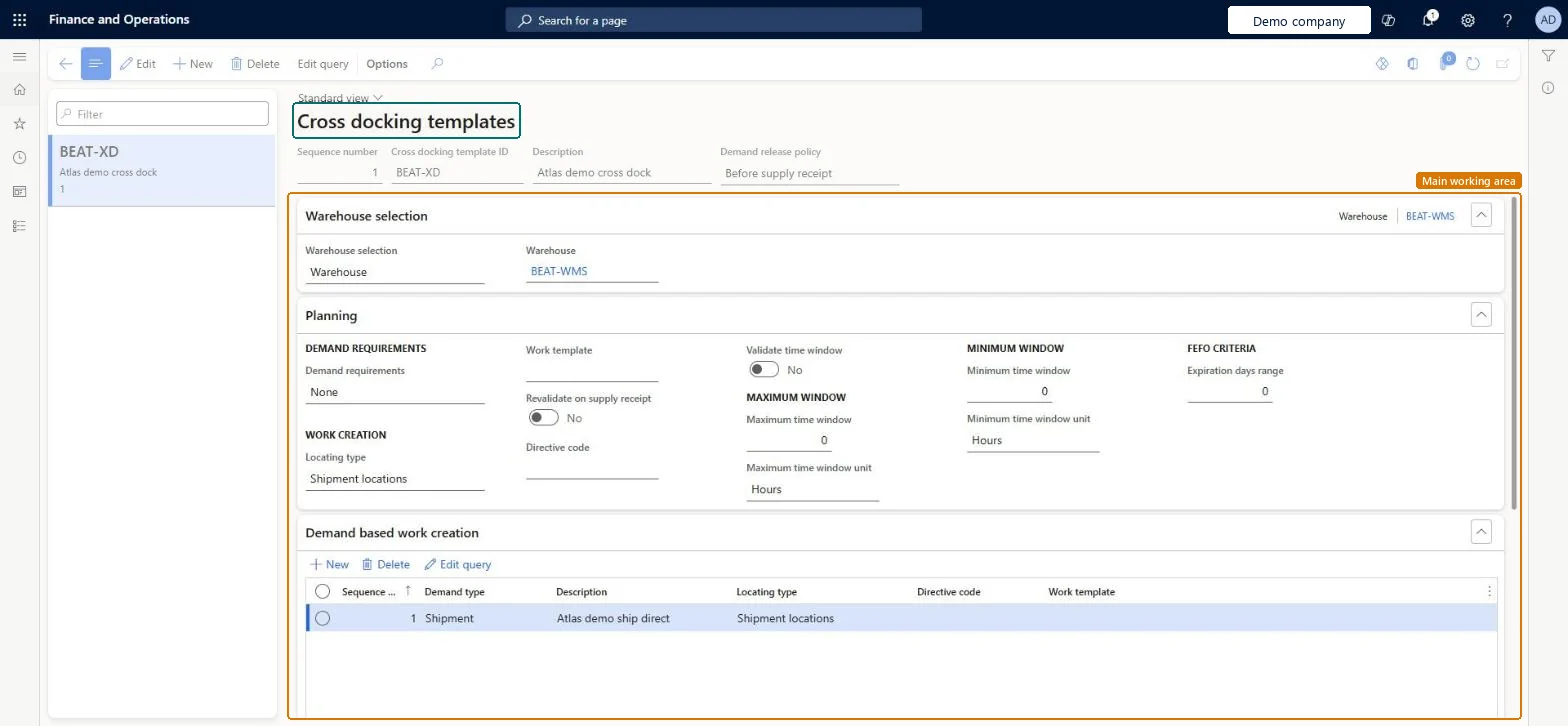
Cross docking templates page in Dynamics 365
The page in Dynamics 365. page title tab to open what to set or check
Functional consultant · Solution architect

2Where it fits

Business processManage warehouse operations
Menu pathWarehouse management › Setup › Work › Cross docking templates
Set up firstLoad posting methods Microsoft Learn
Used next byWork templates Microsoft Learn
In this process Set up Unit sequence groups · Set up Default label printers
End user · Functional consultant

3How to do it

About the examples: Examples and screenshots in this guide use BEAT, a demo company in a Dynamics 365 test environment. Use your own company's codes and values instead of copying them.

Setup steps on this page

Set up Cross docking templates

Use this page to set the warehouses, planning rules and supply sources that apply to planned cross docking.

Steps from Microsoft

  1. Go to Warehouse management > Setup > Work > Cross docking templates.
  2. On the Action Pane, select New to create a template.
  3. In the header, set the sequence number, the cross docking template ID, a description and the demand release policy.
  4. On the Warehouse selection FastTab, specify the warehouse where the template applies.
  5. On the Planning FastTab, set the demand requirements, locating type, time windows and the other planning options.
  6. On the Supply sources FastTab, select New and set the supply source.

Source: Microsoft Learn

Fields on the page

FieldWhat it meansTable column
Sequence numberThe order that templates are evaluated in.Microsoft Learn SequenceNumber
Demand requirementsThe requirements of the demand inventory, such as marking or order reservation before release.Microsoft Learn DemandRequirements
Locating typeWhether cross docking work uses the staging and load locations from the shipment or finds its own through location directives.Microsoft Learn LocatingType
Revalidate on supply receiptWhether the supply is revalidated during receipt.Microsoft Learn RevalidateOnReceipt
Validate time windowWhether the maximum time window is evaluated when a supply source is selected.Microsoft Learn ValidateTimeWindow
Maximum time windowThe maximum period allowed between supply arrival and demand departure.Microsoft Learn MaximumTimeValue
Minimum time windowThe minimum period allowed between supply arrival and demand departure.Microsoft Learn MinimumTimeValue
Expiration days rangeThe first expiry first out criterion, set as a number of days between batch expiration dates.Microsoft Learn FEFODaysRange

Test checklist

  1. Regenerate load posting methods and check planCrossDocking exists.
  2. Create a template for the warehouse with a Purchase order supply source and a cross docking work class and work template.
  3. Create a purchase order and a sales order for the same item, then release the sales order to the warehouse.
  4. Check Planned cross docking quantity on the load line.
  5. Receive the purchase order and check one Cross docking work and one Purchase orders work for the rest.

Source: Microsoft Learn

Functional consultant

4Setup decisions

Setup stepRecommended value and whyDecision, common mistake and test
Set up Cross docking templatesWhat link must the demand have to the supply before release (Demand requirements)?Cancelling cross-docking work and expecting the inventory transactions to be unregistered. They are not, even if that parameter is turned on.

Feature management and licence

Feature to turn onCross docking templates with location directives (Mandatory, on by default)

Microsoft Learn

Solution architect

5Design impact

Shared or per companyPer company: each legal entity has its own records. Microsoft data model
Can it be undoneReversible: Templates are evaluated at release to warehouse; changes affect later releases.
Technical architect

6Technical

Menu itemWHSCrossDockingTemplate Checked in Dynamics 365
FormWHSCrossDockingTemplate Checked in Dynamics 365
TableWHSCrossDockTemplateShown as “CROSS DOCKING TEMPLATES” in Record infoKey field: CrossDockTemplateIdChecked in Dynamics 365
Data entitiesWHSCrossDockingTemplateV2EntityCross docking templates V2 Microsoft data model
Who can open itPrivilegesMaintain cross docking templates WHSCrossDockTemplateMaintainView cross docking templates WHSCrossDockTemplateViewDutiesInquire into warehouse planning master data WHSWarehousePlanningMasterInquireRecord warehouse planning masters WHSWarehousePlanningMasterMaintain
2 security rolesWarehouse planner WHSWarehousePlannerWarehouse manager WMSWarehouseManager
Checked in Dynamics 365
Roles to set it up and use itTo set it up or change itWarehouse manager WMSWarehouseManagerWarehouse planner WHSWarehousePlannerGive people one of these roles. On this system, 2 roles can open this page.Checked in Dynamics 365
Actions on the page(Action Pane without tabs): Edit queryChecked in Dynamics 365
Developer

7Developer

Open it by URLhttps://<your-environment>/?mi=WHSCrossDockingTemplate
Integrate withWHSCrossDockingTemplateV2Entity data entity Microsoft data model
Data migrationWHSCrossDockingTemplateV2Entity (Cross docking templates V2): loaded for each company.Microsoft Learn
Table definitionWHSCrossDockTemplate columns and relations Microsoft data model
Everyone

8Sources

To cite this step: WM-WORK-110, Set up Cross docking templates. Beyond ERP Atlas Hub, 2026-11-11. https://www.beyonderp.cloud/atlas/step/WM-WORK-110