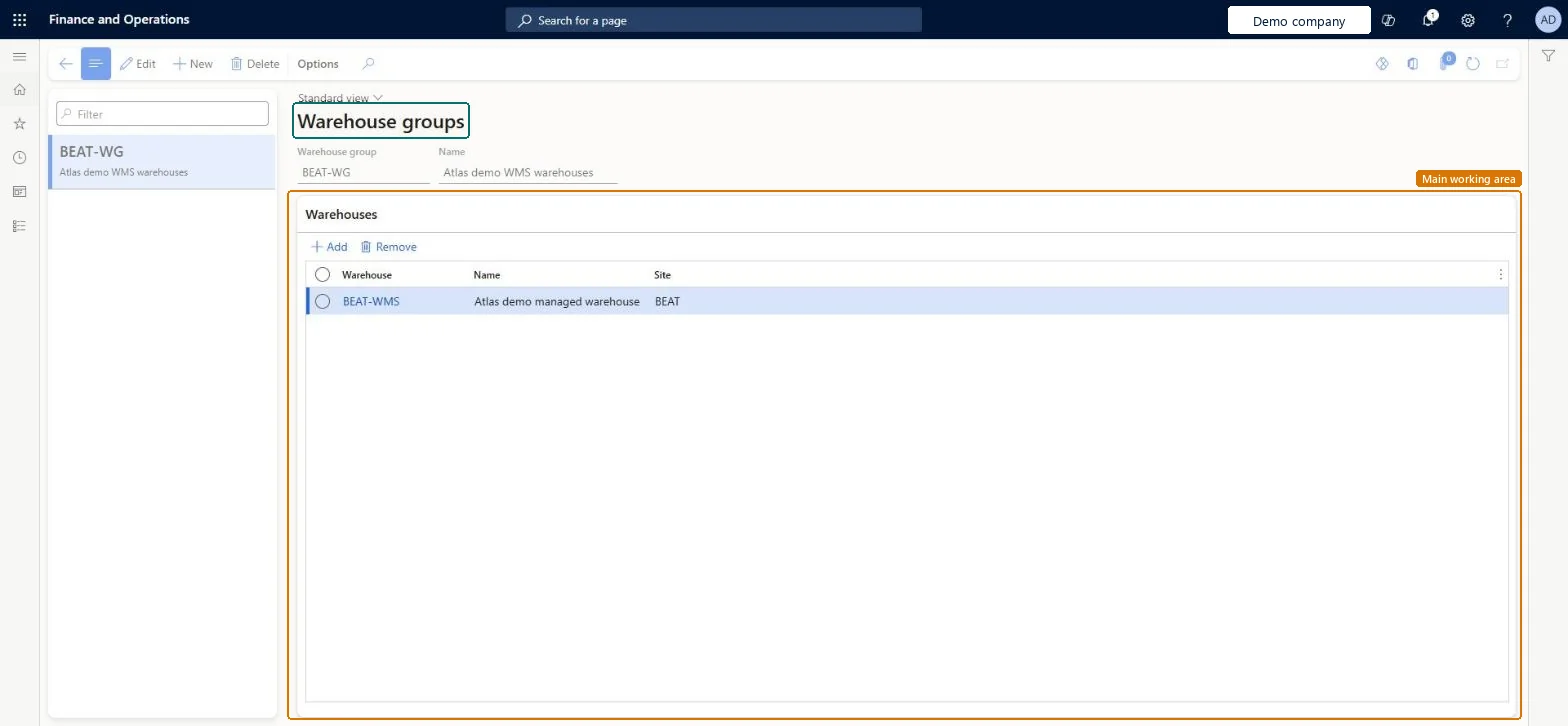
About the examples: Examples and screenshots in this guide use BEAT, a demo company in a Dynamics 365 test environment. Use your own company's codes and values instead of copying them.
Setup steps on this page
Set up Warehouse groups
Use this page to define the warehouse groups that other warehouse setup records can apply to, instead of choosing one warehouse at a time.
Steps from Microsoft
Go to Warehouse management > Setup > Warehouse > Warehouse groups.
Select New on the Action Pane to create a group, or select an existing group and then Edit.
In the Warehouse group field, enter a unique name for the group.
In the Name field, enter a short description of the group.
On the Warehouses FastTab, select Add and choose a warehouse in the Warehouse column for each warehouse that belongs to the group.
Groups of WMS warehouses that share rules, used on location directives, wave templates, cross docking templates and similar setup instead of one warehouse at a timeThese features can apply to a single warehouse, a group or all warehouses, and a warehouse can belong to any number of groups.
Trying to add a warehouse that doesn't use warehouse management processes; only WMS-enabled warehouses can be selected.
Solution architect
5Design impact
Can it be undone
Reversible: Members can be added, removed or replaced at any time; every record that uses the group follows the change.
Technical architect
6Technical
Menu item
WhsWarehouseGroupChecked in Dynamics 365
Form
WhsWarehouseGroupChecked in Dynamics 365
Table
WhsWarehouseGroupShown as “WAREHOUSE GROUPS” in Record infoKey field: WarehouseGroupIdChecked in Dynamics 365
Data entities
WhsWarehouseGroupEntityWarehouse groups Checked in Dynamics 365
Who can open it
PrivilegesMaintain warehouse groups WhsWarehouseGroupMaintainView warehouse groups WhsWarehouseGroupViewDutiesInquire into warehouse operation master WMSWarehouseOperationMasterInquireMaintain warehouse operation master WMSWarehouseOperationMasterMaintain6 security rolesField Service Integration User FieldServiceIntegrationUserProduction supervisor ProdProductionSupervisorProcess engineer RouteProcessEngineerProcess engineering manager RouteProcessEngineeringManagerWarehouse planner WHSWarehousePlannerWarehouse manager WMSWarehouseManagerChecked in Dynamics 365
Roles to set it up and use it
To set it up or change itWarehouse manager WMSWarehouseManagerProcess engineer RouteProcessEngineerTo use itWarehouse planner WHSWarehousePlannerProduction supervisor ProdProductionSupervisorProcess engineering manager RouteProcessEngineeringManagerField Service Integration User FieldServiceIntegrationUserGive people one of these roles. On this system, 6 roles can open this page.Checked in Dynamics 365
Developer
7Developer
Open it by URL
https://<your-environment>/?mi=WhsWarehouseGroup
Integrate with
WhsWarehouseGroupEntity data entity Checked in Dynamics 365