BeyondERP.Newsletter
Menu

Setup step on the Container packing policies page · Warehouse management

Set up Container packing policies

Use this page to define what happens when a container closes and when it is released from the packing station.

Used by
Field Service Integration User, Production supervisor, Process engineer and 3 more roles
Business process
Manage warehouse operations
Menu item
WHSCloseContainerProfile
Main table
WHSCloseContainerProfile
Data entity
WHSContainerClosingProfileEntity
Setup steps
1 on this page
Show what matters for
SETUP GUIDEHow to set it up8 sections. Choose a role to highlight what matters to you.
Everyone

1What it is and why

What it isA setup page where you define container packing policies, which set how a container is closed, released and manifested at a packing station.
What you do hereUse this page to define what happens when a container closes and when it is released from the packing station.
ExampleFor example, a packing station that mainly handles single containers that ship directly to customers can release the containers immediately.
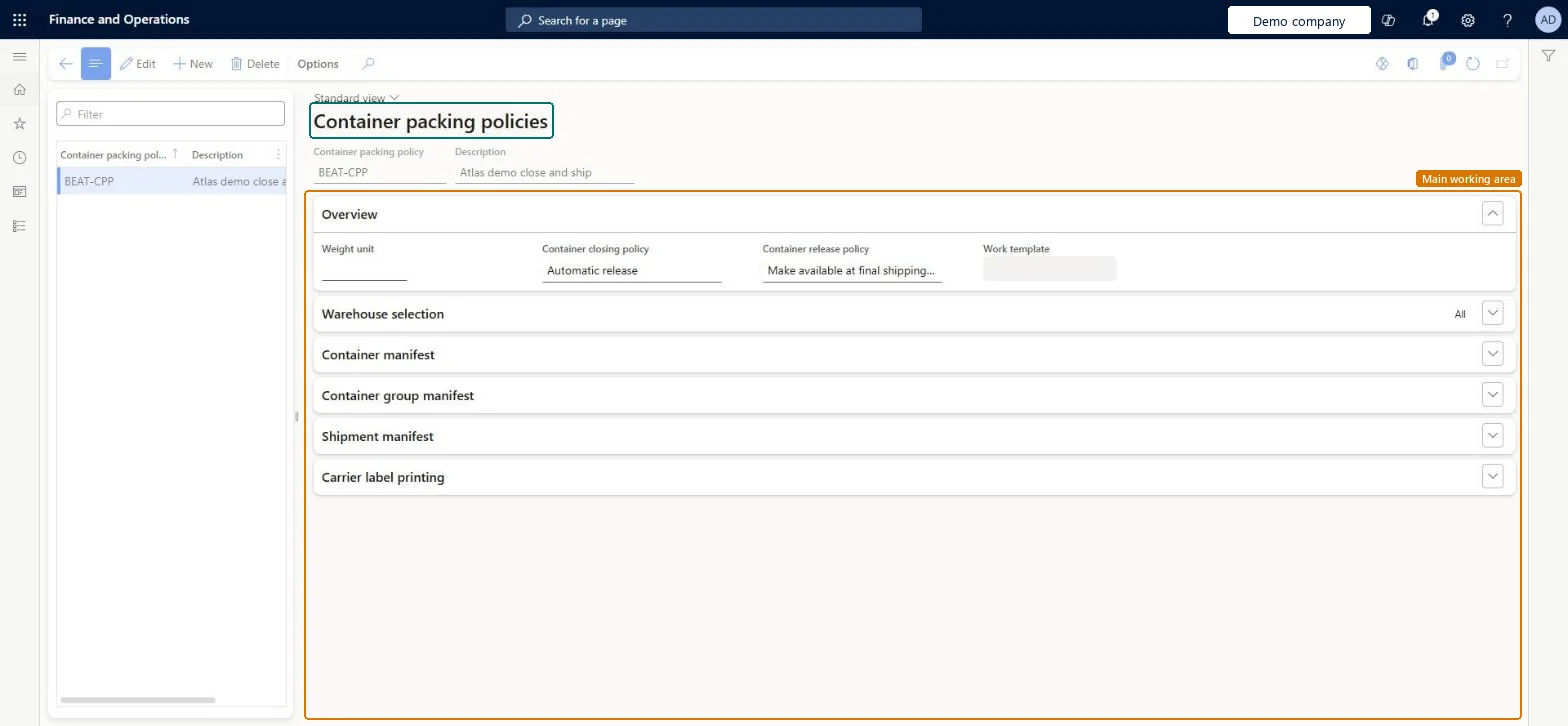
Container packing policies page in Dynamics 365
The page in Dynamics 365. page title tab to open what to set or check
Functional consultant · Solution architect

2Where it fits

Business processManage warehouse operations
Menu pathWarehouse management › Setup › Containers › Container packing policies
Used next byPacking profiles Microsoft Learn Worker Microsoft Learn
Related pagesWarehouse groups Microsoft Learn
In this process Set up Cross docking policy · Set up NMFC codes
End user · Functional consultant

3How to do it

About the examples: Examples and screenshots in this guide use BEAT, a demo company in a Dynamics 365 test environment. Use your own company's codes and values instead of copying them.

Setup steps on this page

Set up Container packing policies

Use this page to define what happens when a container closes and when it is released from the packing station.

Steps from Microsoft

  1. Go to Warehouse management > Setup > Containers > Container packing policies.
  2. Select an existing policy in the list pane, or select New on the Action Pane.
  3. In the header, enter a Container packing policy name and a Description.
  4. On the Overview FastTab, set the Weight unit, the Container closing policy and the Container release policy.
  5. On the Warehouse selection FastTab, choose whether the policy applies to all warehouses, a warehouse group or one warehouse.
  6. On the Container manifest, Container group manifest and Shipment manifest FastTabs, set the manifest requirements.

Source: Microsoft Learn

Fields on the page

FieldWhat it meansTable column
Weight unitThe default unit of measure used when a container is closed and manifested.Microsoft Learn WeightUOM
Container closing policyDefines what happens when a container is closed.Microsoft Learn AutoReleaseContainerAtContainerClose
Container release policyDefines what happens when a container is released from the packing location.Microsoft Learn ContainerClosingWorkCreationProcess
Work templateThe work template applied when work is created to move the container.Microsoft Learn WorkTemplateCode
Warehouse selectionWhether the policy applies to all warehouses, a warehouse group or a single warehouse.Microsoft Learn WarehouseGroupAll

Test checklist

  1. Assign the policy to a packing profile and open the Pack page with that profile.
  2. Create a container, pack a shipment line and close the container.
  3. With Create work to move container from packing station, check that work of type Packed container picking is created with the selected work template.
  4. With Manifest requirements for container set to Manual, check that the container can't be closed or released until it is manifested.

Source: Microsoft Learn

Functional consultant

4Setup decisions

Setup stepRecommended value and whyDecision, common mistake and test
Set up Container packing policiesContainer release policy: Create work to move container from packing station. Container closing policy: Automatic release for single-container parcel shipments, Delayed release for multi-container or pallet shipmentsLearn says that in most cases you should create work to move containers because it better represents the manual process, and that release should be immediate for single containers and delayed until the whole shipment or pallet is packed.Choosing Transportation management as a manifest requirement. Learn says it needs custom development for a carrier engine and doesn't work out of the box.
Solution architect

5Design impact

Shared or per companyPer company: each legal entity has its own records. Microsoft data model
Can it be undoneReversible: Policies can be edited at any time; the policy is selected each time a container is created, so changes apply to new containers.
Technical architect

6Technical

Menu itemWHSCloseContainerProfile Checked in Dynamics 365
FormWHSCloseContainerProfile Checked in Dynamics 365
TableWHSCloseContainerProfileShown as “CONTAINER PACKING POLICIES” in Record infoKey field: CloseContainerProfileIdChecked in Dynamics 365
Data entitiesWHSContainerClosingProfileEntityContainer packing policies Microsoft data model
Who can open itPrivilegesMaintain close container profiles WHSCloseContainerProfileMaintainView close container profiles WHSCloseContainerProfileViewDutiesInquire into warehouse operation master WMSWarehouseOperationMasterInquireMaintain warehouse operation master WMSWarehouseOperationMasterMaintain
6 security rolesField Service Integration User FieldServiceIntegrationUserProduction supervisor ProdProductionSupervisorProcess engineer RouteProcessEngineerProcess engineering manager RouteProcessEngineeringManagerWarehouse planner WHSWarehousePlannerWarehouse manager WMSWarehouseManager
Checked in Dynamics 365
Roles to set it up and use itTo set it up or change itWarehouse manager WMSWarehouseManagerProcess engineer RouteProcessEngineerTo use itWarehouse planner WHSWarehousePlannerProduction supervisor ProdProductionSupervisorProcess engineering manager RouteProcessEngineeringManagerField Service Integration User FieldServiceIntegrationUserGive people one of these roles. On this system, 6 roles can open this page.Checked in Dynamics 365
Developer

7Developer

Open it by URLhttps://<your-environment>/?mi=WHSCloseContainerProfile
Integrate withWHSContainerClosingProfileEntity data entity Microsoft data model
Data migrationWHSContainerClosingProfileEntity (Container packing policies): loaded for each company, in Microsoft's default template 400 - Warehouse management.Load order: Microsoft's default template 400 - Warehouse management loads Container packing policies at execution unit 1, level 400, sequence 15. Lower levels load first, and entities at the same level load in sequence order.Load first: Units, Warehouses, Warehouse locations, the default templates at lower levels (System setup to Quality management)Microsoft Learn
Table definitionWHSCloseContainerProfile columns and relations Microsoft data model
Everyone

8Sources

To cite this step: WM-CONT-050, Set up Container packing policies. Beyond ERP Atlas Hub, 2026-11-11. https://www.beyonderp.cloud/atlas/step/WM-CONT-050