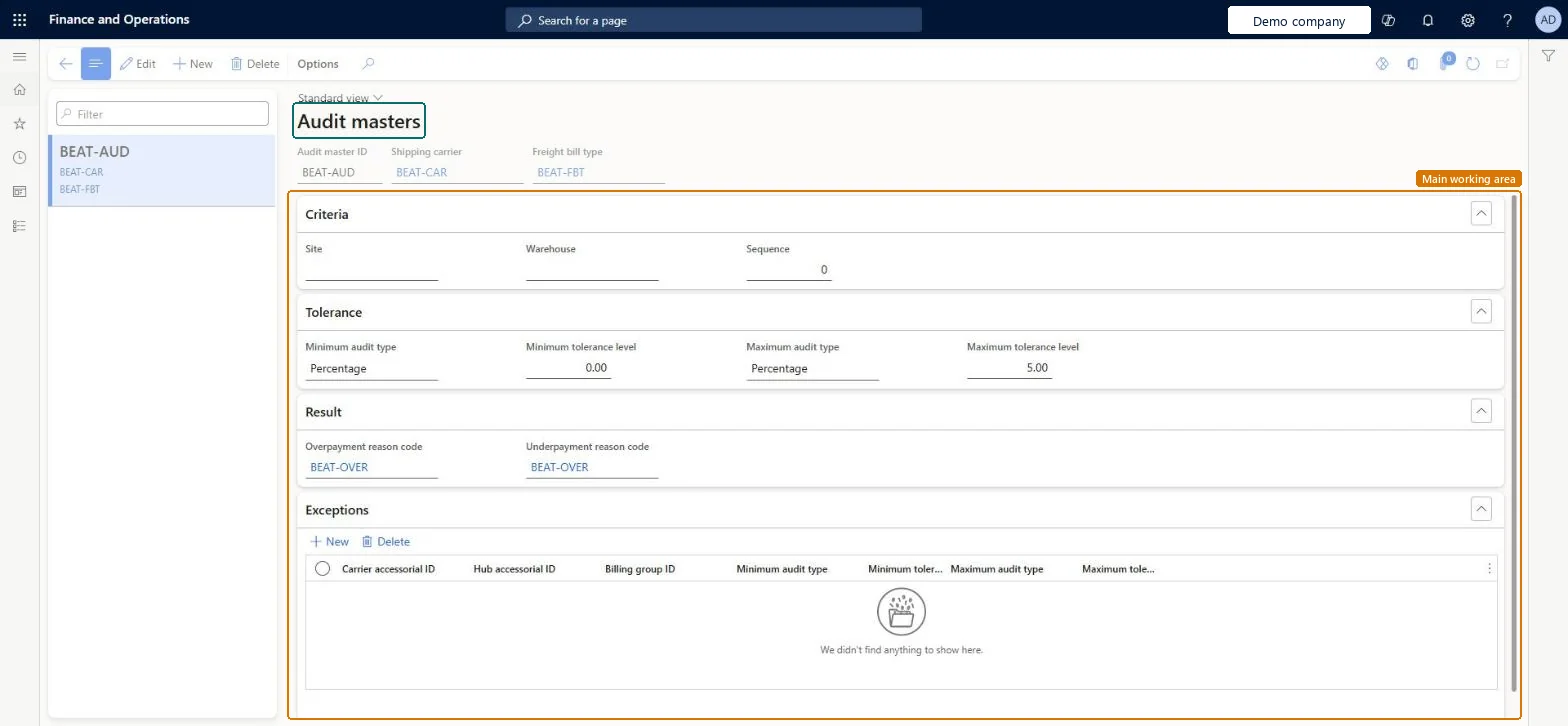
Setup step on the Audit master page · Transportation management
Set up Audit master
Use this page to specify how much the amounts on a freight bill and a carrier invoice can differ during automatic reconciliation, and which reason codes record the difference.
SETUP GUIDEHow to set it up8 sections. Choose a role to highlight what matters to you.
Everyone
1What it is and why
What it is
A setup page where you define audit masters, which set the tolerance limits for automatic freight reconciliation and how discrepancies are handled.
What you do here
Use this page to specify how much the amounts on a freight bill and a carrier invoice can differ during automatic reconciliation, and which reason codes record the difference.
The page in Dynamics 365. page title tab to open what to set or check
About the examples: Examples and screenshots in this guide use BEAT, a demo company in a Dynamics 365 test environment. Use your own company's codes and values instead of copying them.
Setup steps on this page
Set up Audit master
Use this page to specify how much the amounts on a freight bill and a carrier invoice can differ during automatic reconciliation, and which reason codes record the difference.
Steps from Microsoft
Go to Transportation management > Setup > Freight reconciliation > Audit master.
Select New, and then enter a value in the Audit master ID field.
In the Shipping carrier field, select the shipping carrier.
In the Freight bill type field, select the freight bill type.
On the Tolerance FastTab, enter the Minimum tolerance level and the Maximum tolerance level.
On the Result FastTab, enter or select the Overpayment reason code and the Underpayment reason code.
The lower tolerance limit for the difference between the freight bill and the carrier invoice. Outside the limits, reconciliation is prevented.Microsoft Learn
Maximum tolerance level
The upper tolerance limit for the difference between the freight bill and the carrier invoice. Outside the limits, reconciliation is prevented.Microsoft Learn
Overpayment reason code
The reason code that specifies the accounts that an overpayment within tolerance is registered on.Microsoft Learn
OverageReasonCode
Underpayment reason code
The reason code that specifies the accounts that an underpayment within tolerance is registered on.Microsoft Learn
UnderageReasonCode
Exceptions
Types of charges that should not be evaluated according to the same criteria as the audit master during automatic reconciliation.Microsoft Learn
Test checklist
Create an audit master for the carrier with the freight bill type, minimum and maximum tolerance, and both reason codes.
Run automatic reconciliation for an invoice within tolerance and check it is reconciled to the reason code.
Run it for an invoice outside tolerance and check that reconciliation is prevented.
Match a negative-amount invoice manually and check it matches a freight bill that isn't fully matched.
One audit master per shipping carrier, using that carrier's freight bill type, with tolerance limits agreed with Finance and an overpayment and underpayment reason codeThe audit master sets how far the freight bill and carrier invoice may differ in automatic reconciliation, and the reason codes record where a difference inside tolerance posts.
Relying on auto matching for invoices with negative amounts. Auto matching sorts invoices by amount and can leave a negative invoice unmatched once the freight bill is fully matched, so Microsoft says to match those manually.Test: Auto matching respects tolerance
Reversible: Tolerances and reason codes can be changed and apply to the next automatic reconciliation run.
Technical architect
6Technical
Menu item
TMSAuditMasterChecked in Dynamics 365
Form
TMSAuditMasterChecked in Dynamics 365
Table
TMSAuditMasterShown as “AUDIT MASTER” in Record infoKey field: AuditMasterIdChecked in Dynamics 365
Data entities
TMSFreightBillMatchingAuditToleranceLevelEntityFreight bill matching audit tolerance levels Microsoft data model
Who can open it
PrivilegesMaintain audit master TMSAuditMasterMaintainView audit master TMSAuditMasterViewDutiesEnable the transportation management process TMSTransportationMgmtEnableInquire into transportation management policies TMSTransportationMgmtPoliciesInquire2 security rolesLogistics manager TMSLogisticsManagerTransportation coordinator TMSTransportationCoordinatorChecked in Dynamics 365
Roles to set it up and use it
To set it up or change itLogistics manager TMSLogisticsManagerTo use itTransportation coordinator TMSTransportationCoordinatorGive people one of these roles. On this system, 2 roles can open this page.Checked in Dynamics 365