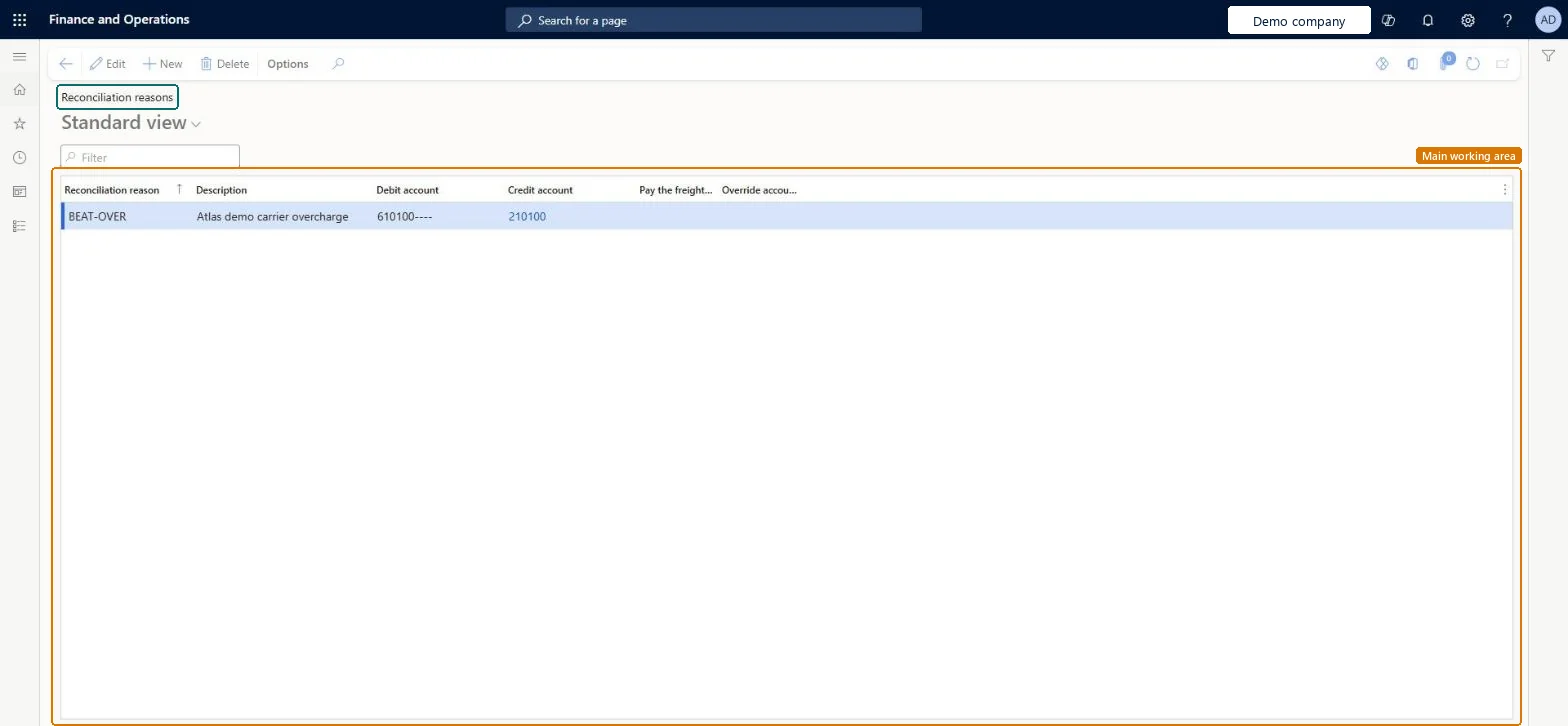
A setup page where you define reconciliation reasons, which specify the accounts that are debited and credited with variances between freight bills and carrier invoices.
PAGE GUIDEWhat the page does and how to use it8 sections. Choose a role to highlight what matters to you.
Everyone
1What it is and why
What it is
A setup page where you define reconciliation reasons, which specify the accounts that are debited and credited with variances between freight bills and carrier invoices.
What you do here
Use this page to set up the reason codes that determine how differences between freight bills and invoices are posted in the general ledger, in both manual and automatic reconciliation.
The page in Dynamics 365. page title tab to open what to set or check
About the examples: Examples and screenshots in this guide use BEAT, a demo company in a Dynamics 365 test environment. Use your own company's codes and values instead of copying them.
Setup steps on this page
Set up Reconciliation reasons
Use this page to set up the reason codes that determine how differences between freight bills and invoices are posted in the general ledger, in both manual and automatic reconciliation.
How to use it
Go to Transportation management > Setup > Freight reconciliation > Reconciliation reasons.
Select New.
Enter a Reconciliation reason and a Description.
Select the Debit account and the Credit account.
Set the Pay the freight vendor and Override accounts options as required.
Source: Checked in Dynamics 365
Fields on the page
Field
What it means
Table column
Debit account
The account that is debited with a variance between the freight bill and the invoice.Microsoft Learn
OffAcctLedgerDimension
Credit account
The account that is credited with a variance between the freight bill and the invoice.Microsoft Learn
LedgerAccount
Pay freight vendor
Select this option when any credit should be paid to the vendor instead of being credited to a specific account.Microsoft Learn
Override accounts
Select this option to charge the debit and credit accounts on this page instead of apportioning the charges back to the original source document.Microsoft Learn
OverrideAccts
Test checklist
Set Enable freight reconciliation to Yes in Transportation management parameters.
Create one overpayment and one underpayment reason code with debit and credit accounts.
Reconcile a carrier invoice that differs from the freight bill and choose a reason code for the difference.
Post the vendor invoice journal and check the voucher uses the reason code's accounts.
Separate reason codes for overpayment and underpayment, each with debit and credit accounts; select Pay freight vendor only where the credit should be paid to the carrier, and Override accounts only where the reason's accounts should be charged instead of the source documentReconciliation reasons determine how variances between freight bills and invoices post in the general ledger, and the audit master uses an overpayment and an underpayment reason code.
Hard to reverse: Reason codes can be edited, but they decide how differences post to the general ledger when the reconciliation journal is posted. Posted variances aren't changed by a later edit. Microsoft Learn
Technical architect
6Technical
Menu item
TMSFreightMatchReasonChecked in Dynamics 365
Form
TMSFreightMatchReasonChecked in Dynamics 365
Table
TMSFreightMatchReasonShown as “RECONCILIATION REASONS” in Record infoKey field: FreightReasonCodeChecked in Dynamics 365
Data entities
TMSFreightReconciliationReasonCodeEntityFreight reconciliation reason codes Microsoft data model
Who can open it
PrivilegesMaintain freight match reasons TMSFreightMatchReasonMaintainView freight match reasons TMSFreightMatchReasonViewDutiesInquire into freight reconciliation master TMSFreightReconcileMasterInquireMaintain freight reconciliation master TMSFreightReconcileMasterMaintain2 security rolesLogistics manager TMSLogisticsManagerTransportation coordinator TMSTransportationCoordinatorChecked in Dynamics 365
Roles to set it up and use it
To set it up or change itLogistics manager TMSLogisticsManagerTo use itTransportation coordinator TMSTransportationCoordinatorGive people one of these roles. On this system, 2 roles can open this page.Checked in Dynamics 365
TMSFreightReconciliationReasonCodeEntity (Freight reconciliation reason codes): loaded for each company, in Microsoft's default template 405 - Transportation management.Load order: Microsoft's default template 405 - Transportation management loads Freight reconciliation reason codes at execution unit 1, level 30, sequence 10. Lower levels load first, and entities at the same level load in sequence order.Load first: the default templates at lower levels (System setup to General ledger)Microsoft Learn