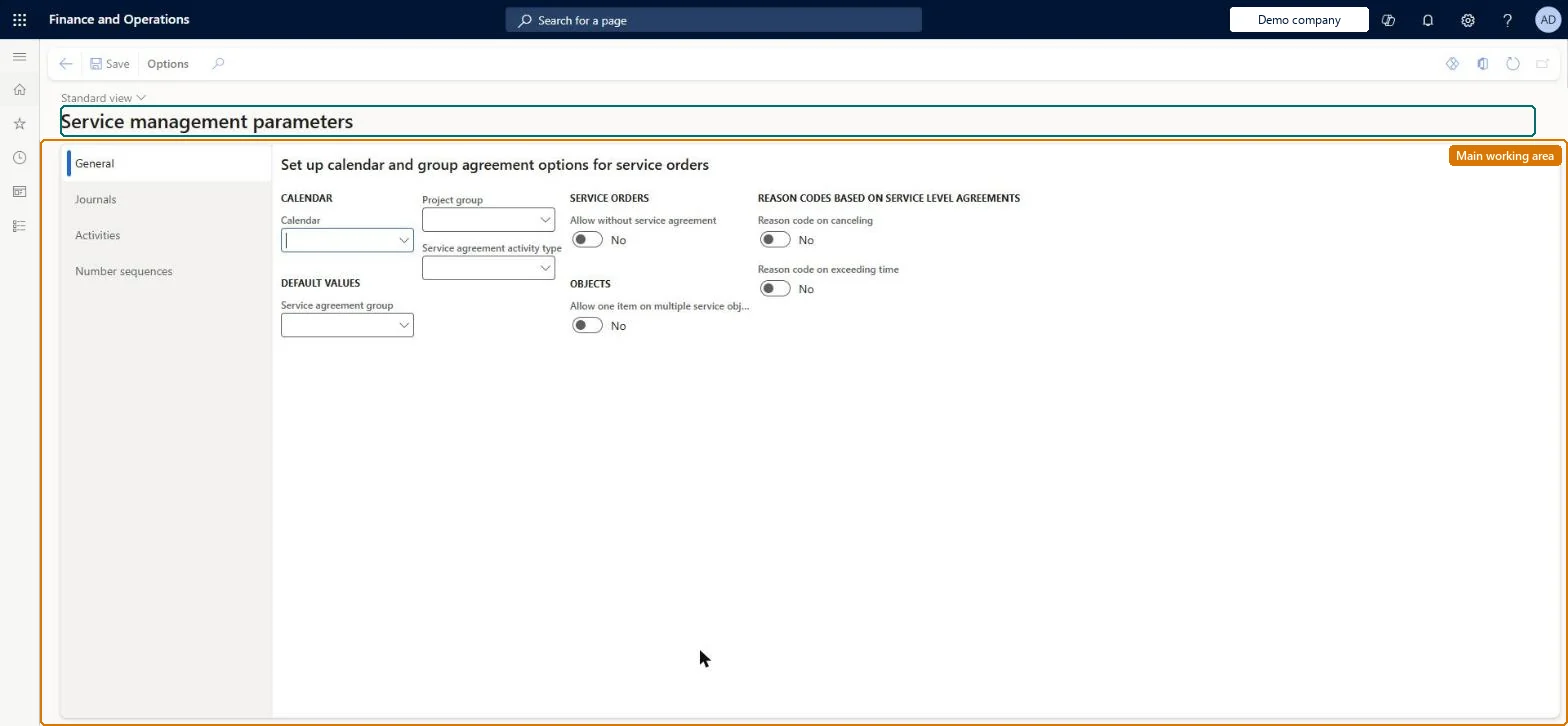
Setup step on the Service management parameters page · Service management
Set up Service management parameters
Use this page to set the defaults and rules that apply to every service agreement, service order, template BOM and dispatch view in the module before you start creating service data.
SETUP GUIDEHow to set it up8 sections. Choose a role to highlight what matters to you.
Everyone
1What it is and why
What it is
A setup page where you define module-wide settings for Service management, such as the default calendar and service agreement group, whether service orders may exist without a service agreement, when stage reason codes are required, default journal names, and number sequences.
What you do here
Use this page to set the defaults and rules that apply to every service agreement, service order, template BOM and dispatch view in the module before you start creating service data.
Example
For example, if your company takes emergency calls that are not covered by an agreement, select Allow without service agreement so dispatchers can create a service order directly.
The page in Dynamics 365. page title tab to open what to set or check
About the examples: Examples and screenshots in this guide use BEAT, a demo company in a Dynamics 365 test environment. Use your own company's codes and values instead of copying them.
Setup steps on this page
Set up Service management parameters
Use this page to set the defaults and rules that apply to every service agreement, service order, template BOM and dispatch view in the module before you start creating service data.
Steps from Microsoft
Go to Service management > Setup > Service management parameters.
Select the General link.
Select the Reason code on canceling check box if a reason code must be given when a service level agreement is canceled.
Select the Reason code on exceeding time check box if a reason code must be given when the SLA time limit is exceeded.
Select Number sequences and select a number sequence code for each reference, such as template BOMs.
Allow without service agreement = Yes when the service desk must log emergency or one-time visitsService orders that aren't linked to a service agreement can only be created when Allow without service agreement is selected; Microsoft's example is an emergency call where there is no time to set up an agreement.
Leaving Allow without service agreement cleared, so dispatchers can't create a service order for an unscheduled visit and must first build an agreement.
Number sequences
Reference
Shared or per company
Note
Service agreement
Per company
BEAT uses number sequence Serv_3. Checked in Dynamics 365
Service order
Per company
BEAT uses number sequence Serv_7. Checked in Dynamics 365
Pre-service order line ID
Per company
BEAT uses number sequence Serv_11. Checked in Dynamics 365
Template BOM
Per company
BEAT uses number sequence Serv_15. Checked in Dynamics 365
BOM history line number
Per company
BEAT uses number sequence Serv_19. Checked in Dynamics 365
Service object
Per company
BEAT uses number sequence Serv_23. Checked in Dynamics 365
Service object relation
Per company
BEAT uses number sequence Serv_27. Checked in Dynamics 365
Solution architect
5Design impact
Can it be undone
Reversible: The parameter can be changed at any time and controls service order creation from then on.
If you change it later
Clearing the default calendar means service orders are created without regard to closed days; changing the reason-code options changes when users are forced to enter a reason code on service orders. Microsoft Learn
Technical architect
6Technical
Menu item
SMAParametersChecked in Dynamics 365
Form
SMAParametersChecked in Dynamics 365
Table
SMAParametersShown as “SERVICE MANAGEMENT PARAMETERS” in Record infoChecked in Dynamics 365
Data entities
SMAServiceManagementParametersEntityService management parameters Microsoft data model
Who can open it
PrivilegesMaintain service parameters SMAParametersMaintainView service parameters SMAParametersViewDutiesInquire into service agreement policies SMAServiceAgreementPoliciesInquireEnable service agreement process SMAServiceAgreementProcessEnableInquire into service order policies SMAServiceOrderPoliciesInquireEnable service order process SMAServiceOrderProcessEnable1 security roleService delivery manager SMAServiceDeliveryManagerChecked in Dynamics 365
Roles to set it up and use it
To set it up or change itService delivery manager SMAServiceDeliveryManagerGive people one of these roles. On this system, 1 role can open this page.Checked in Dynamics 365
Checked in a working Dynamics 365 system, version 10.0.49: the menu item, form, table and security, the page.
To cite this step: SVC-SETUP-010, Set up Service management parameters. Beyond ERP Atlas Hub, 2026-11-11. https://www.beyonderp.cloud/atlas/step/SVC-SETUP-010