BeyondERP.Newsletter
Menu

Setup step on the Repair stages page · Service management

Set up Repair stages

Use this page to define the stages technicians set on repair lines, and to mark which stage closes the line by recording the finish date and time.

Used by
Service dispatcher, Service delivery manager
Business process
Receive service requests
Menu item
SMARepairStage
Main table
SMARepairStage
Data entity
SMAServiceRepairStageEntity
Setup steps
1 on this page
Show what matters for
SETUP GUIDEHow to set it up8 sections. Choose a role to highlight what matters to you.
Everyone

1What it is and why

What it isA setup page where you create the stages of a repair cycle (ID, description and a Finished flag) used to track the progress of a repair line.
What you do hereUse this page to define the stages technicians set on repair lines, and to mark which stage closes the line by recording the finish date and time.
ExampleFor example, a repair line is moved through received, in progress and finished stages, and selecting the Finished stage records the completion time.
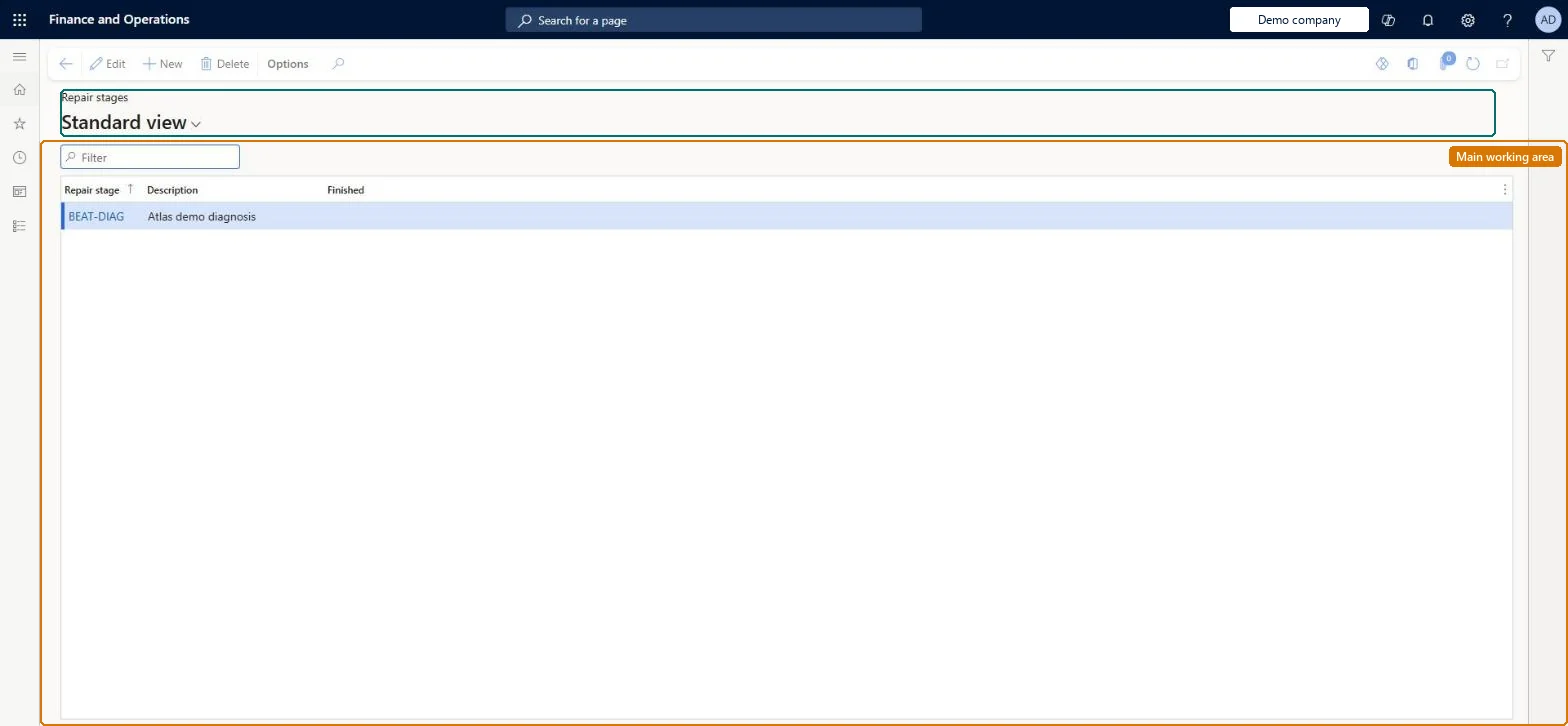
Repair stages page in Dynamics 365
The page in Dynamics 365. page title tab to open what to set or check
Functional consultant · Solution architect

2Where it fits

Business processManage service work › Receive service requests
Menu pathService management › Setup › Repair › Repair stages
Used next byRepair lines Microsoft Learn
Related pagesService objects Microsoft Learn
In this process Set up Service level agreements
End user · Functional consultant

3How to do it

About the examples: Examples and screenshots in this guide use BEAT, a demo company in a Dynamics 365 test environment. Use your own company's codes and values instead of copying them.

Setup steps on this page

Set up Repair stages

Use this page to define the stages technicians set on repair lines, and to mark which stage closes the line by recording the finish date and time.

How to use it

  1. Go to Service management > Setup > Repair > Repair stages.
  2. Use the Filter box to find a record.
  3. Select New and enter the Repair stage code and its Description.
  4. Select Edit to change a selected record, or Delete to remove it.
  5. Select Finished for the stage that ends the repair.

Source: Checked in Dynamics 365

Fields on the page

FieldWhat it meansTable column
Repair stageThe identifier of the stage.Microsoft Learn RepairStageId
DescriptionA short description of the stage.Microsoft Learn Name
FinishedMarks the repair line as finished and sets its finish date when this stage is selected.Microsoft Learn Finished

Test checklist

  1. Create stages such as Received, In repair and Done, with Finished only on Done.
  2. Set a repair line to In repair and check it stays open.
  3. Set it to Done and check the line closes with the current date and time as finish time.

Source: Microsoft Learn

Functional consultant

4Setup decisions

Setup stepRecommended value and whyDecision, common mistake and test
Set up Repair stagesProgress stages for the repair, with Finished selected only on the stage that closes the lineSelecting a stage with Finished closes the repair line and records the current date and time as its finish time.Selecting Finished on an intermediate stage. Lines are then closed and stamped with a finish time before the repair is done.
Solution architect

5Design impact

Can it be undoneReversible: The Finished flag can be changed on the stage; it acts when a stage is selected on a repair line.
If you change it laterSetting the Finished flag on a stage means that selecting that stage on a repair line closes the line and stamps the current date and time as the finish time. Microsoft Learn
Technical architect

6Technical

Menu itemSMARepairStage Checked in Dynamics 365
FormSMARepairStage Checked in Dynamics 365
TableSMARepairStageShown as “REPAIR STAGES” in Record infoChecked in Dynamics 365
Data entitiesSMAServiceRepairStageEntityRepair stages Microsoft data model
Who can open itPrivilegesMaintain repair stages SMARepairStageMaintainView repair stages SMARepairStageViewDutiesEnable service order process SMAServiceOrderProcessEnableInquire into service order reference data SMAServiceOrderReferenceDataInquire
2 security rolesService dispatcher SMADispatcherService delivery manager SMAServiceDeliveryManager
Checked in Dynamics 365
Roles to set it up and use itTo set it up or change itService delivery manager SMAServiceDeliveryManagerTo use itService dispatcher SMADispatcherGive people one of these roles. On this system, 2 roles can open this page.Checked in Dynamics 365
Developer

7Developer

Open it by URLhttps://<your-environment>/?mi=SMARepairStage
Integrate withSMAServiceRepairStageEntity data entity Microsoft data model
Data migrationSMAServiceRepairStageEntity (Repair stages): loaded for each company.Microsoft Learn
Table definitionSMARepairStage columns and relations Microsoft data model
Everyone

8Sources

To cite this step: SVC-REPAIR-050, Set up Repair stages. Beyond ERP Atlas Hub, 2026-11-11. https://www.beyonderp.cloud/atlas/step/SVC-REPAIR-050