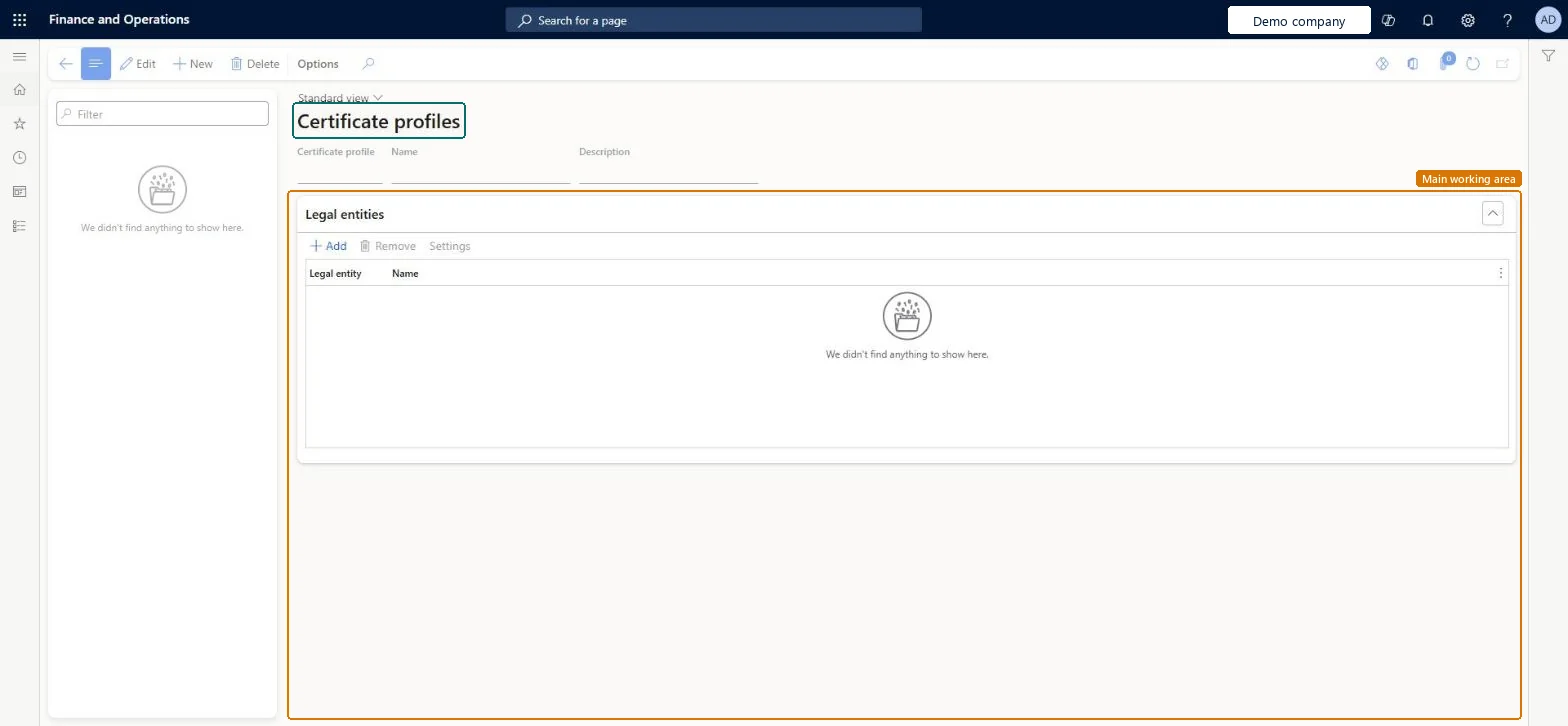
Setup step on the Certificate profiles page · System administration
Set up Certificate profiles
Use this page to give each certificate one ID that works across companies, and to set per legal entity which local or Key Vault certificates the Commerce channels can use.
SETUP GUIDEHow to set it up8 sections. Choose a role to highlight what matters to you.
Everyone
1What it is and why
What it is
A setup page where you create certificate profiles that name a default certificate and set the order in which certificates are searched.
What you do here
Use this page to give each certificate one ID that works across companies, and to set per legal entity which local or Key Vault certificates the Commerce channels can use.
Example
For example, a store's point of sale can fall back to a local certificate while it runs offline and can't reach Key Vault.
The page in Dynamics 365. page title tab to open what to set or check
About the examples: Examples and screenshots in this guide use BEAT, a demo company in a Dynamics 365 test environment. Use your own company's codes and values instead of copying them.
Setup steps on this page
Set up Certificate profiles
Use this page to give each certificate one ID that works across companies, and to set per legal entity which local or Key Vault certificates the Commerce channels can use.
Steps from Microsoft
Go to System administration > Setup > Certificate profiles.
Select New.
Enter values in the Certificate profile, Name and Description fields.
On the Legal entities FastTab, select Add and choose the legal entity that should use the profile.
Repeat for each other legal entity that needs the profile.
Select Settings to open the Certificate profile settings page.
Add a line for each certificate that can be used, in priority order.
On each line, set Location type, then either Key Vault certificate or Thumbprint (and optionally Store name and Store location).
The unique ID of the certificate across all companies and Commerce components.Microsoft Learn
ProfileId
Priority
Set automatically; 1 is tried first, and Move up or Move down changes the order.Microsoft Learn
Location type
Where the certificate is stored: Local certificate or Key Vault.Microsoft Learn
Key Vault certificate
The Key Vault certificate secret to use; required when Location type is Key Vault.Microsoft Learn
Store name
Optional default store name used to search for a local certificate.Microsoft Learn
Thumbprint
The thumbprint of a local certificate; required when Location type is Local certificate.Microsoft Learn
Common errors and fixes
Message
What to do
A store that is offline can't sign or read data with the certificate
Add a Local certificate line (Thumbprint, Store name, Store location) after the Key Vault line, and give the user who runs the app, for example Store Commerce in offline mode, read access to the local certificate's private key. Microsoft Learn
A changed certificate line isn't used straight away
Certificate search results are cached (one hour by default), so a change can take up to the cache time to apply. Microsoft Learn
Test checklist
Set Use advanced certificate store to Yes on System parameters and turn on the feature.
Create a certificate profile, add the legal entity and open Settings.
Add a Key Vault line at priority 1 and a Local certificate line with its Thumbprint at priority 2.
Run a store terminal offline and check that the local certificate is used.
One certificate profile per certificate, with a Key Vault line at priority 1 and a Local certificate line as the fallbackWhen Key Vault can't be reached, the certificate isn't found there or the POS is offline, the Commerce runtime moves to the next line by priority, so a local certificate keeps stores working.
User-defined certificate profiles for retail stores (Must be on)
Licence or add-in
On this system the page opens for Information technology manager and Retail service. Turn on the feature and set Use advanced certificate store to Yes on System parameters before you create profiles.
Set per legal entity: a profile has one ID that works across companies and Commerce components, and each legal entity that may use it is added on the Legal entities FastTab with its own certificate lines in Settings. Microsoft Learn
Can it be undone
Reversible: Lines can be added and reordered at any time; a new certificate version can be rolled out gradually by adding it as a higher-priority line.
If you change it later
To roll out a new certificate version store by store, add it as a higher-priority line; stores that don't have it yet keep using the previous version. Microsoft Learn
Technical architect
6Technical
Menu item
RetailUserDefinedCertificateProfileChecked in Dynamics 365
Form
RetailUserDefinedCertificateProfileChecked in Dynamics 365
Table
RetailUserDefinedCertificateProfileShown as “Certificate profiles” in Record infoChecked in Dynamics 365
Data entities
RetailUserDefinedCertificateProfileSettingsEntityCertificate profile settings (only the certificate lines on the Certificate profile settings page; the profiles and their legal entities are entered on this page by hand)
Who can open it
PrivilegesMaintain Certificate profiles RetailUserDefinedCertificateProfileMaintainDutiesMaintain Retail security parameters RetailSecurityParametersMaintainMaintain system settings SysServerSettingsMaintain2 security rolesRetail service RetailServiceInformation technology manager SysServerITManagerChecked in Dynamics 365
Roles to set it up and use it
To set it up or change itInformation technology manager SysServerITManagerRetail service RetailServiceGive people one of these roles. On this system, 2 roles can open this page.Checked in Dynamics 365
Actions on the page
Options: Personalize, Page options, ShareChecked in Dynamics 365
RetailUserDefinedCertificateProfileSettingsEntity (Certificate profile settings): shared; loads the certificate lines of existing profiles.Load order: Certificate profile settings isn't in Microsoft's default configuration templates. Create each certificate profile and add its legal entities by hand first, then load the settings lines.Load first: Certificate profiles and their legal entities, entered by hand, Key Vault parameters (for Key Vault lines)Checked in Dynamics 365