About the examples: Examples and screenshots in this guide use BEAT, a demo company in a Dynamics 365 test environment. Use your own company's codes and values instead of copying them.
Setup steps on this page
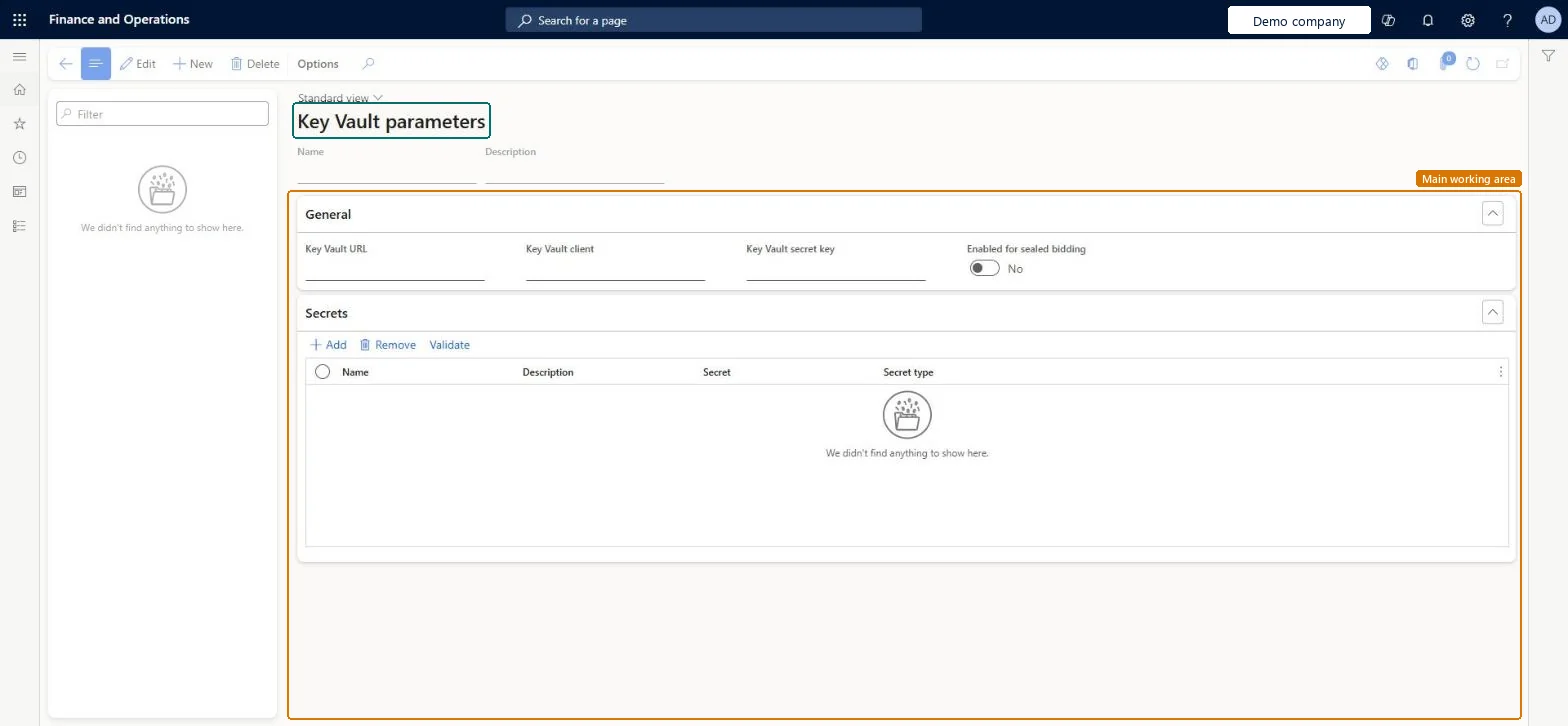
Set up Key Vault parameters
Use this page to refer to certificates and secrets kept in Key Vault instead of using them directly.
Steps from Microsoft
Go to System administration > Setup > Key Vault parameters.
Select New and enter a name and description.
On the General tab, enter the Key Vault URL, Key Vault client and Key Vault secret key.
On the Certificates tab, select Add and enter a name, description and the Key Vault certificate secret reference.
Select Validate to check the reference and the certificate.
A reference to the certificate in the vault, in the form vault:///<SecretName>.Microsoft Learn
Common errors and fixes
Message
What to do
Validate reports that the certificate reference or the certificate isn't valid
Check the Key Vault certificate secret format vault://<KeyVaultName>/<SecretName>/<SecretVersion> (only <SecretName> is required, so vault:///<SecretName> works when the Key Vault URL is set on the record), then check the Key Vault client and secret key of the Microsoft Entra application and select Validate again. Microsoft Learn
Certificates stored in Key Vault aren't used at all
Set Use advanced certificate store to Yes on the General tab of System parameters. With No, the system uses local certificate storage; Key Vault storage is the only option for a production environment in the Azure cloud. Microsoft Learn
Test checklist
Create a Key Vault record with Key Vault URL, Key Vault client and Key Vault secret key.
On the Secrets tab, add a secret in the form vault:///<SecretName>.
Check the app registration has Get and List secret permissions in the key vault access policy.
Select the secret in the consuming setup (for example the tax feature setup) and run a call that uses it.
One Key Vault parameters record per Key Vault storage, with each certificate referenced as vault:///<SecretName>/<SecretVersion> and checked with ValidateLearn asks for a separate record for each Key Vault storage you use. Because certificates are cached, Learn recommends naming the secret version in the reference; without a version the system takes the active certificate with the latest expiration date.
On this system the page opens for Information technology manager. Key Vault storage is used when Use advanced certificate store is Yes on System parameters. No Feature management feature needs to be turned on for this page.
Reversible: Key Vault records and secret references can be edited at any time. A secret reference without a version picks up the active secret with the latest expiration date, so a renewed secret is used without changes here. Microsoft Learn
If you change it later
If no secret version is given, the system uses the active certificate with the latest expiration date, so a renewed certificate is picked up automatically. Microsoft Learn
Technical architect
6Technical
Menu item
KeyVaultParametersChecked in Dynamics 365
Form
KeyVaultParametersChecked in Dynamics 365
Table
KeyVaultParametersShown as “Key Vault parameters” in Record infoChecked in Dynamics 365
Who can open it
PrivilegesMaintain KeyVault parameters KeyVaultParametersMaintainDutiesMaintain system settings SysServerSettingsMaintain1 security roleInformation technology manager SysServerITManagerChecked in Dynamics 365
Roles to set it up and use it
To set it up or change itInformation technology manager SysServerITManagerGive people one of these roles. On this system, 1 role can open this page.Checked in Dynamics 365
Actions on the page
Options: Personalize, Page options, ShareChecked in Dynamics 365
Developer
7Developer
Open it by URL
https://<your-environment>/?mi=KeyVaultParameters
Data migration
Load order: Key Vault parameters has no data entity in Data management, so it can't be loaded from a file or a configuration template. Enter the Key Vault URL, Key Vault client, Key Vault secret key and certificate references by hand in each legal entity that needs them, then select Validate on each certificate.Checked in Dynamics 365