Scale unit administrator, Information technology manager
Business process
Administer system features
Menu item
SysMessageQueueSetup
Main table
SysMessageQueueSetup
Setup steps
1 on this page
Show what matters for
SETUP GUIDEHow to set it up8 sections. Choose a role to highlight what matters to you.
Everyone
1What it is and why
What it is
A setup page where you set, per message queue, how many processor tasks it uses and how long processed and canceled messages are kept.
What you do here
Use this page to set how long processed and canceled messages are kept in each queue before they're deleted.
Example
For example, BEAT keeps processed Warehouse messages for 30 days and canceled ones for 60, with 2 processor tasks; after saving, the Cleanup job for the message processor appears as a daily background process.
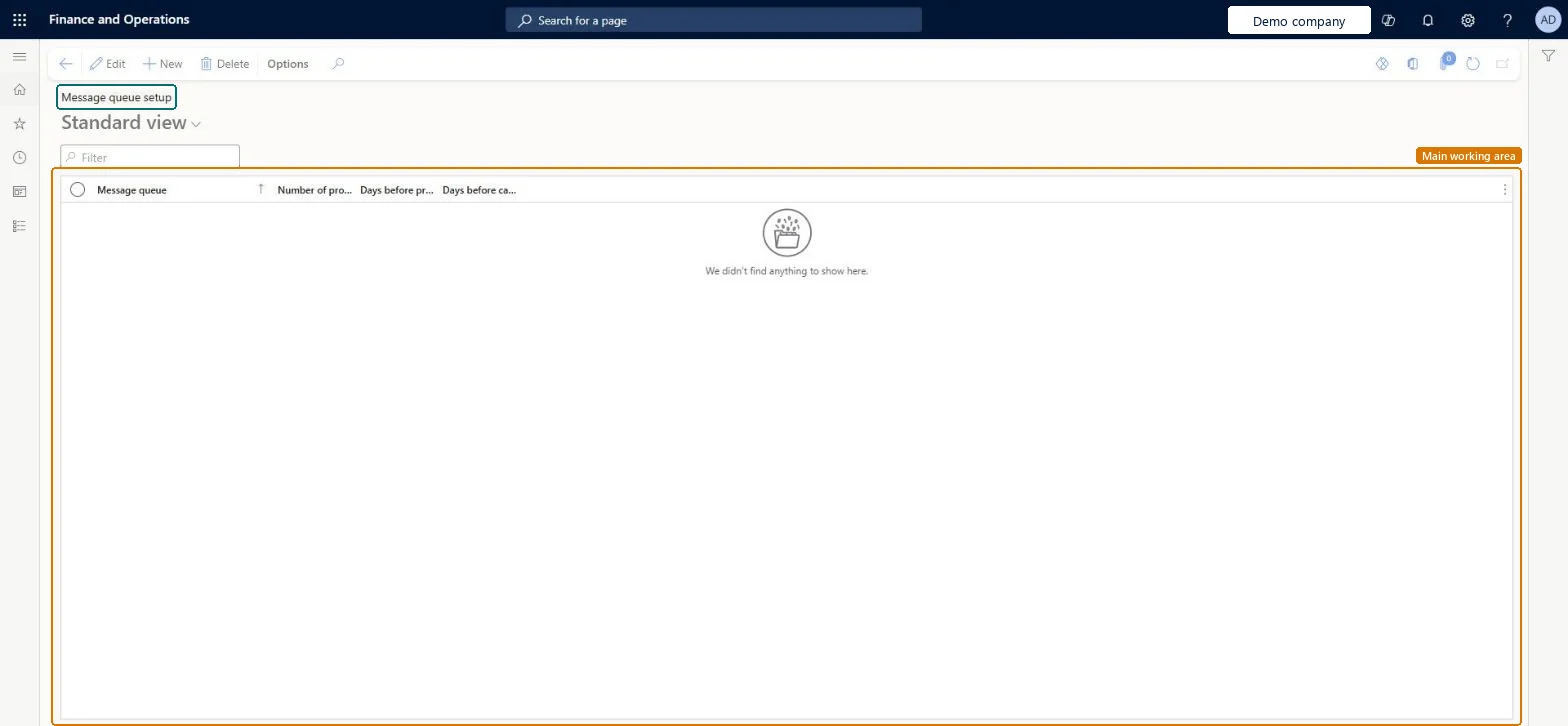
The page in Dynamics 365. page title tab to open what to set or check
About the examples: Examples and screenshots in this guide use BEAT, a demo company in a Dynamics 365 test environment. Use your own company's codes and values instead of copying them.
Setup steps on this page
Set message retention per queue
Decide how long processed and canceled messages are kept.
Steps from Microsoft
Go to System administration > Message processor > Message queue setup.
Select Edit and select a queue, or select Add and choose the queue in the Message queue field.
How many processor tasks work on the queue (maximum 8; the minimum depends on the batch threads, typically 2).Microsoft Learn
2
MessageProcessorsTasks
Days before processed message deletion
Days to keep processed messages; 0 turns cleanup off.Microsoft Learn
30
MessageDaysBeforeProcessedMessageDeletion
Days before canceled message deletion
Days to keep canceled messages; 0 turns cleanup off.Microsoft Learn
60
Common errors and fixes
Message
What to do
Old processed messages are never deleted
Days before processed message deletion is 0, which turns cleanup off, or the Cleanup job for the message processor is paused on Process automations. Microsoft Learn
Test checklist
Add a row for the queue and set Number of processor tasks (maximum 8).
Set Days before processed message deletion and Days before canceled message deletion.
Save, then check after the cleanup period that older processed and canceled messages are gone from Message processor messages.
Check that failed and queued messages are still listed.
Non-zero cleanup days for every queue in use, so the daily cleanup job removes old messagesLearn: 0 turns cleanup off; with at least one queue set, the system creates a daily cleanup background process, and Optimization advisor flags messages older than 30 days.
On this system the page opens for Information technology manager and Scale unit administrator. Message cleanup needs version 10.0.45 or later. No Feature management feature needs to be turned on for this page.
Per message queue: each row sets the processor tasks and cleanup days of one queue; queues you don't configure use a default. Microsoft Learn
Can it be undone
Reversible: Values can be changed; deleted messages can't come back.
If you change it later
Queues you don't configure use a default value that you can override. Microsoft Learn
Technical architect
6Technical
Menu item
SysMessageQueueSetupChecked in Dynamics 365
Form
SysMessageQueueSetupChecked in Dynamics 365
Table
SysMessageQueueSetupChecked in Dynamics 365
Who can open it
PrivilegesCleanup job for the message processor SysMessageCleanupSelfHealingOpportunityTakeActionProcess messages SysMessageProcessDutiesMaintain the runtime of scale units. ScaleUnitRuntimeMaintainSysMessageSelfHealingRuleMaintainMaintain system settings SysServerSettingsMaintain2 security rolesScale unit administrator ScaleUnitRuntimeAdminInformation technology manager SysServerITManagerChecked in Dynamics 365
Roles to set it up and use it
To set it up or change itInformation technology manager SysServerITManagerScale unit administrator ScaleUnitRuntimeAdminGive people one of these roles. On this system, 2 roles can open this page.Checked in Dynamics 365
Actions on the page
Options: Personalize, Page options, ShareChecked in Dynamics 365
Load order: Message queue setup has no data entity in Data management, so it can't be loaded from a file or a configuration template. Enter the few queue rows by hand in each environment.Checked in Dynamics 365