BeyondERP.Newsletter
Menu

Setup step on the Sales tax overrides page · Retail and Commerce

Set up Sales tax overrides

Use this page to create each override with its status, override type, the From and To tax groups and whether it applies by line or by transaction; then add it to a sales tax override group.

Used by
Retail operations manager, Retail service
Business process
Manage sales channels
Menu item
RetailTaxOverrideCode
Main table
RetailSalesTaxOverride
Data entity
RetailSalesTaxOverrideEntity
Setup steps
1 on this page
Show what matters for
SETUP GUIDEHow to set it up8 sections. Choose a role to highlight what matters to you.
Everyone

1What it is and why

What it isA setup page where you define a sales tax override: a rule that replaces one sales tax group or item sales tax group with another, for a line or a whole transaction, so cashiers can change the tax applied at the POS.
What you do hereUse this page to create each override with its status, override type, the From and To tax groups and whether it applies by line or by transaction; then add it to a sales tax override group.
ExampleFor example, an override from the CA tax group to an exempt tax group lets a cashier remove tax for a tax-exempt customer in a store that uses store-based taxes.
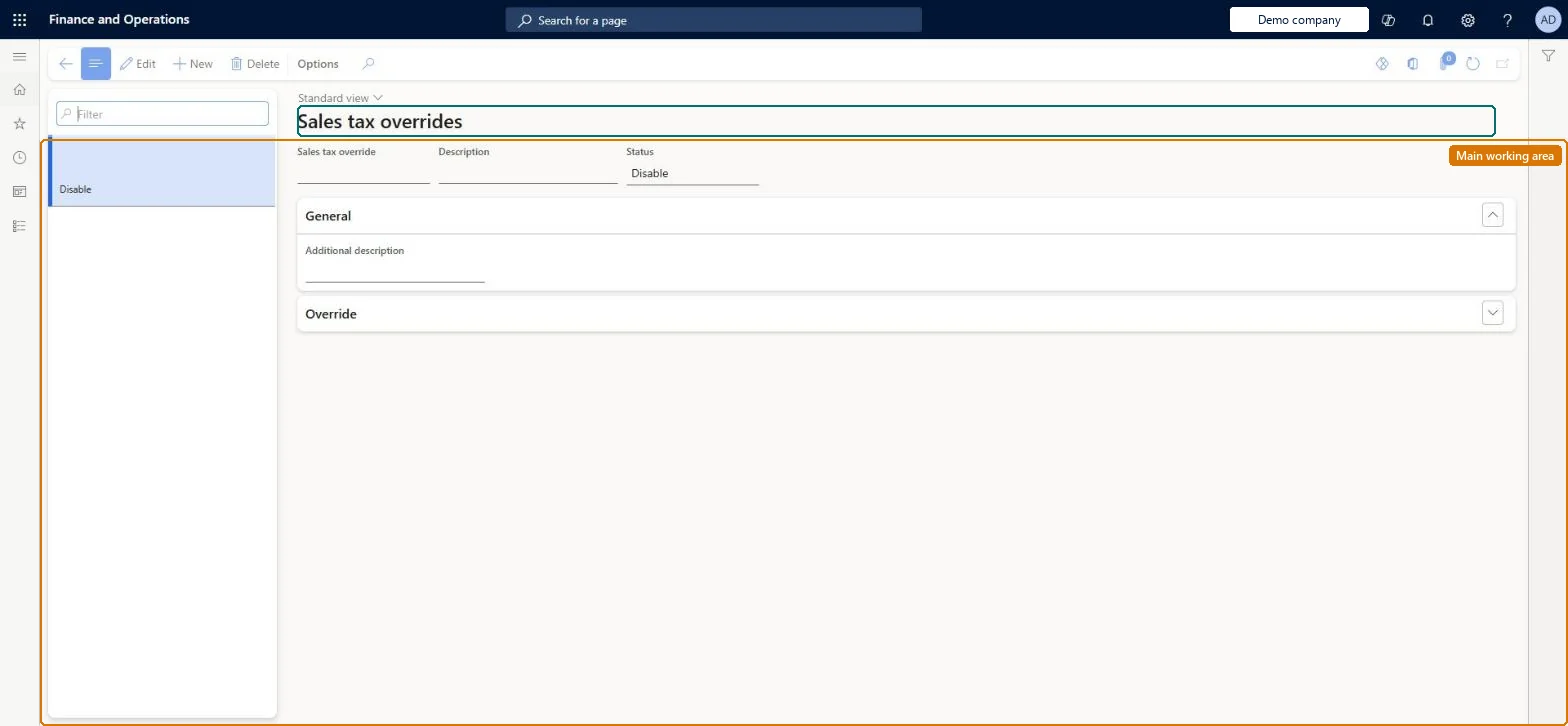
Sales tax overrides page in Dynamics 365
The page in Dynamics 365. page title tab to open what to set or check
Functional consultant · Solution architect

2Where it fits

End user · Functional consultant

3How to do it

About the examples: Examples and screenshots in this guide use BEAT, a demo company in a Dynamics 365 test environment. Use your own company's codes and values instead of copying them.

Setup steps on this page

Set up Sales tax overrides

Use this page to create each override with its status, override type, the From and To tax groups and whether it applies by line or by transaction; then add it to a sales tax override group.

Steps from Microsoft

  1. Go to Retail and Commerce > Channel setup > Sales taxes > Sales tax overrides.
  2. Select New, and enter a name for the sales tax override.
  3. Set the status to Enable.
  4. In the Override type field, select Sales tax group (or Item sales tax group).
  5. In the From and To fields, choose Any tax group or Specified tax group.
  6. Select the From tax group and To tax group.
  7. Select Save, then add the override to a sales tax override group.

Source: Microsoft Learn

Fields on the page

FieldWhat it meansTable column
StatusEnable or Disable; a disabled override is ignored even if its group is applied.Microsoft Learn Status
Override typeWhether a sales tax group or an item sales tax group is overridden.Microsoft Learn
FromWhether the override applies from any tax group or a specified one.Microsoft Learn OverrideFrom
ToWhether the replacement is any tax group or a specified one.Microsoft Learn OverrideTo
From tax groupThe tax group that is replaced at the POS.Microsoft Learn
To tax groupThe tax group used instead.Microsoft Learn
Override byWhether the override applies to specific lines or the whole transaction.Microsoft Learn OverrideBy

Test checklist

  1. Create an override with Status Enable, Override type Sales tax group, From Any tax group, To the exempt group.
  2. Add it to the Default override group and run job 9999.
  3. Relaunch POS, add an item, apply Override transaction tax and check tax is 0.
  4. Check the posted statement shows the exempt tax group on the line.

Source: Microsoft Learn

Functional consultant

4Setup decisions

Setup stepRecommended value and whyDecision, common mistake and test
Set up Sales tax overridesStatus Enable, Override type Sales tax group, From Any tax group to a specified exempt sales tax group, for tax-exempt sales at the storeLearn describes this pattern for store-based tax exemption: the override swaps the store tax group for a group whose tax code is marked Exempt. With Calculate price inclusive tax exempt on, prices are reduced in tax-inclusive stores.How should tax-exempt customers be handled at the store?Creating the override but not adding it to a sales tax override group, or pointing To tax group at a group whose tax code isn't marked Exempt, so the override does nothing useful at POS.Test: Tax-exempt override in a tax-inclusive store

Feature management and licence

Feature to turn onEnable tax exemption for the 'price includes sales tax' scenario (Optional)

Microsoft Learn

Solution architect

5Design impact

Can it be undoneReversible: Overrides can be disabled or edited; completed transactions are not recalculated.
If you change it laterOverrides reach the POS only after the channel database is synchronised; cached tax details may require restarting the POS. Microsoft Learn
Technical architect

6Technical

Menu itemRetailTaxOverrideCode Checked in Dynamics 365
FormRetailTaxOverrideCode Checked in Dynamics 365
TableRetailSalesTaxOverrideShown as “SALES TAX OVERRIDES” in Record infoChecked in Dynamics 365
Data entitiesRetailSalesTaxOverrideEntitySales tax overrides Microsoft data model
Who can open itPrivilegesMaintain retail tax overrides RetailTaxOverridesMaintainDutiesMaintain retail tax reference data RetailTaxReferenceDataMaintain
2 security rolesRetail operations manager RetailOperationsManagerRetail service RetailService
Checked in Dynamics 365
Roles to set it up and use itTo set it up or change itRetail service RetailServiceRetail operations manager RetailOperationsManagerGive people one of these roles. On this system, 2 roles can open this page.Checked in Dynamics 365
Developer

7Developer

Open it by URLhttps://<your-environment>/?mi=RetailTaxOverrideCode
Integrate withRetailSalesTaxOverrideEntity data entity Microsoft data model
Data migrationRetailSalesTaxOverrideEntity (Sales tax overrides): loaded for each company.Microsoft Learn
Table definitionRetailSalesTaxOverride columns and relations Microsoft data model
Everyone

8Sources

To cite this step: RC-TAX-020, Set up Sales tax overrides. Beyond ERP Atlas Hub, 2026-11-11. https://www.beyonderp.cloud/atlas/step/RC-TAX-020