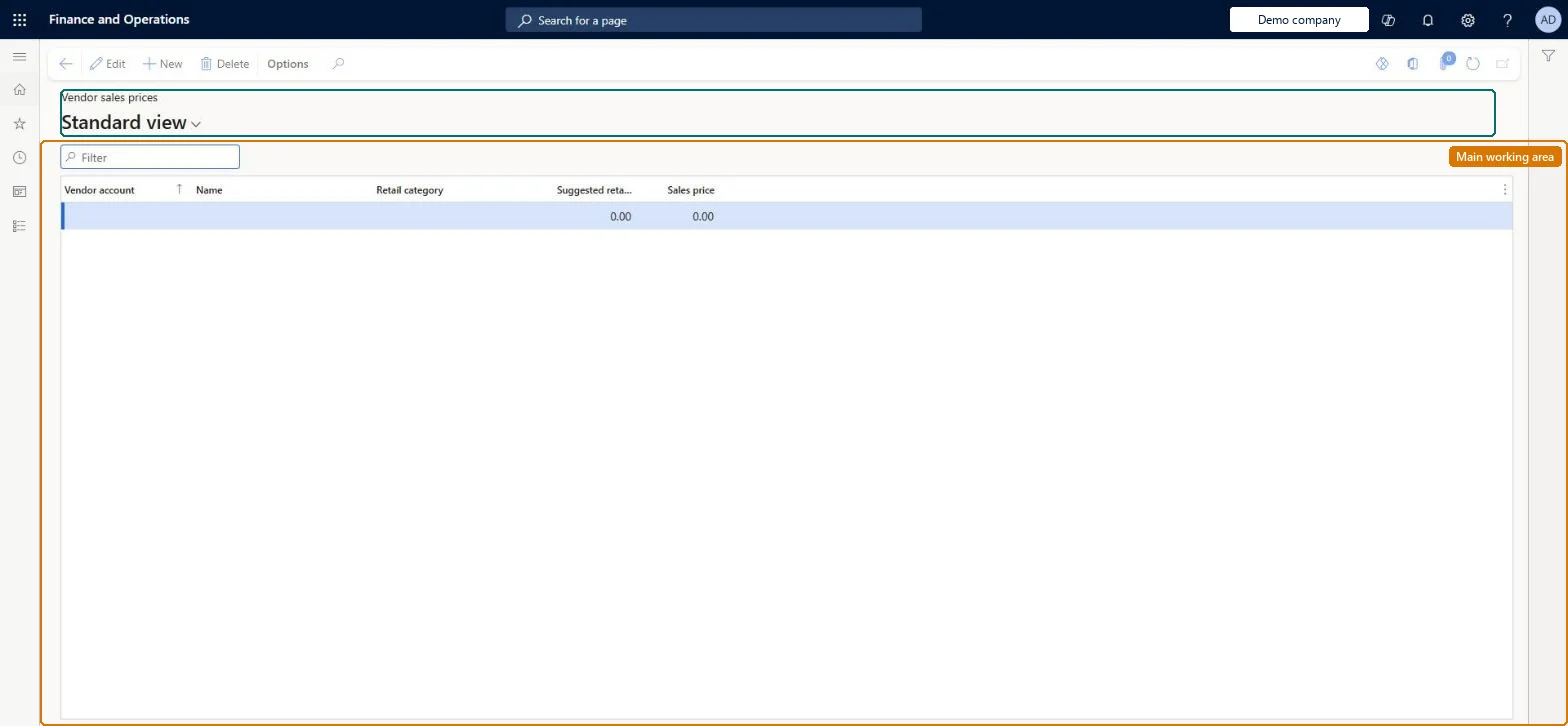
Setup step on the Vendor sales price point setup page · Retail and Commerce
Set up Vendor sales price point setup
Use this page to create sales price points for a vendor so that, when vendor products are imported, a suggested retail price is converted to a fixed local sales price.
Retail and CommerceProducts and categoriesVendor catalog import
RetailVendorSalesPricePointSetup
Used by
Retail merchandising manager, Retail service
Business process
Manage sales channels
Menu item
RetailVendorSalesPricePointSetup
Main table
RetailVendorSalesPricePointSetup
Data entity
RetailVendorSalesPricePointSetupEntity
Setup steps
1 on this page
Show what matters for
SETUP GUIDEHow to set it up7 sections. Choose a role to highlight what matters to you.
Everyone
1What it is and why
What it is
A setup page that holds, per vendor and retail category, price points that map a vendor's suggested retail price to the sales price you charge in local currency.
What you do here
Use this page to create sales price points for a vendor so that, when vendor products are imported, a suggested retail price is converted to a fixed local sales price.
Example
For example, set a price point so that every product the vendor suggests at a given retail price is sold at your chosen local price.
The page in Dynamics 365. page title tab to open what to set or check
About the examples: Examples and screenshots in this guide use BEAT, a demo company in a Dynamics 365 test environment. Use your own company's codes and values instead of copying them.
Setup steps on this page
Set up Vendor sales price point setup
Use this page to create sales price points for a vendor so that, when vendor products are imported, a suggested retail price is converted to a fixed local sales price.
Steps from Microsoft
Go to Retail and Commerce > Products and categories > Vendor catalog import > Vendor sales price point setup.
Select New and select the Vendor account to set up a price point for.
Select the Retail category the vendor's products are assigned to.
In the Suggested retail price field, enter the vendor's suggested retail price factor.
In the Sales price field, enter the price at which the product is sold.
The product category the vendor's products are assigned to.Microsoft Learn
Name
Suggested retail price
The vendor's suggested retail price value that the price point matches.Microsoft Learn
suggestedRetailPrice
Sales price
The local sales price assigned to products at that suggested retail price.Microsoft Learn
SalesPrice
Solution architect
4Design impact
If you change it later
Price points take precedence over the vendor's sales price margin, so adding or changing a price point changes which sales price imported products in that category receive. Microsoft Learn
Technical architect
5Technical
Menu item
RetailVendorSalesPricePointSetupChecked in Dynamics 365
Form
RetailVendorSalesPricePointSetupChecked in Dynamics 365
Table
RetailVendorSalesPricePointSetupShown as “VENDOR SALES PRICE POINT SETUP” in Record infoChecked in Dynamics 365
Data entities
RetailVendorSalesPricePointSetupEntityVendor sales price point setup Checked in Dynamics 365
Who can open it
PrivilegesMaintain retail pricing RetailPricingMaintainDutiesMaintain retail product pricing RetailProductPricingMaintain2 security rolesRetail merchandising manager RetailMerchandisingManagerRetail service RetailServiceChecked in Dynamics 365
Roles to set it up and use it
To set it up or change itRetail service RetailServiceRetail merchandising manager RetailMerchandisingManagerGive people one of these roles. On this system, 2 roles can open this page.Checked in Dynamics 365
Checked in a working Dynamics 365 system, version 10.0.49: the menu item, form, table and security, the page.
To cite this step: RC-VENDCAT-020, Set up Vendor sales price point setup. Beyond ERP Atlas Hub, 2026-11-11. https://www.beyonderp.cloud/atlas/step/RC-VENDCAT-020