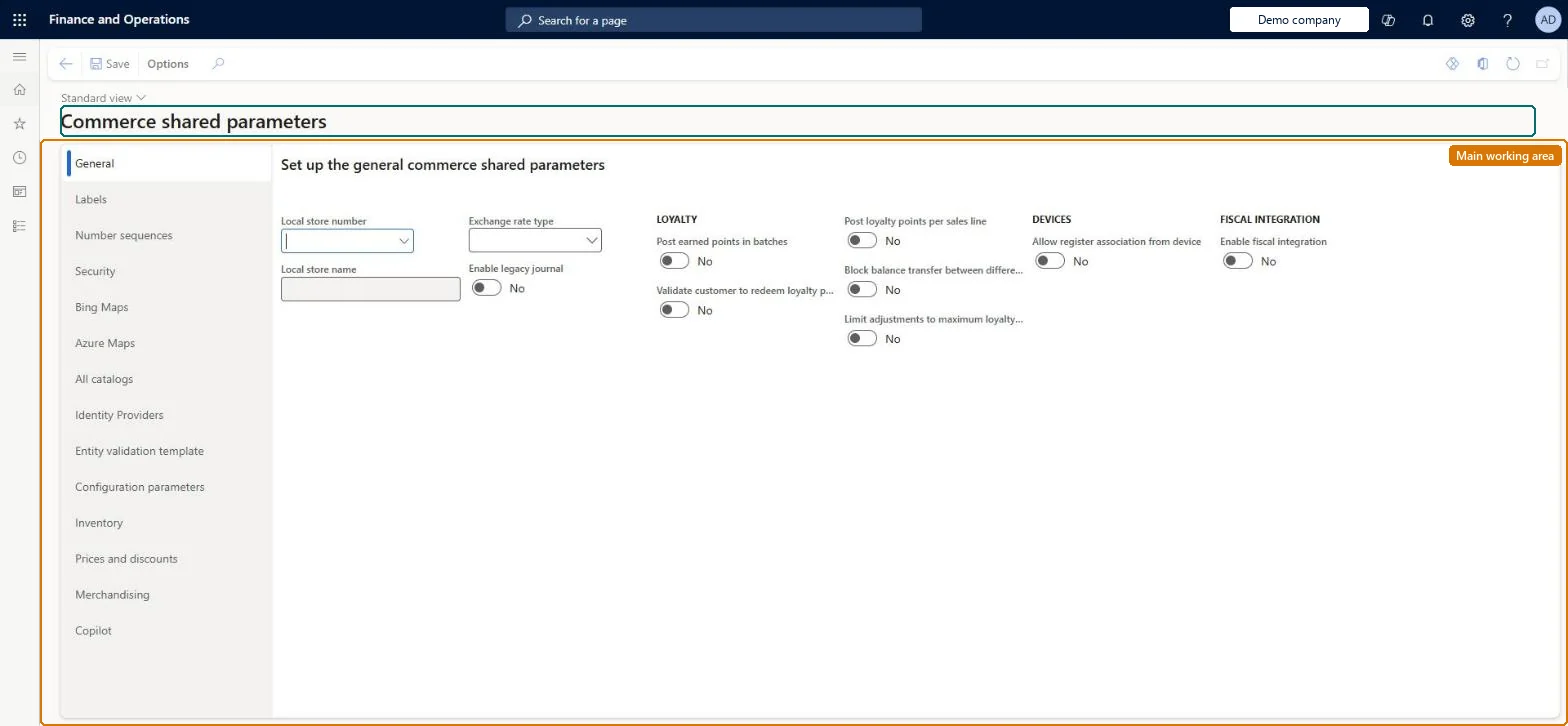
Setup step on the Commerce shared parameters page · Retail and Commerce
Set up Commerce shared parameters
Use this page to register the identity providers and relying parties that may call Retail Server, set security settings such as the Real-time Service profile and password algorithms, enable Azure Maps, and enter configuration keys that switch optional CDX and notification behaviour on or off.
Retail operations manager, Retail store IT, Retail store manager
Business process
Manage sales channels
Menu item
RetailSharedParameters
Main table
RetailSharedParameters
Data entity
RetailSharedParameterEntity
Setup steps
1 on this page
Show what matters for
SETUP GUIDEHow to set it up8 sections. Choose a role to highlight what matters to you.
Everyone
1What it is and why
What it is
A setup page holding Commerce settings that are shared across all legal entities, with tabs such as Identity providers, Security, Azure Maps and Configuration parameters where feature keys and their values are entered.
What you do here
Use this page to register the identity providers and relying parties that may call Retail Server, set security settings such as the Real-time Service profile and password algorithms, enable Azure Maps, and enter configuration keys that switch optional CDX and notification behaviour on or off.
Example
For example, to delay the creation of download sessions until a device is activated you add the key CDX_ENABLE_DELAYED_OFFLINE_DOWNLOAD_SESSION_CREATION with the value 1 under Configuration parameters.
The page in Dynamics 365. page title tab to open what to set or check
About the examples: Examples and screenshots in this guide use BEAT, a demo company in a Dynamics 365 test environment. Use your own company's codes and values instead of copying them.
Setup steps on this page
Set up Commerce shared parameters
Use this page to register the identity providers and relying parties that may call Retail Server, set security settings such as the Real-time Service profile and password algorithms, enable Azure Maps, and enter configuration keys that switch optional CDX and notification behaviour on or off.
Steps from Microsoft
Go to Retail and Commerce > Headquarters setup > Parameters > Commerce shared parameters.
On the left pane, select Configuration parameters.
Enter the key in the Name field.
Enter the setting in the Value field.
Select Save, then run distribution schedule job 1110 so the channel database receives the change.
In Configuration parameters set CDX_ENABLE_ROLLBACK_ON_FAILURE = 0, and add CDX_ENABLE_UPDATE_STATISTICS_FOR_REQUIRED_TABLE = 1 when Optimize database statistics automatically is usedLearn says not to use the roll back on failure key because of a known issue and to change it from its default 1 to 0, and to add the statistics flag when statistics optimisation is on.
Changing identity providers, relying parties or server resource IDs and not running job 1110, so channels keep the old settings.
Number sequences
Reference
Shared or per company
Note
Customer hierarchy ID
Shared
BEAT uses number sequence Cust_1. Checked in Dynamics 365
Store number
Shared
BEAT uses number sequence Comm_80. Checked in Dynamics 365
Register number
Shared
BEAT uses number sequence Comm_81. Checked in Dynamics 365
Discount code
Shared
BEAT uses number sequence Comm_82. Checked in Dynamics 365
Assortment ID
Shared
BEAT uses number sequence Comm_83. Checked in Dynamics 365
Configuration
Shared
BEAT uses number sequence Comm_84. Checked in Dynamics 365
Card number
Shared
BEAT uses number sequence Comm_85. Checked in Dynamics 365
Kit assembly order name
Shared
BEAT uses number sequence Comm_86. Checked in Dynamics 365
Loyalty adjustment ID
Shared
BEAT uses number sequence Comm_87. Checked in Dynamics 365
Retail Channel Id
Shared
BEAT uses number sequence ATLAS-CHN. Checked in Dynamics 365
Catalog number
Shared
BEAT uses number sequence Comm_88. Checked in Dynamics 365
Device ID
Shared
BEAT uses number sequence Comm_89. Checked in Dynamics 365
Fiscal technical profile number
Shared
BEAT uses number sequence Comm_90. Checked in Dynamics 365
Registration process number
Shared
BEAT uses number sequence Comm_91. Checked in Dynamics 365
Fiscal connector group number
Shared
BEAT uses number sequence Comm_92. Checked in Dynamics 365
Other loyalty activity type ID
Shared
BEAT uses number sequence Comm_93. Checked in Dynamics 365
Loyalty non-transaction ID
Shared
BEAT uses number sequence Comm_94. Checked in Dynamics 365
Safes
Shared
BEAT uses number sequence Comm_95. Checked in Dynamics 365
Retail document operation identifier
Shared
BEAT uses number sequence Comm_96. Checked in Dynamics 365
Number sequence for validation Id
Shared
BEAT uses number sequence Comm_97. Checked in Dynamics 365
Solution architect
5Design impact
Can it be undone
Reversible: Values can be changed; channel-side settings change after job 1110 runs.
If you change it later
Switching off Azure Maps here makes the feature unavailable across Commerce, and changes on this page only reach channels after job 1110 is run. Microsoft Learn
Technical architect
6Technical
Menu item
RetailSharedParametersChecked in Dynamics 365
Form
RetailSharedParametersChecked in Dynamics 365
Table
RetailSharedParametersShown as “COMMERCE SHARED PARAMETERS” in Record infoChecked in Dynamics 365
Data entities
RetailSharedParameterEntityCommerce shared parameters Checked in Dynamics 365RetailSharedAzureMapsParameterEntityRetail shared Azure Maps parameters Checked in Dynamics 365RetailSharedBingParameterEntityRetail shared Bing Maps parameters Checked in Dynamics 365RetailSharedFacebookParameterEntityRetail shared Facebook application parameters Checked in Dynamics 365RetailSharedTwitterParameterEntityRetail shared Twitter application parameters Checked in Dynamics 365
Who can open it
PrivilegesMaintain retail shared parameters RetailSharedParametersMaintainDutiesMaintain retail parameters RetailParametersMaintain3 security rolesRetail operations manager RetailOperationsManagerRetail store IT RetailStoreITRetail store manager RetailStoreManagerChecked in Dynamics 365
Roles to set it up and use it
To set it up or change itRetail operations manager RetailOperationsManagerRetail store manager RetailStoreManagerRetail store IT RetailStoreITGive people one of these roles. On this system, 3 roles can open this page.Checked in Dynamics 365
Checked in a working Dynamics 365 system, version 10.0.49: the menu item, form, table and security, the page.
To cite this step: RC-PARAM-030, Set up Commerce shared parameters. Beyond ERP Atlas Hub, 2026-11-11. https://www.beyonderp.cloud/atlas/step/RC-PARAM-030