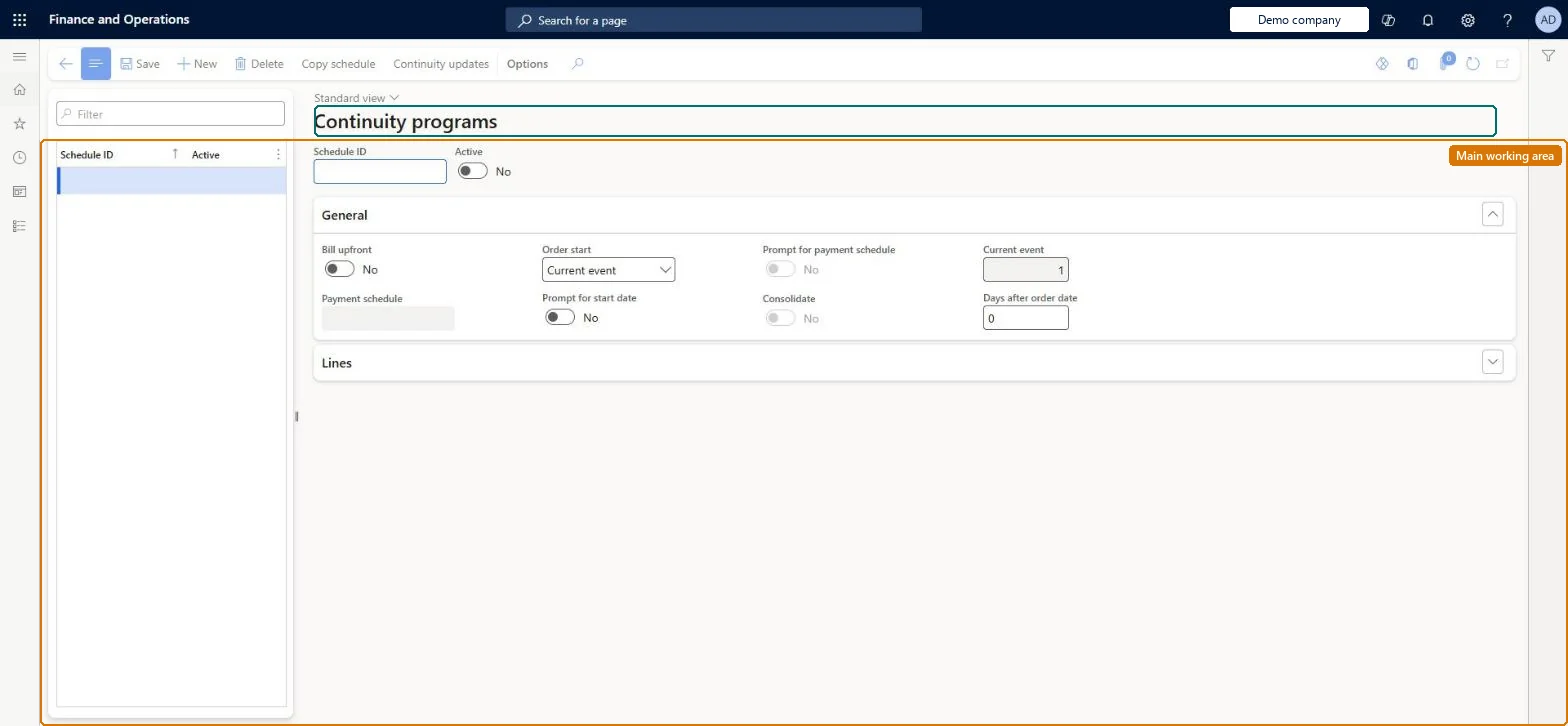
Setup step on the Continuity programs page · Retail and Commerce
Set up Continuity programs
Use this page to create and maintain each continuity program, including the payment schedule, timing of shipments, whether billing is up front, and the list of event products with their intervals. The program is then linked to a parent released product that call center agents sell.
SETUP GUIDEHow to set it up8 sections. Choose a role to highlight what matters to you.
Everyone
1What it is and why
What it is
A setup page where you define continuity (recurring order) programs: a schedule ID, order start rule, and the sequence of events, each tied to a product, that are shipped to customers on a predefined schedule.
What you do here
Use this page to create and maintain each continuity program, including the payment schedule, timing of shipments, whether billing is up front, and the list of event products with their intervals. The program is then linked to a parent released product that call center agents sell.
Example
For example, set up a book-of-the-month club where event 1 ships product 0013 on the start date, event 2 ships 0014 thirty days later, and event 3 ends the program.
The page in Dynamics 365. page title tab to open what to set or check
About the examples: Examples and screenshots in this guide use BEAT, a demo company in a Dynamics 365 test environment. Use your own company's codes and values instead of copying them.
Setup steps on this page
Set up Continuity programs
Use this page to create and maintain each continuity program, including the payment schedule, timing of shipments, whether billing is up front, and the list of event products with their intervals. The program is then linked to a parent released product that call center agents sell.
Steps from Microsoft
Go to Retail and Commerce > Continuity > Continuity programs.
Select New and enter the Schedule ID.
In Order start, choose First event or Current event, and set whether to prompt for the order start date.
Select Add line and enter the Item number and availability date for the first event.
Add further lines; clear Date interval code and enter the number of days between shipments where needed.
On the last event, set the action to End.
Select Save.
On the parent released product, Sell section, enter this Schedule ID.
One continuity program per recurring offer, with one event line per product and a day interval between events, linked to one parent released product on its Sell FastTabThe call center applies continuity logic only when it sells the released product that carries the program's Schedule ID, so the program and its parent product must be set up as a pair.
If you change a program that already has orders, the parent sales orders are not updated until you run the continuity update, which synchronizes the program changes to the continuity parent sales orders. Microsoft Learn
Technical architect
6Technical
Menu item
MCRContinuityScheduleChecked in Dynamics 365
Form
MCRContinuityScheduleChecked in Dynamics 365
Roles to set it up and use it
To set it up or change itSales manager TradeSalesManagerGive people one of these roles. On this system, 1 role can open this page.Checked in Dynamics 365
Actions on the page
(Action Pane without tabs): Copy schedule, Continuity updatesChecked in Dynamics 365