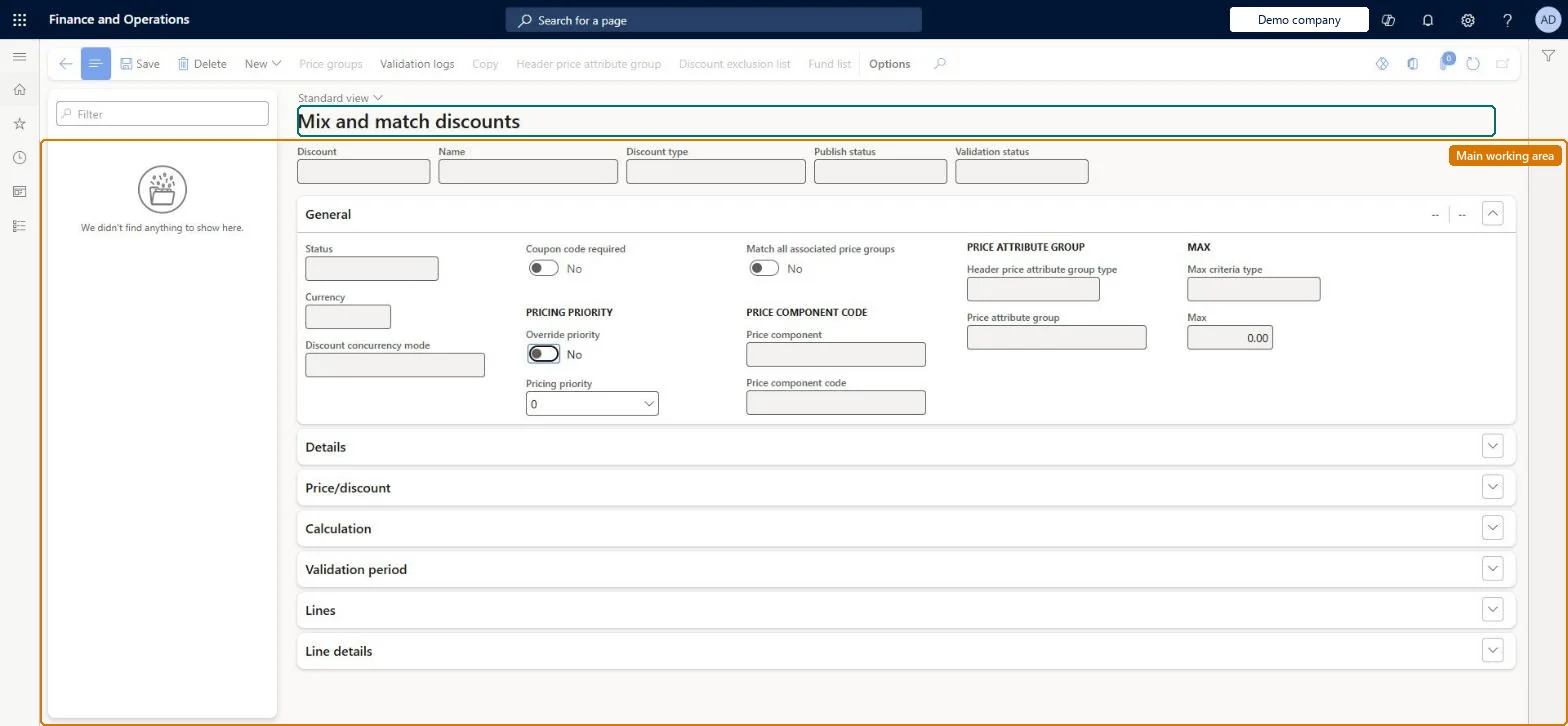
Setup step on the Mix and match discounts page · Pricing management
Set up Mix and match discounts
Use this page to set up discounts that customers get when they buy a specific combination of products, using line groups to set how many products are needed from each group.
Retail merchandising manager, Retail operations manager, Retail service and 3 more roles
Business process
Set product prices
Menu item
GUPDiscountMixAndMatch
Main table
RetailPeriodicDiscount
Data entity
RetailDiscountEntity
Setup steps
1 on this page
Show what matters for
SETUP GUIDEHow to set it up8 sections. Choose a role to highlight what matters to you.
Everyone
1What it is and why
What it is
A page where you view, edit and create mix-and-match discounts only.
What you do here
Use this page to set up discounts that customers get when they buy a specific combination of products, using line groups to set how many products are needed from each group.
Example
For example, a customer who buys 10 or more items of brand A gets 5 percent off items from package group B.
The page in Dynamics 365. page title tab to open what to set or check
About the examples: Examples and screenshots in this guide use BEAT, a demo company in a Dynamics 365 test environment. Use your own company's codes and values instead of copying them.
Setup steps on this page
Set up Mix and match discounts
Use this page to set up discounts that customers get when they buy a specific combination of products, using line groups to set how many products are needed from each group.
Steps from Microsoft
Go to Pricing management > During-sales pricing > Discounts > Mix and match discounts.
Select New on the Action Pane, and enter an identifier in the Discount field and a Name.
On the General FastTab, select the Currency, the Price component code and the Discount concurrency mode.
On the Price/discount FastTab, select the Calculation type and enter the discount terms.
On the Action Pane, select Mix and match line groups to choose the line groups for this discount.
On the Lines FastTab, add a line for each item or collection of items and assign a Line group to each.
On the Validation period FastTab, set the Effective date and Expiration date, and then set Status to Enabled.
The calculation the rule uses: deal price, percentage off, amount off, least expensive or line spec.Microsoft Learn
Percentage off
The default discount percentage for new lines on the Lines FastTab.Microsoft Learn
DiscountPercentValue
Quantity limit
The maximum order quantity that the discount applies to, for all lines.Microsoft Learn
Number of least expensive lines
For the least expensive calculation, how many of the cheapest items get the discount.Microsoft Learn
NoOfLeastExpensiveLines
Count non-discountable products
When set to Yes, items that can't be discounted still count toward the required quantity.Microsoft Learn
MixAndMatchCountNonDiscountItems
Line group
The line group that a line belongs to, which sets the number of products needed.Microsoft Learn
lineGroup
Test checklist
Create line groups A and B on Mix and match line group setup.
Create a mix-and-match discount with Calculation type Line spec: line 1 for the qualifying items in group A at 0%, line 2 for the reward item in group B at 10%.
Enable the discount.
Create a sales order with one item from each line and check 10% off the reward item.
Remove the qualifying item and check that the discount no longer applies.
Set up line groups first, then assign a line group to every line of the mix-and-match ruleYou must set up line groups and add them to the rule before you can select a Line group on the Lines FastTab; the Number of products needed comes from the line group.
For Least expensive, the number of least-expensive products must be more than one and less than the number of products needed. For Line spec, Calculation type and Discount must be the same on all lines of a line group. Discount claims are not available for mix-and-match discounts.
Number sequences
Reference
Shared or per company
Note
Discount
Per company
New records on this page take their Discount from the RetailOfferIdEx3 reference; BEAT uses number sequence Comm_79. Checked in Dynamics 365
Solution architect
5Design impact
Can it be undone
Reversible: Disable the discount to change it; the change affects orders priced afterwards.
If you change it later
A rule is read-only while it is enabled, so you must disable it before you change it. Microsoft Learn
Technical architect
6Technical
Menu item
GUPDiscountMixAndMatchChecked in Dynamics 365
Form
RetailPeriodicDiscountChecked in Dynamics 365
Table
RetailPeriodicDiscountShown as “PERIODIC DISCOUNT” in Record infoKey field: OfferIdChecked in Dynamics 365
PrivilegesMaintain pricing service sales discount records GUPDiscountRecordMaintainView pricing service discount agreements and records GUPDiscountRecordViewDutiesInquiries into pricing service discount agreements and records GUPDiscountInquiryMaintain pricing service sales discount records GUPDiscountMaintainMaintain pricing service sales discount records GUPDiscountRecordMaintainMaintain coupons MCRCouponMaintainMaintain retail coupons RetailCouponsMaintainMaintain retail campaign discounts RetailDiscountOfferMaintainMaintain retail campaign discounts RetailDiscountOfferView7 security rolesMCRTestUserRoleRetail merchandising manager RetailMerchandisingManagerRetail operations manager RetailOperationsManagerRetail service RetailServiceRetail store manager RetailStoreManagerSales clerk TradeSalesClerkSales manager TradeSalesManagerChecked in Dynamics 365
Roles to set it up and use it
To set it up or change itRetail service RetailServiceSales manager TradeSalesManagerRetail merchandising manager RetailMerchandisingManagerTo use itSales clerk TradeSalesClerkRetail operations manager RetailOperationsManagerRetail store manager RetailStoreManagerGive people one of these roles. On this system, 6 roles can open this page.Checked in Dynamics 365
Actions on the page
(Action Pane without tabs): New, Price groups, Validation logs, Copy, Header price attribute group, Discount exclusion list, Fund listChecked in Dynamics 365