Setup step on the Price trees page · Pricing management
Set up Price trees
Use this page to set the pricing sequence, compounding, posting and concurrency options for each price component code in a structure, and, with multiple trees, to say which order attribute value selects each tree and to enable it.
Auditor, Chief financial officer, Accounts receivable manager and 13 more roles
Business process
Set product prices
Menu item
GUPPricingTree
Main table
GUPPricingTree
Data entity
GUPPricingTreeEntity
Setup steps
1 on this page
Show what matters for
SETUP GUIDEHow to set it up8 sections. Choose a role to highlight what matters to you.
Everyone
1What it is and why
What it is
A setup page where you build price structures (price trees) by listing price component codes in calculation order.
What you do here
Use this page to set the pricing sequence, compounding, posting and concurrency options for each price component code in a structure, and, with multiple trees, to say which order attribute value selects each tree and to enable it.
Example
For example, a company with several price trees lets an order attribute decide which tree prices each sales order.
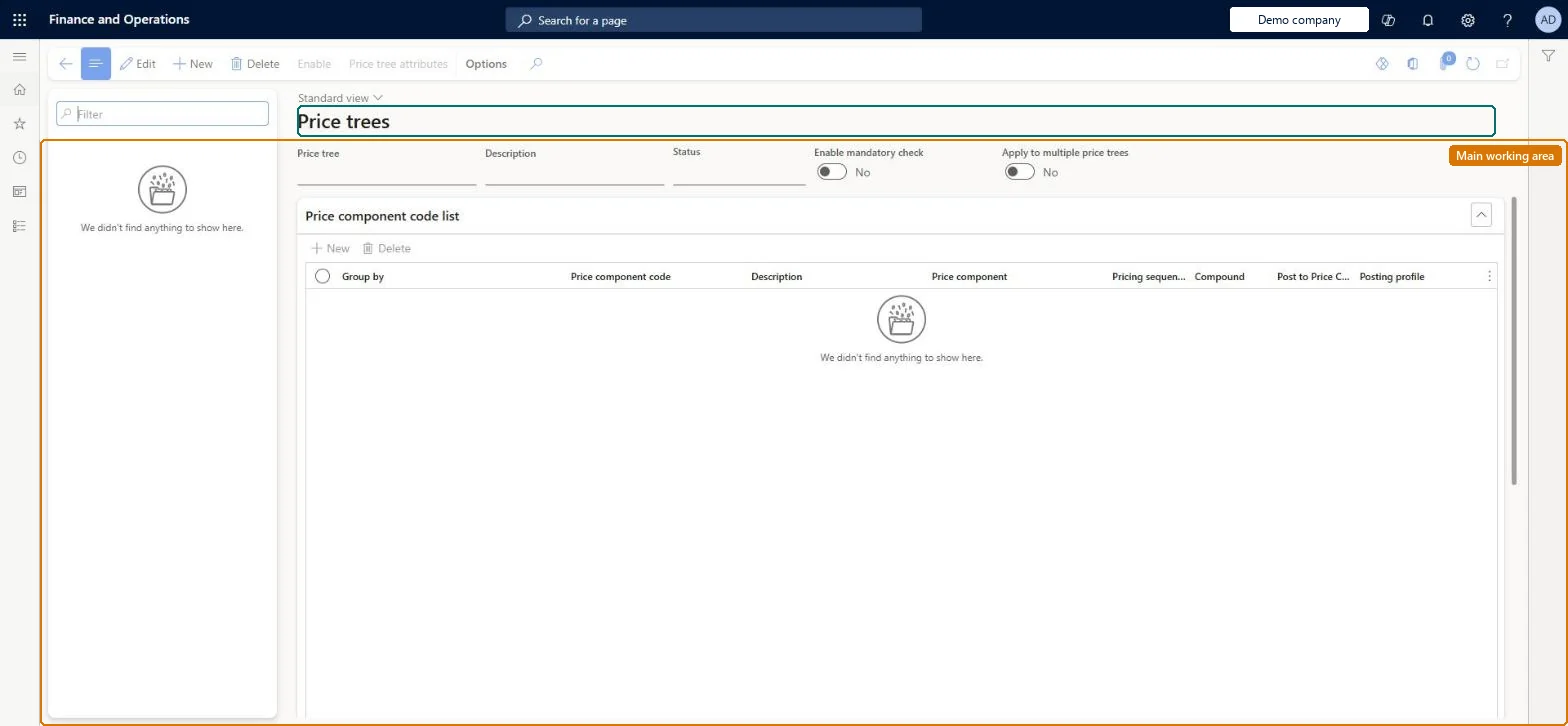
The page in Dynamics 365. page title tab to open what to set or check
About the examples: Examples and screenshots in this guide use BEAT, a demo company in a Dynamics 365 test environment. Use your own company's codes and values instead of copying them.
Setup steps on this page
Set up Price trees
Use this page to set the pricing sequence, compounding, posting and concurrency options for each price component code in a structure, and, with multiple trees, to say which order attribute value selects each tree and to enable it.
Steps from Microsoft
Go to Pricing management > Setup > Price component codes > Price trees.
Select New.
Enter the Price tree name and Description, and set Enable mandatory check if needed.
On the Price component code list FastTab, add each price component code and set its Pricing sequence and other options.
Select Save.
Select Price tree attribute to set the attribute value that selects this tree.
Pricing sequence in steps of 10 (10, 20, 30, 40) with the base price firstLearn recommends leaving gaps between sequence numbers so new price components can be inserted later. The calculation runs from the lowest to the highest number.
Reversible: Only Enabled trees affect calculations; disable, change and enable again. The Price component code on an existing line can't be edited, so remove the line and add a new one.
If you change it later
Changing the pricing sequence can change the final unit price, especially with percentage calculations and compounding. Microsoft Learn
Technical architect
6Technical
Menu item
GUPPricingTreeChecked in Dynamics 365
Form
GUPPricingTreeChecked in Dynamics 365
Table
GUPPricingTreeShown as “PRICE TREE” in Record infoKey field: NameChecked in Dynamics 365
Data entities
GUPPricingTreeEntityPrice tree Checked in Dynamics 365GUPPriceComponentCodeSetupEntityPrice component code setup Checked in Dynamics 365
Who can open it
PrivilegesView price component code setup master GUPComponentCodeSetupViewMaintain pricing service multiple pricing trees GUPPricingTreeSetupMaintainMaintain price component for sales posting GUPSalesPostingPriceComponentMaintainView price component for sales posting GUPSalesPostingPriceComponentViewDutiesInquire into general ledger policies GUPGeneralLedgerPolicyInquiryEnable general ledger process GUPGeneralLedgerProcessMaintainInquiries into policies governing pricing setting process GUPMasterDataInquiryEnable pricing setting process GUPMasterDataMaintainMaintain pricing service multiple pricing trees GUPPricingTreeSetupMaintainInquiries into price component for sales posting GUPSalesPostingPriceComponentInquiryMaintain price component for sales posting GUPSalesPostingPriceComponentMaintain17 security rolesAuditor AuditPolicyManagerChief financial officer CompanyChiefFinancialOfficerAccounts receivable manager CustInvoiceAccountsReceivableManagerInventory accountant InventCostAccountantInventory accountant clerk InventCostCostClerkAccountant LedgerAccountantAccounting manager LedgerAccountingManagerAccounting supervisor LedgerAccountingSupervisorFinancial controller LedgerFinancialControllerMCRTestUserRoleRetail merchandising manager RetailMerchandisingManagerRetail operations manager RetailOperationsManagerRetail service RetailServiceRetail store IT RetailStoreITPurchasing manager TradePurchasingManagerSales clerk TradeSalesClerkSales manager TradeSalesManagerChecked in Dynamics 365
Roles to set it up and use it
To set it up or change itRetail service RetailServiceSales manager TradeSalesManagerRetail merchandising manager RetailMerchandisingManagerPurchasing manager TradePurchasingManagerRetail store IT RetailStoreITTo use itSales clerk TradeSalesClerkAccounts receivable manager CustInvoiceAccountsReceivableManagerAccountant LedgerAccountantInventory accountant InventCostAccountantInventory accountant clerk InventCostCostClerkGive people one of these roles. On this system, 16 roles can open this page.Checked in Dynamics 365
Actions on the page
(Action Pane without tabs): Enable, Price tree attributesChecked in Dynamics 365
Developer
7Developer
Open it by URL
https://<your-environment>/?mi=GUPPricingTree
Integrate with
GUPPricingTreeEntity data entity Checked in Dynamics 365