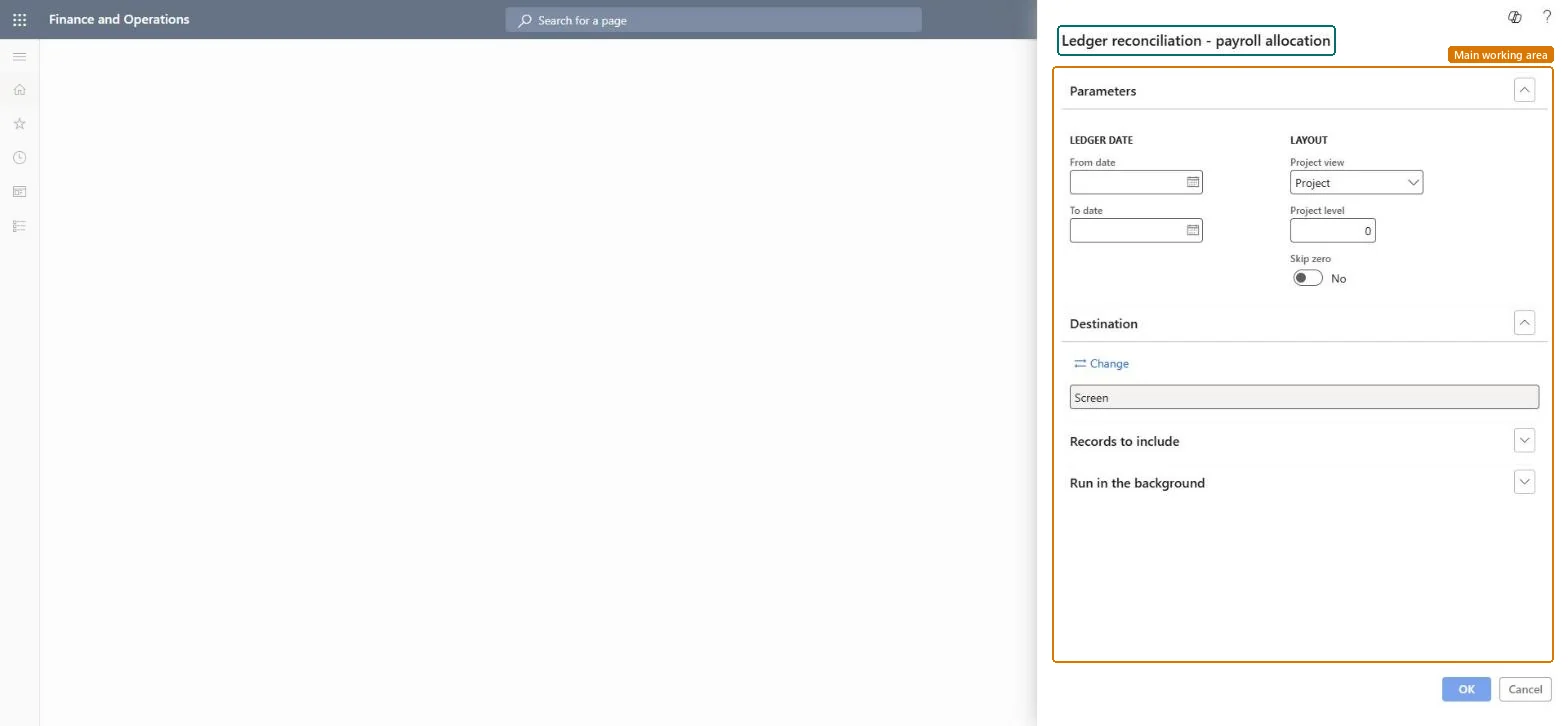
Set the ledger dates and layout for Ledger reconciliation - payroll allocation
Project management and accountingInquiries and reportsGeneral ledger reconciliation reports
output:ProjListLedgerReconPayroll
Business process
Manage project financials
Menu item
output:ProjListLedgerReconPayroll
Setup steps
1 on this page
Show what matters for
SETUP GUIDEHow to set it up8 sections. Choose a role to highlight what matters to you.
Everyone
1What it is and why
What it is
A report that compares, per project, the hour cost posted from projects against the payroll allocation account with the balance of that account in the general ledger, for a ledger date range.
What you do here
Use it at period close to prove that the payroll allocation account holds only project hour postings and to find differences.
Example
BEAT closes October 2026: the project side shows 61,240.00 of payroll allocation and the general ledger account 61,240.00 as well, except 450.00 on PRJ-0061 that a general journal posted directly to the account.
The page in Dynamics 365. page title tab to open what to set or check
About the examples: Examples and screenshots in this guide use BEAT, a demo company in a Dynamics 365 test environment. Use your own company's codes and values instead of copying them.
When to run it
When to run it
At period close, after hour transactions are posted, to reconcile project payroll allocation with the payroll allocation accounts in the general ledger.
How often
At each period close.
What the output shows
Hour cost is credited to the Payroll allocation account of Ledger posting setup whether the profile posts hour cost to Balance or to Profit and loss; a difference on the account is usually a posting from outside the project module or a change in ledger posting setup. The report changes nothing; it only lists amounts.
Set the ledger dates and layout for Ledger reconciliation - payroll allocation
Get a result that can be matched with the general ledger for one period.
Steps from Microsoft
Go to Project management and accounting > Inquiries and reports > General ledger reconciliation reports > Ledger reconciliation - payroll allocation.
Under Ledger date, enter the From date and To date of the closed period whose payroll allocation you reconcile.
Under Layout, set Project view to Project and Project level to 0, and turn Skip zero on.
Run the report and look for projects where the project amount and the ledger amount of the payroll allocation account differ.
For each difference, open Ledger updates - payroll allocation for the same dates to find the voucher, and correct project transactions with Adjust transactions.
First ledger date of the postings to include.Checked in Dynamics 365
2026-10-01
To date
Last ledger date of the postings to include.Checked in Dynamics 365
2026-10-31
Project view
Groups the rows of the report, for example by project.Checked in Dynamics 365
Project
Project level
How many levels of subprojects are shown; 0 shows the project level as grouped.Checked in Dynamics 365
0
Skip zero
Leave out rows whose amounts are zero.Checked in Dynamics 365
Yes
Common errors and fixes
Message
What to do
The project side and the ledger side differ for a project.
Look for general journal postings on the same account, a change in ledger posting setup during the period, or postings with a ledger date outside the range; correct project postings with Adjust transactions. Microsoft Learn
Use exactly one closed fiscal period as the ledger date range, after all project postings and Post costs for it are done, with Skip zero on.The report sets the project side next to the ledger side; open postings or a range that cuts a period make timing differences look like errors.
On the live system, Project manager, Project supervisor, Chief executive officer and Chief financial officer can run this page.
Checked in Dynamics 365
Solution architect
5Design impact
Shared or per company
Per legal entity: the report reads only the project data of the company you are signed in to, so run it in each company you close. Checked in Dynamics 365
Can it be undone
Reversible: Running or rerunning the report changes no data.
If you change it later
Hour cost is credited to the Payroll allocation account of Ledger posting setup whether the profile posts hour cost to Balance or to Profit and loss; a difference on the account is usually a posting from outside the project module or a change in ledger posting setup. Microsoft Learn
Technical architect
6Technical
Menu item
output:ProjListLedgerReconPayrollChecked in Dynamics 365
Form
SysOperationTemplateFormChecked in Dynamics 365
Roles to set it up and use it
To use itProject manager ProjProjectManagerProject supervisor ProjProjectSupervisorChief executive officer CompanyChiefExecutiveOfficerChief financial officer CompanyChiefFinancialOfficerGive people one of these roles. On this system, 4 roles can run this page.Checked in Dynamics 365
Load order: Ledger reconciliation - payroll allocation has no data entity in Data management: it is an SSRS report (design ProjListLedgerRecon) that reads posted project data. There is nothing to migrate for the report itself; load the project data it reads, for example opening balances through Journals > Beginning balance, then run the report in the new system and compare its totals with the old one.Microsoft Learn
Checked in a working Dynamics 365 system, version 10.0.49: the menu item, form, table and security, the page.
To cite this step: PM-RC-260, Set the ledger dates and layout for Ledger reconciliation - payroll allocation. Beyond ERP Atlas Hub, 2026-11-11. https://www.beyonderp.cloud/atlas/step/PM-RC-260