Project management and accountingInquiries and reportsRetention reports
output:PSAPayWhenPaid
Business process
Manage project financials
Menu item
output:PSAPayWhenPaid
Setup steps
1 on this page
Show what matters for
SETUP GUIDEHow to set it up8 sections. Choose a role to highlight what matters to you.
Everyone
1What it is and why
What it is
A report that lists project vendor invoices under pay-when-paid terms for a date range, optionally for one vendor, project or project contract, so you can see which vendor lines wait for the customer's payment.
What you do here
Use it when customer payments come in on pay-when-paid projects, to decide which vendor invoice lines you can release for payment.
Example
BEAT's project accountant lists pay-when-paid vendor invoices dated 2026-10-01 to 2026-10-31 for PRJ-0042: VI-20877 from V-1020 for 9,000.00 still waits, because the customer has paid 42% of invoiced amounts against a 50% threshold.
The page in Dynamics 365. page title tab to open what to set or check
About the examples: Examples and screenshots in this guide use BEAT, a demo company in a Dynamics 365 test environment. Use your own company's codes and values instead of copying them.
When to run it
When to run it
When a vendor asks for payment on a project with pay-when-paid terms, before you decide which vendor invoice lines to release.
How often
On demand, when customer payments for pay-when-paid projects come in.
What the output shows
Vendor invoices with pay when paid in the date range, with the retention summary by vendor. An invoice still listed after the customer paid usually means its lines weren't released with Release vendor payment.
See which vendor invoice lines wait for customer payment on one project.
Steps from Microsoft
Go to Project management and accounting > Inquiries and reports > Retention reports > Vendor invoices with pay when paid.
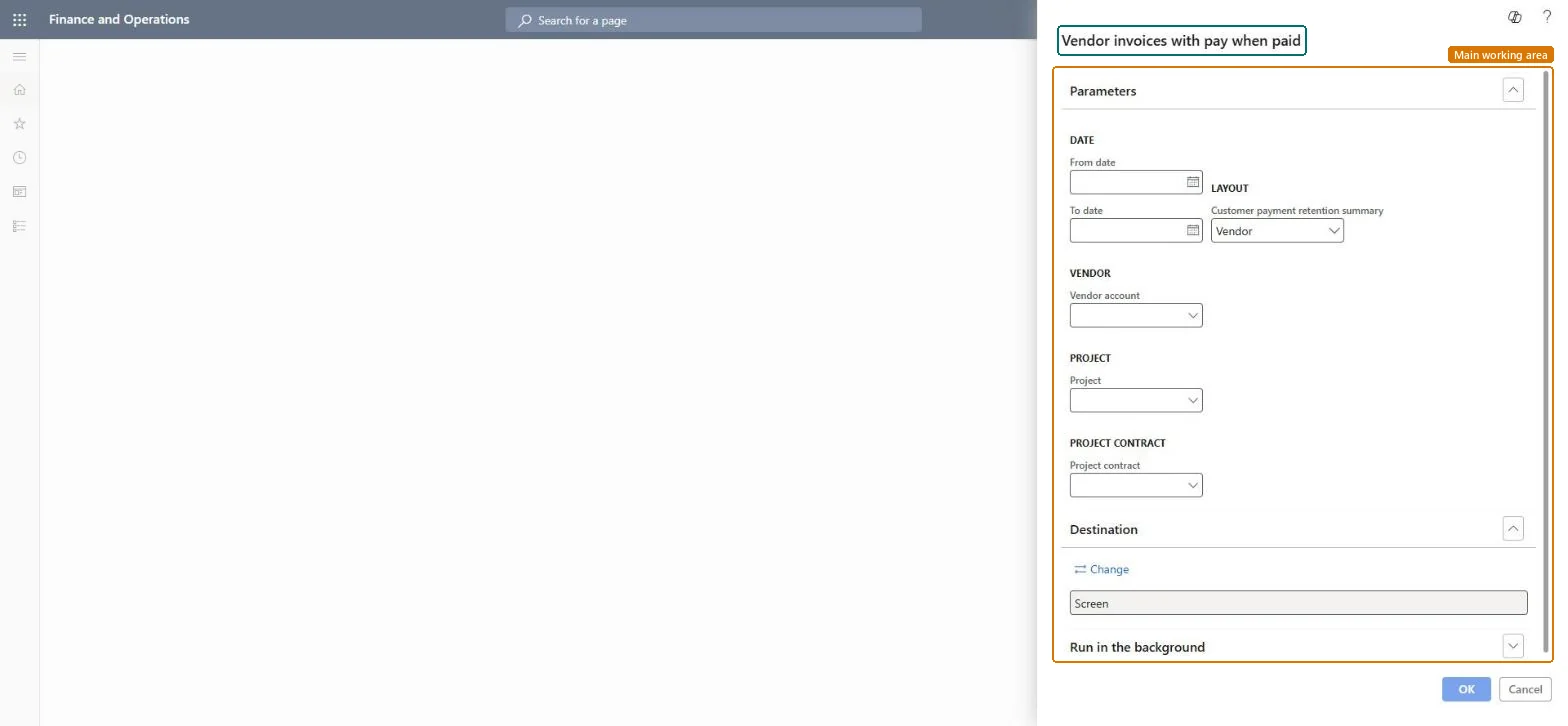
Under Date, enter the From date and To date of the vendor invoices to list.
Under Layout, keep the summary field on Vendor to group the invoices by vendor; on this dialog that field carries the label Customer payment retention summary although the report lists vendor invoices.
Choose a Vendor account, Project or Project contract to list only the pay-when-paid invoices for one of them, then run the report.
For each line that still waits, check the customer payments on the project; when the threshold is met, release the line on the Vendor invoices with pay when paid inquiry.
First date of the vendor invoices to list.Checked in Dynamics 365
2026-10-01
To date
Last date of the vendor invoices to list.Checked in Dynamics 365
2026-10-31
Customer payment retention summary
Layout field that sets how the vendor invoices are grouped; it proposes Vendor. The label is the one shown on this dialog, even though the report is about vendor invoices.Checked in Dynamics 365
Vendor
Vendor account
Limit the report to one vendor's pay-when-paid invoices.Checked in Dynamics 365
V-1020
Project
Limit the report to the pay-when-paid invoices of one project.Checked in Dynamics 365
PRJ-0042
Project contract
Limit the report to the projects of one project contract.Checked in Dynamics 365
PC-0042
Common errors and fixes
Message
What to do
An invoice is still listed after the customer paid.
The pay-when-paid condition is cleared only when the line is released: open Vendor invoices with pay when paid, select the line and select Release vendor payment. Microsoft Learn
Filter on the Project (or Project contract) whose customer has just paid, keep the summary on Vendor, and use the date range since the project started.The PWP threshold is set per project, so the customer payments of that project decide which of its vendor lines can be released.
On the live system, Project manager and Project accountant can run this page.
Checked in Dynamics 365
Solution architect
5Design impact
Shared or per company
Per legal entity: the report reads only the project data of the company you are signed in to, so run it in each company you close. Checked in Dynamics 365
Can it be undone
Reversible: Running or rerunning the report changes no data.
If you change it later
The report only lists invoices; releasing is done on the inquiry. The PWP threshold percentage comes from the project's Vendor agreements and is copied to purchase order lines, so a threshold change affects only purchase orders created afterwards. Microsoft Learn
Technical architect
6Technical
Menu item
output:PSAPayWhenPaidChecked in Dynamics 365
Form
SysOperationTemplateFormChecked in Dynamics 365
Roles to set it up and use it
To use itProject manager ProjProjectManagerProject accountant ProjProjectAccountantGive people one of these roles. On this system, 2 roles can run this page.Checked in Dynamics 365
Load order: Vendor invoices with pay when paid has no data entity in Data management: the menu item PSAPayWhenPaid opens a report that only reads posted project data. There is nothing to migrate for the report itself; load the project data it reads, for example opening balances through Journals > Beginning balance, then run the report in the new system and compare its totals with the old one.Checked in Dynamics 365
Checked in a working Dynamics 365 system, version 10.0.49: the menu item, form, table and security, the page.
To cite this step: PM-RC-190, List pay-when-paid vendor invoices per project. Beyond ERP Atlas Hub, 2026-11-11. https://www.beyonderp.cloud/atlas/step/PM-RC-190