BeyondERP.Newsletter
Menu

Setup step on the Project price groups page · Project management and accounting

List who uses a price group before changing it

See which projects and contracts a price group change will reach.

Business process
Manage project financials
Menu item
output:ProjPriceGroupList
Setup steps
1 on this page
Show what matters for
SETUP GUIDEHow to set it up8 sections. Choose a role to highlight what matters to you.
Everyone

1What it is and why

What it isA report that lists the projects and project contracts that use a project price group. Projects and contracts each carry a sales price group that steers the prices their transactions get.
What you do hereUse it to answer 'who is affected if we change this price group?' before you change prices for a group.
ExampleBefore raising price group PG-STD by 5.00 percent, the BEAT project accountant runs the report with Project and Project contract on and finds 14 projects and 3 contracts on PG-STD, including CON-0107 for a customer with a fixed rate agreement.
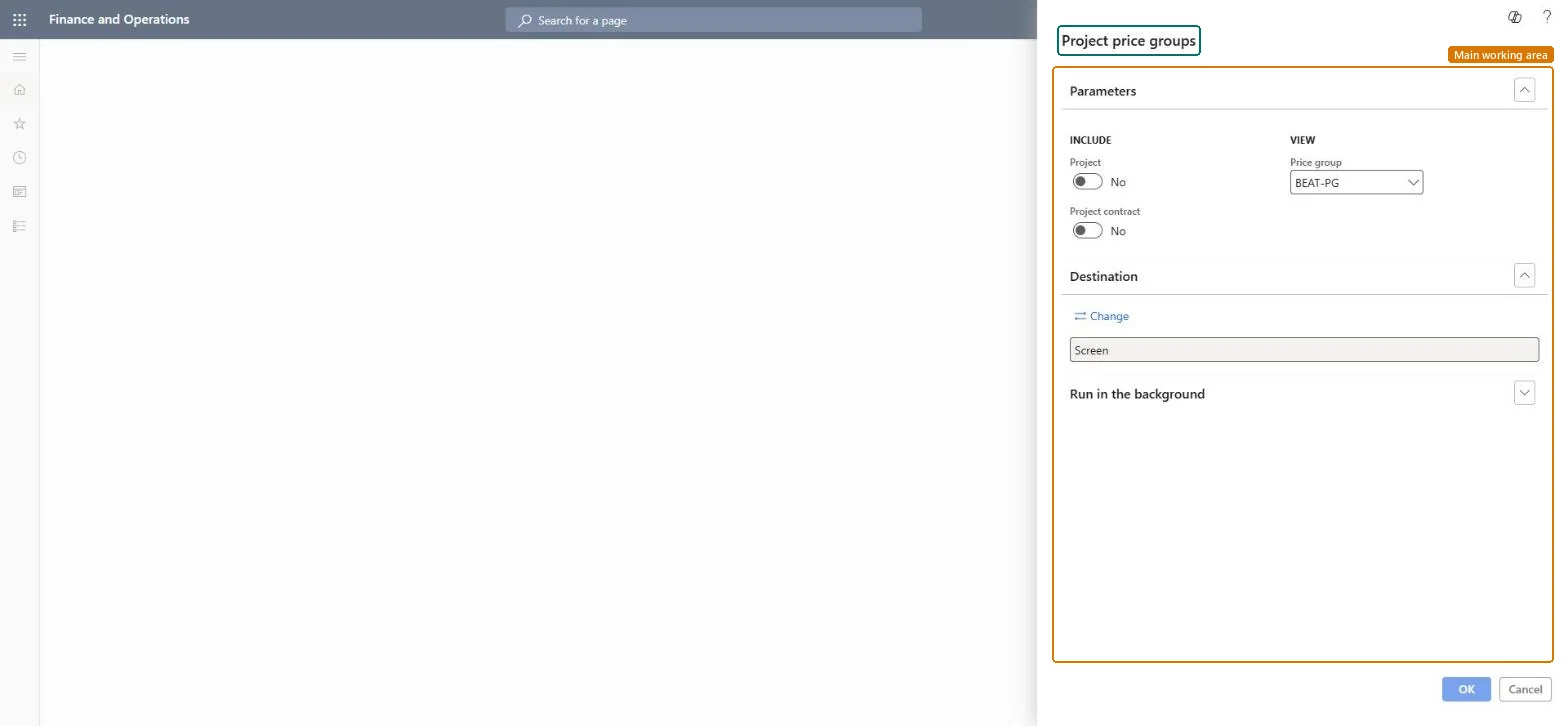
Project price groups page in Dynamics 365
The page in Dynamics 365. page title tab to open what to set or check
Functional consultant · Solution architect

2Where it fits

Business processManage project financials
Menu pathProject management and accounting › Inquiries and reports › Prices reports › Project price groups
Set up firstProject contracts Microsoft Learn All projects Microsoft data model
Used next bySales price (hour) Microsoft Learn
Related pagesProject prices Microsoft Learn
In this process Check the sales price for a date · Check pending transactions before period end
End user · Functional consultant

3How to do it

About the examples: Examples and screenshots in this guide use BEAT, a demo company in a Dynamics 365 test environment. Use your own company's codes and values instead of copying them.

When to run it

When to run itBefore you change prices for a price group, and when you assign a price group to new contracts.
How oftenOn demand.
What the output showsProjects and project contracts that carry the selected price group.

Source: Microsoft Learn

Setup steps on this page

List who uses a price group before changing it

See which projects and contracts a price group change will reach.

Steps from Microsoft

  1. Go to Project management and accounting > Inquiries and reports > Prices reports > Project price groups.
  2. Under Include, turn on Project, Project contract or both.
  3. Under View, choose the Price group you plan to change.
  4. Check each listed contract's price agreement before you add new prices for the group on the Sales price pages.

Source: Microsoft Learn

Fields on the page

FieldWhat it meansExample
Project contractUnder Include: lists project contracts that carry the price group.Checked in Dynamics 365Yes
Price groupUnder View: the price group to report on. It is the sales price group on the project or contract.Microsoft data model PG-STD
ProjectUnder Include: lists projects that carry the price group.Checked in Dynamics 365Yes

Common errors and fixes

MessageWhat to do
The report is empty for a price group in use.Turn on Project, Project contract or both; both toggles start at No. Checked in Dynamics 365

Test checklist

  1. Set price group PG-STD on PRJ-0042 and on contract CON-0107.
  2. Run the report with both toggles on and PG-STD.
  3. Check that PRJ-0042 and CON-0107 are listed.

Source: Microsoft Learn

Functional consultant

4Setup decisions

Setup stepRecommended value and whyDecision, common mistake and test
List who uses a price group before changing itTurn on both Project and Project contract and choose the price group.The price group sits on both projects and contracts; checking only one misses agreements.Should contracts with special rates get their own price group?Changing a price group used by a contract with a fixed rate agreement.Test: Price group users

Feature management and licence

Licence or add-inOn the live system, Project accountant runs this report.

Checked in Dynamics 365

Solution architect

5Design impact

Shared or per companyPer company: price groups, projects and contracts belong to one legal entity. Microsoft data model
Can it be undoneReversible: Reading the page changes no data.
If you change it laterA price change for the group reaches every listed project and contract from the new price's effective date. Microsoft Learn
Technical architect

6Technical

Menu itemoutput:ProjPriceGroupList Checked in Dynamics 365
FormSysOperationTemplateForm Checked in Dynamics 365
Roles to set it up and use itTo use itProject accountant ProjProjectAccountantGive people one of these roles. On this system, 1 role can run this page.Checked in Dynamics 365
Developer

7Developer

Open it by URLhttps://<your-environment>/?mi=output:ProjPriceGroupList
Data migrationLoad order: The Project price groups report has no data entity in Data management: it reads the price group on projects and contracts, which loads with the project and contract entities.Load first: Projects V2 (ProjProjectV2Entity), Project contract headers (ProjProjectContractHeaderEntity)Microsoft data model
Everyone

8Sources