SETUP GUIDEHow to set it up8 sections. Choose a role to highlight what matters to you.
Everyone
1What it is and why
What it is
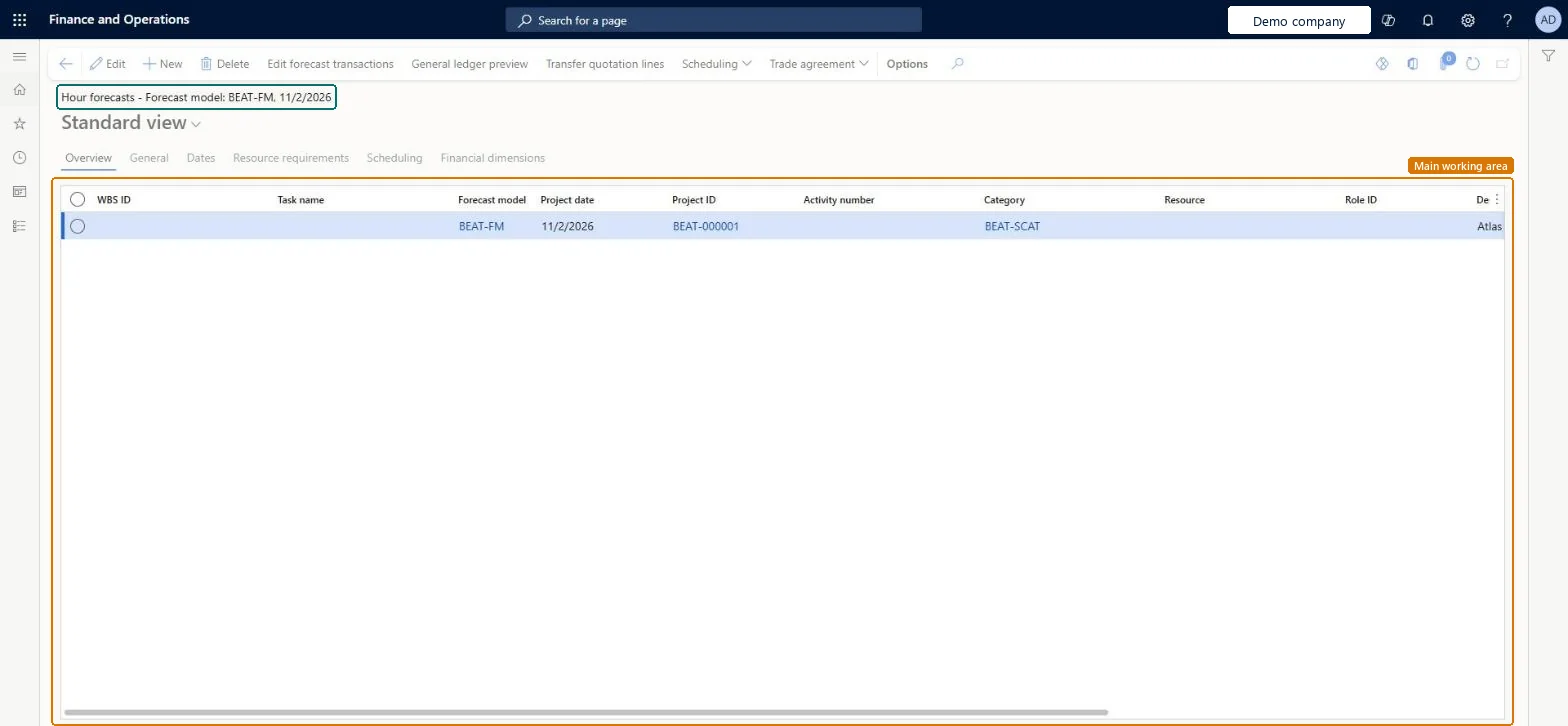
An inquiry that lists hour forecast lines for all projects in the company, with forecast model, project date, project, activity, category, resource and role.
What you do here
Use it to answer 'how many hours have we planned, for whom and in which model?' across projects, and to check the forecast before it is copied, reduced or sent to a ledger budget.
Example
The BEAT project manager filters model FC-2026 on PRJ-0042 and finds 160.00 forecast hours for role CONSULT in November at a cost price of 85.00 EUR, while the remaining-budget model FC-2026-R shows 40.00 hours left.
The page in Dynamics 365. page title tab to open what to set or check
About the examples: Examples and screenshots in this guide use BEAT, a demo company in a Dynamics 365 test environment. Use your own company's codes and values instead of copying them.
Setup steps on this page
Read hour forecasts for one model
Check planned hours per resource and role in one forecast model.
Steps from Microsoft
Go to Project management and accounting > Inquiries and reports > Forecasts inquiries > Hour.
Filter on the Forecast model first, then on Project ID; the page shows every project and every model at once.
Read hours by Resource or Role ID, and open the Dates and Resource requirements tabs for the planned schedule.
Select General ledger preview to see the cost and revenue the selected lines would post to a ledger budget.
If the forecast is right, copy the model on Copy forecasts before forecast reduction starts reducing it.
The model that holds the line. Every project forecast belongs to one model; original and remaining models hold different numbers for the same work.Microsoft Learn
FC-2026
ModelId
Project date
The date the forecast hours are planned for; forecasts have no fiscal period, so the period is read from this date.Microsoft Learn
2026-11-03
Role ID
The role the hours are forecast for, used when a named resource isn't known yet.Checked in Dynamics 365
CONSULT
WBS ID / Task name
The work breakdown structure task the forecast line belongs to.Checked in Dynamics 365
1.2 Design workshop
Common errors and fixes
Message
What to do
Forecast hours look twice as high as planned.
Lines from the original model and its copy or submodels are listed together; filter on one forecast model. Microsoft Learn
A new hour forecast line takes an unexpected model.
The system suggests a model on each new line; check the Forecast model field before saving. Microsoft Learn
Test checklist
Enter 8.00 forecast hours on PRJ-0042 in model FC-2026.
Open the inquiry and filter on FC-2026 and PRJ-0042.
Check that one line with 8.00 hours shows, and none from other models.
Filter on the Forecast model first, then the project.Each forecast model is a separate budget for the project, and submodels or copies hold overlapping lines.
On the live system, Project manager, Project accountant and Project assistant maintain this page.
Checked in Dynamics 365
Solution architect
5Design impact
Shared or per company
Per company: forecast lines belong to the legal entity of the project, and each line sits in one forecast model. Microsoft data model
Can it be undone
Reversible: Reading the page changes no data.
If you change it later
Any user with access to this page can change forecast lines without approval, and forecast reduction subtracts actual hours from the model without an audit trail. Reports and ledger budgets based on the model change the next time they run. Microsoft Learn
Technical architect
6Technical
Menu item
ProjForecastEmplChecked in Dynamics 365
Form
ProjForecastEmplChecked in Dynamics 365
Table
ProjForecastEmplShown as “Hour forecast” in Record infoKey field: ModelId, SchedFromDate, ProjId, ProjFundingSource, ProjFundingSource_ContractId, ProjFundingSource_FundingSourceId, ActivityNumber, CategoryId, Resource, Resource_Name, Resource_ResourceId, Resource_ResourceCompanyId, ResourceCategory, LinePropertyIdChecked in Dynamics 365
PrivilegesMaintain hour forecasts ProjForecastEmplMaintainView hour forecasts ProjForecastEmplViewDutiesMaintain project budgets ProjProjectBudgetsMaintainMaintain project forecasts ProjProjectForecastMaintainInquire into project forecast status ProjProjectForecastStatusInquire3 security rolesProject accountant ProjProjectAccountantProject assistant ProjProjectClerkProject manager ProjProjectManagerChecked in Dynamics 365
Roles to set it up and use it
To set it up or change itProject manager ProjProjectManagerProject accountant ProjProjectAccountantProject assistant ProjProjectClerkGive people one of these roles. On this system, 3 roles can open this page.Checked in Dynamics 365
Actions on the page
Options: Personalize, Page options, ShareChecked in Dynamics 365
ProjForecastEmplEntity Project hour forecasts; loads the lines of this page.Load order: Load forecast models, projects and roles first, then hour forecasts with ProjForecastEmplEntity.Load first: Forecast models, Projects V2 (ProjProjectV2Entity)Microsoft data model