SETUP GUIDEHow to set it up8 sections. Choose a role to highlight what matters to you.
Everyone
1What it is and why
What it is
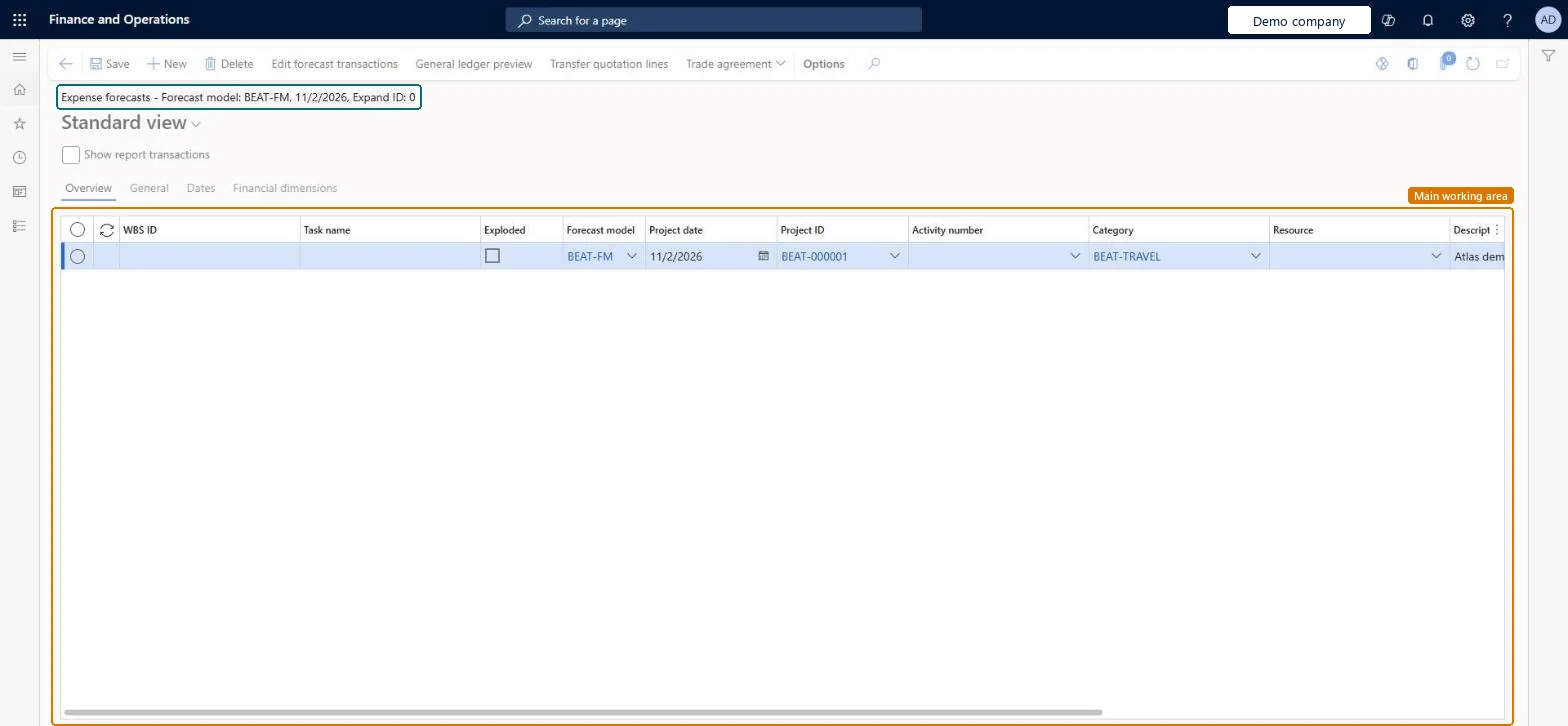
An inquiry that lists expense forecast lines for all projects in the company, with forecast model, project date, project, activity, category, resource and amounts.
What you do here
Use it to answer 'which travel and other expenses do we expect, on which projects and in which model?' and to correct expense forecasts before they feed cost control or a ledger budget.
Example
The BEAT project assistant filters model FC-2026 on category TRAVEL and finds 4 expense lines on PRJ-0042 totalling 2,400.00 EUR for flights in December; one line for 600.00 EUR was entered on PRJ-0024 by mistake and is moved.
The page in Dynamics 365. page title tab to open what to set or check
About the examples: Examples and screenshots in this guide use BEAT, a demo company in a Dynamics 365 test environment. Use your own company's codes and values instead of copying them.
Setup steps on this page
Review expense forecasts by category
Check forecast expenses per category and model before they feed cost control.
Steps from Microsoft
Go to Project management and accounting > Inquiries and reports > Forecasts inquiries > Expense.
Filter on the Forecast model and then on Category, so you review one kind of expense across projects.
Use Edit forecast transactions to correct amounts or move a line to the right project.
Select General ledger preview to see the cost the lines will post to a ledger budget, then run Copy forecasts to ledger if the model feeds the budget.
Filter on the Forecast model, then on Category.Expense forecasts are amount lines per category; reviewing by category across projects shows misplaced or duplicated lines.
On the live system, Project manager, Project accountant and Project assistant maintain this page.
Checked in Dynamics 365
Solution architect
5Design impact
Shared or per company
Per company: forecast lines belong to the legal entity of the project, and each line sits in one forecast model. Microsoft data model
Can it be undone
Reversible: Reading the page changes no data.
If you change it later
Edits take effect at once for every report and cost control view that uses the model; forecasts have no approval workflow and keep no revision history. Microsoft Learn
Technical architect
6Technical
Menu item
ProjForecastCostChecked in Dynamics 365
Form
ProjForecastCostChecked in Dynamics 365
Table
ProjForecastCostShown as “Expense forecast” in Record infoKey field: ModelId, StartDate, ProjId, ProjFundingSource, ProjFundingSource_ContractId, ProjFundingSource_FundingSourceId, ActivityNumber, CategoryId, Resource, Resource_Name, Resource_ResourceId, Resource_ResourceCompanyId, ResourceCategory, LinePropertyIdChecked in Dynamics 365
PrivilegesMaintain expense forecasts ProjForecastCostMaintainView expense forecasts ProjForecastCostViewDutiesMaintain project budgets ProjProjectBudgetsMaintainMaintain project forecasts ProjProjectForecastMaintainInquire into project forecast status ProjProjectForecastStatusInquire3 security rolesProject accountant ProjProjectAccountantProject assistant ProjProjectClerkProject manager ProjProjectManagerChecked in Dynamics 365
Roles to set it up and use it
To set it up or change itProject manager ProjProjectManagerProject accountant ProjProjectAccountantProject assistant ProjProjectClerkGive people one of these roles. On this system, 3 roles can open this page.Checked in Dynamics 365
Actions on the page
Options: Personalize, Page options, Edit, ShareChecked in Dynamics 365
ProjForecastCostEntity Project expense forecasts; loads the lines of this page.Load order: Load forecast models, projects and expense categories, then expense forecasts with ProjForecastCostEntity.Load first: Forecast models, Project categoriesMicrosoft data model