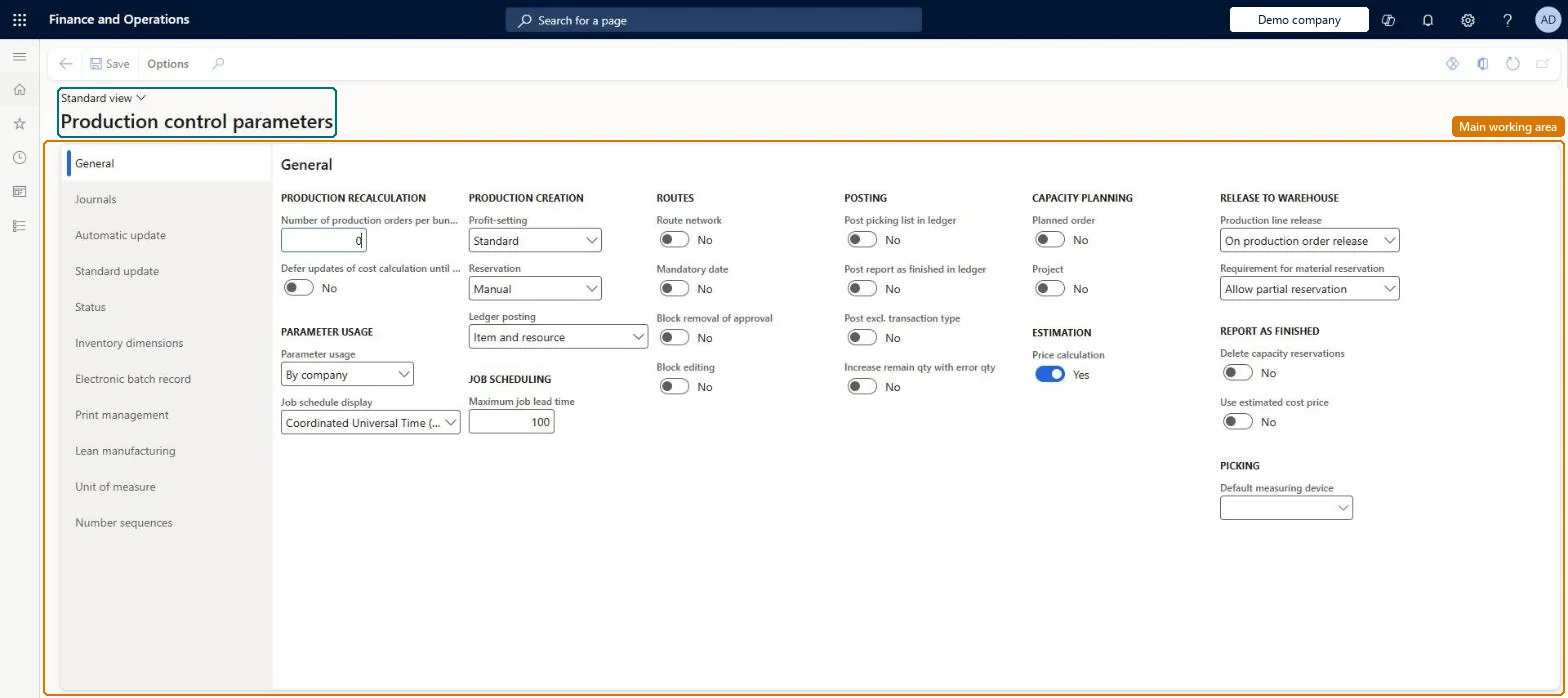
Setup step on the Production control parameters page · Production control
Set up Production control parameters
Use this page to define how production orders are created, estimated, scheduled, and consumed, which feedback and journals are used, and how cost accounting is done.
SETUP GUIDEHow to set it up8 sections. Choose a role to highlight what matters to you.
Everyone
1What it is and why
What it is
A setup page holding the company-wide parameters that control how production orders are created, estimated, scheduled, consumed, reported and posted to the ledger.
What you do here
Use this page to define how production orders are created, estimated, scheduled, and consumed, which feedback and journals are used, and how cost accounting is done.
Example
For example, set Block removal of approval and Block editing to Yes under Routes so that approved routes cannot be changed afterwards.
The page in Dynamics 365. page title tab to open what to set or check
About the examples: Examples and screenshots in this guide use BEAT, a demo company in a Dynamics 365 test environment. Use your own company's codes and values instead of copying them.
Setup steps on this page
Set up Production control parameters
Use this page to define how production orders are created, estimated, scheduled, and consumed, which feedback and journals are used, and how cost accounting is done.
Steps from Microsoft
Go to Production control > Setup > Production control parameters.
Set the Block removal of approval slider to Yes under the Routes group.
Set the Block editing slider to Yes under the Routes group.
Ledger posting = Item and resource when operating costs are assigned to resources; Item and category when the focus is process efficiency and activity timeLearn calls Item and resource the most detailed option, for organisations that assign operating costs to resources; Item and category is a more summarised option based on cost categories.
Hard to reverse: The field can be changed, but each level reads accounts from a different place (posting profile, resources or cost categories, or production groups). All accounts for the new level must exist first, and production groups are copied to production orders when they're created.
If you change it later
Changed defaults apply to production orders created afterwards; existing orders keep the values they were created with. Microsoft Learn
Technical architect
6Technical
Menu item
ProdParametersChecked in Dynamics 365
Form
ProdParametersChecked in Dynamics 365
Table
ProdParametersShown as “PRODUCTION PARAMETERS” in Record infoChecked in Dynamics 365
Data entities
ProdProductionControlParametersEntityProduction control parameters Microsoft data model
Who can open it
PrivilegesMaintain production parameters ProdParametersMaintainView production parameters ProdParametersViewDutiesInquire into production policies ProdProductionPoliciesInquireEnable production process ProdProductionProcessEnable2 security rolesProduction manager ProdProductionManagerProcess engineering manager RouteProcessEngineeringManagerChecked in Dynamics 365
Roles to set it up and use it
To set it up or change itProduction manager ProdProductionManagerProcess engineering manager RouteProcessEngineeringManagerGive people one of these roles. On this system, 2 roles can open this page.Checked in Dynamics 365
ProdProductionControlParametersEntity (Production control parameters): loaded for each company, in Microsoft's default template 410 - Production control.Load order: Microsoft's default template 410 - Production control loads Production control parameters at execution unit 1, level 410, sequence 70. Lower levels load first, and entities at the same level load in sequence order.Load first: the default templates at lower levels (System setup to Transportation management)Microsoft Learn
Checked in a working Dynamics 365 system, version 10.0.49: the menu item, form, table and security, the page.
To cite this step: PC-SETUP-010, Set up Production control parameters. Beyond ERP Atlas Hub, 2026-11-11. https://www.beyonderp.cloud/atlas/step/PC-SETUP-010