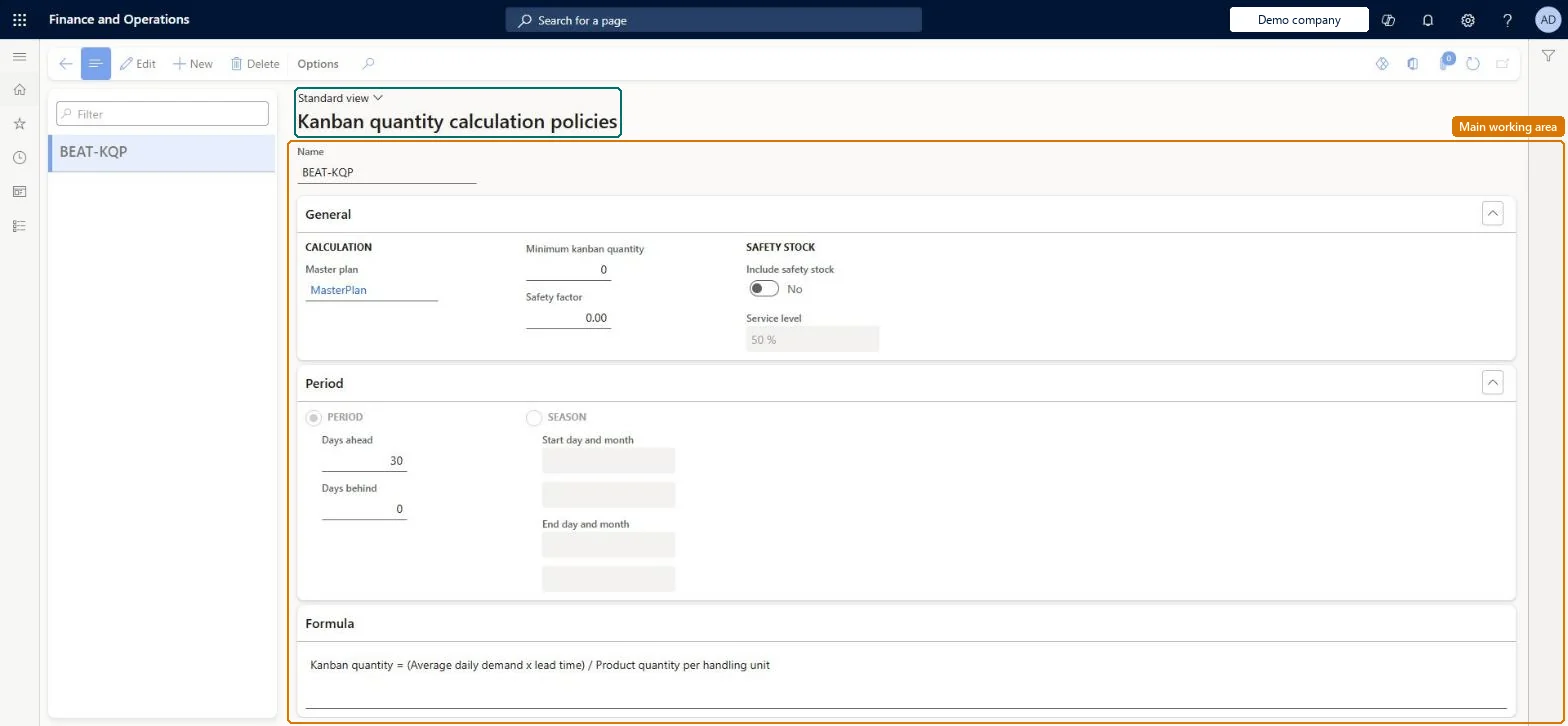
Setup step on the Kanban quantity calculation policies page · Production control
Set up Kanban quantity calculation policies
Use this page to create a policy (master plan, minimum kanban quantity, safety factor, days behind and ahead or a season) and then assign it to fixed-quantity kanban rules so that the kanban quantity calculation can propose kanban quantities.
Production controlPeriodic tasksKanban quantity calculation
KanbanQuantityPolicy
Used by
Materials manager, Shop supervisor, Production manager and 4 more roles
Business process
Develop production processes
Menu item
KanbanQuantityPolicy
Main table
KanbanQuantityPolicy
Setup steps
1 on this page
Show what matters for
SETUP GUIDEHow to set it up8 sections. Choose a role to highlight what matters to you.
Everyone
1What it is and why
What it is
A setup page where you define policies that control how the number of kanbans in circulation for a product is calculated from demand, lead time, safety factors and a demand period.
What you do here
Use this page to create a policy (master plan, minimum kanban quantity, safety factor, days behind and ahead or a season) and then assign it to fixed-quantity kanban rules so that the kanban quantity calculation can propose kanban quantities.
Example
For example, with a safety factor of 1 and a minimum kanban quantity of 1 the formula becomes Kanban quantity = ((Average daily demand x lead time x 2.00) / Product quantity per handling unit) + 1.
The page in Dynamics 365. page title tab to open what to set or check
About the examples: Examples and screenshots in this guide use BEAT, a demo company in a Dynamics 365 test environment. Use your own company's codes and values instead of copying them.
Setup steps on this page
Set up Kanban quantity calculation policies
Use this page to create a policy (master plan, minimum kanban quantity, safety factor, days behind and ahead or a season) and then assign it to fixed-quantity kanban rules so that the kanban quantity calculation can propose kanban quantities.
Steps from Microsoft
Go to Production control > Periodic tasks > Kanban quantity calculation > Kanban quantity calculation policies.
Select New and enter a Name.
In the Master plan field, select the plan used to calculate demand.
Enter the Minimum kanban quantity and the Safety factor.
Enter the Days ahead and Days behind for the demand period.
Save and close the page.
Open the kanban rule and, on the Kanban quantity calculation policies FastTab, select Add and pick the policy.
One policy per group of fixed-quantity kanban rules that you recalculate on the same cycle with the same parameters; Include safety stock only where demand during lead time variesLearn describes the policy as the way to group kanban rules that are calculated with the same parameters at the same regularity, and recommends adding safety stock and a service level only where demand during the lead time varies; for stable demand the simpler formula without safety stock applies.
Reversible: The policy only produces proposals. Kanban rules change only when you select Update on a calculated kanban quantity calculation, and the updated rules take effect from the Rule effective date you choose.
If you change it later
Switching on safety stock changes the formula and slows the calculation; the policy only affects rules that it is assigned to. Microsoft Learn
Technical architect
6Technical
Menu item
KanbanQuantityPolicyChecked in Dynamics 365
Form
KanbanQuantityPolicyChecked in Dynamics 365
Table
KanbanQuantityPolicyShown as “KANBAN QUANTITY CALCULATION POLICIES” in Record infoKey field: NameChecked in Dynamics 365
Who can open it
PrivilegesMaintain kanban quantity calculation policies KanbanQuantityPolicyMaintainView kanban quantity calculation policies KanbanQuantityPolicyViewDutiesEnable the kanban rules management process KanbanRulesManagementProcessEnableInquire into kanban rules master KanbanRulesMasterInquireMaintain kanban rules master KanbanRulesMasterMaintainInquire into kanban rules management policies KanbanRulesPoliciesInquireInquire into kanban scheduling policies KanbanSchedulePoliciesInquireEnable the kanban scheduling process KanbanScheduleProcessEnable7 security rolesMaterials manager InventMaterialsManagerShop supervisor JmgShopSupervisorProduction manager ProdProductionManagerProduction supervisor ProdProductionSupervisorProduction planner ReqProductionPlannerProcess engineer RouteProcessEngineerWarehouse manager WMSWarehouseManagerChecked in Dynamics 365
Roles to set it up and use it
To set it up or change itProduction manager ProdProductionManagerMaterials manager InventMaterialsManagerWarehouse manager WMSWarehouseManagerTo use itProduction supervisor ProdProductionSupervisorShop supervisor JmgShopSupervisorProduction planner ReqProductionPlannerProcess engineer RouteProcessEngineerGive people one of these roles. On this system, 7 roles can open this page.Checked in Dynamics 365
Checked in a working Dynamics 365 system, version 10.0.49: the menu item, form, table and security, the page.
To cite this step: PC-LEAN-010, Set up Kanban quantity calculation policies. Beyond ERP Atlas Hub, 2026-11-11. https://www.beyonderp.cloud/atlas/step/PC-LEAN-010