Setup step on the Calendars page · Leave and absence
Set up Calendars
Use this page to create a working time calendar, choose work days and times, add holidays, closures and nonwork time, generate the calendar days for a date range and add work schedules, so that time-off requests take them into account.
Human resource assistant, Human resource manager, Payroll administrator and 1 more role
Business process
Develop leave and absence policies
Menu item
HcmWorkCalendarTable
Main table
WorkCalendarTable
Data entity
WorkCalendarEntity
Setup steps
1 on this page
Show what matters for
SETUP GUIDEHow to set it up8 sections. Choose a role to highlight what matters to you.
Everyone
1What it is and why
What it is
A setup page for working time calendars, which show the days and hours employees work.
What you do here
Use this page to create a working time calendar, choose work days and times, add holidays, closures and nonwork time, generate the calendar days for a date range and add work schedules, so that time-off requests take them into account.
Example
For example, if you have locations in several countries or regions, set up a working time calendar for each area.
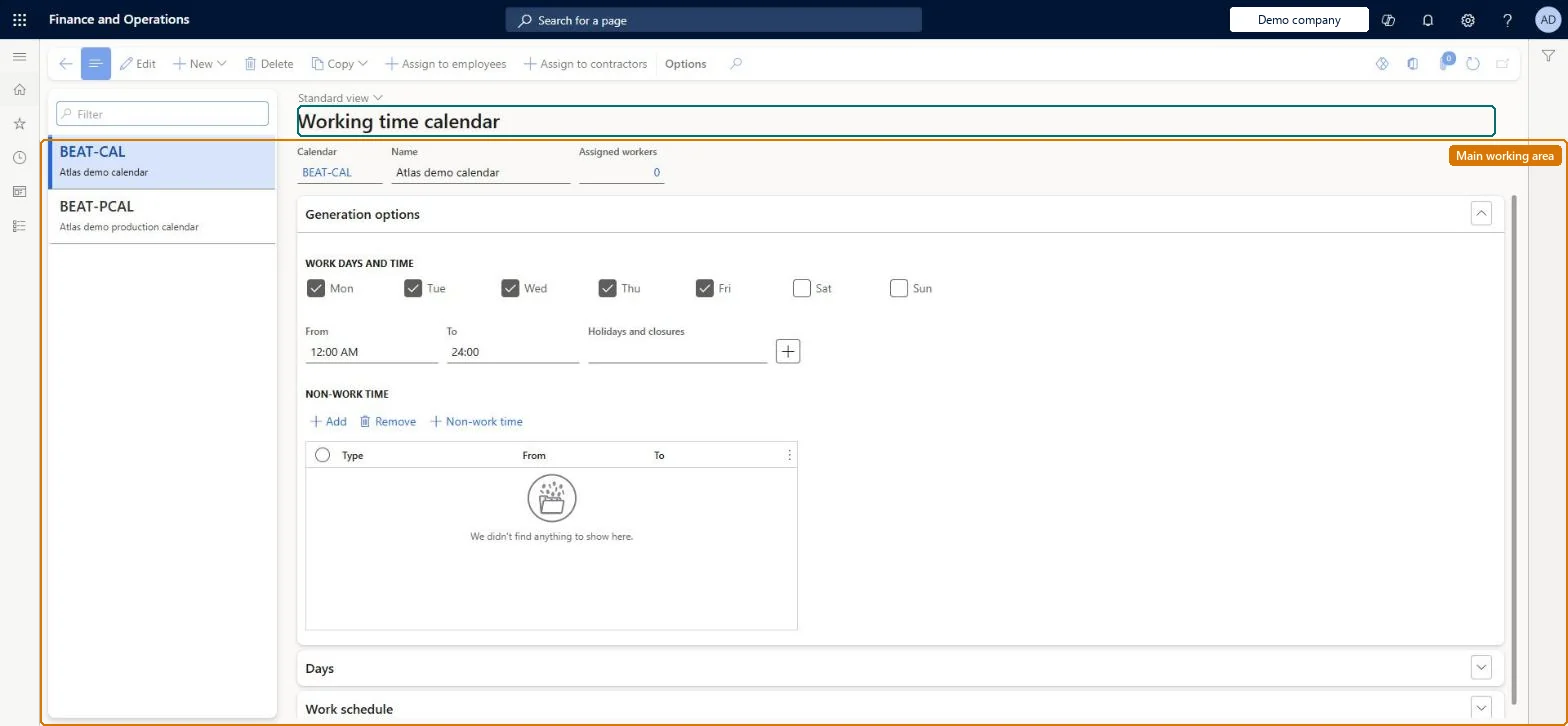
The page in Dynamics 365. page title tab to open what to set or check
About the examples: Examples and screenshots in this guide use BEAT, a demo company in a Dynamics 365 test environment. Use your own company's codes and values instead of copying them.
Setup steps on this page
Set up Calendars
Use this page to create a working time calendar, choose work days and times, add holidays, closures and nonwork time, generate the calendar days for a date range and add work schedules, so that time-off requests take them into account.
Steps from Microsoft
Go to Leave and absence > Setup > Calendars > Calendars.
Select New and enter a name and description for the calendar.
Under Generation options, select the work days and enter work times.
Optionally, add Holidays and closures and Nonwork time.
Under Days, select Generate, enter the date range and select Generate days.
Under Work schedule, select Add and enter the times for each schedule.
At least one working time calendar, and one per country or region when locations work different days, holidays or hours.The calendar holds the days and hours employees work, so time-off requests take holidays and closures into account; Learn suggests a calendar for each area when you operate in several countries or regions.
Loading hours worked for hours-worked accrual plans that exceed the calendar's scheduled hours. The import checks regular hours against the calendar and rejects days over the schedule.
Solution architect
5Design impact
Can it be undone
Reversible: Calendars can be edited and days generated again; time-off requests and hours-worked imports use the calendar as it is when they are entered.
If you change it later
Imported hours worked are checked against the calendar's scheduled hours, so the calendar limits the regular hours that can be loaded for hours-worked accrual plans. Microsoft Learn
Technical architect
6Technical
Menu item
HcmWorkCalendarTableChecked in Dynamics 365
Form
HcmWorkCalendarTableChecked in Dynamics 365
Table
WorkCalendarTableShown as “CALENDAR” in Record infoKey field: CalendarIdChecked in Dynamics 365
PrivilegesView work calendars HcmWorkCalendarTableInquireMaintain work calendars HcmWorkCalendarTableMaintainDutiesView work calendar worker assignments HcmWorkCalendarAssignmentInquireMaintain work calendar worker assignments HcmWorkCalendarAssignmentMaintainView work calendars HcmWorkCalendarSetupInquireMaintain work calendars HcmWorkCalendarSetupMaintain4 security rolesHuman resource assistant HcmHumanResourceAssistantHuman resource manager HcmHumanResourceManagerPayroll administrator HcmPayrollAdministratorPayroll manager HcmPayrollManagerChecked in Dynamics 365
Roles to set it up and use it
To set it up or change itHuman resource assistant HcmHumanResourceAssistantPayroll administrator HcmPayrollAdministratorTo use itHuman resource manager HcmHumanResourceManagerPayroll manager HcmPayrollManagerGive people one of these roles. On this system, 4 roles can open this page.Checked in Dynamics 365
Actions on the page
(Action Pane without tabs): New, Delete, Copy, Assign to employees, Assign to contractorsChecked in Dynamics 365
WorkCalendarEntity (Calendar): loaded for each company, in Microsoft's default template 025 - General ledger.Load order: Microsoft's default template 025 - General ledger loads Calendar at execution unit 1, level 25, sequence 10. Lower levels load first, and entities at the same level load in sequence order.Load first: the default templates at lower levels (System setup to Workflow)Microsoft Learn