Chief executive officer, Chief financial officer, Compensation and benefits manager and 6 more roles
Business process
Develop people strategy
Menu item
HcmPositionHierarchyType
Main table
HcmPositionHierarchyType
Data entity
HcmPositionHierarchyTypeEntity
Setup steps
1 on this page
Show what matters for
SETUP GUIDEHow to set it up8 sections. Choose a role to highlight what matters to you.
Everyone
1What it is and why
What it is
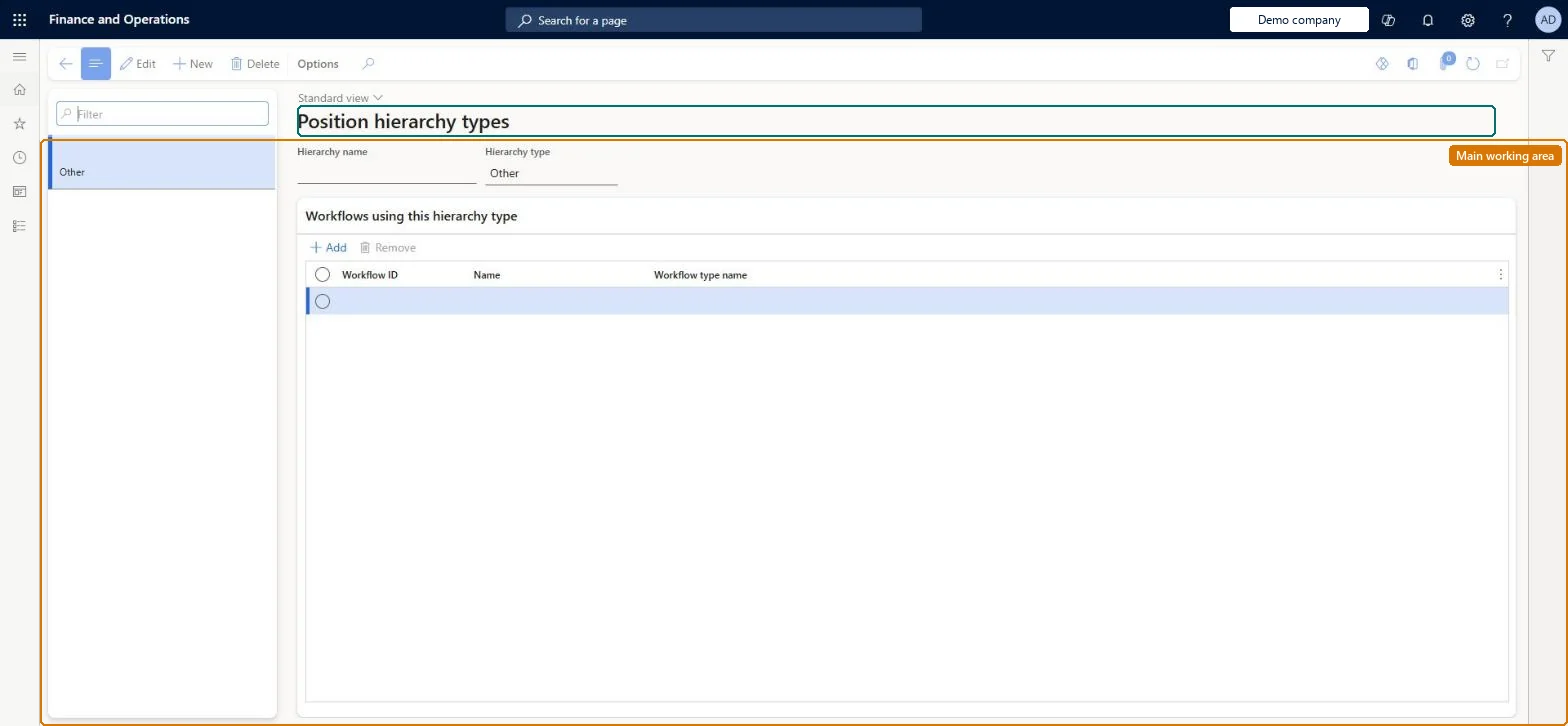
A setup page where you define position hierarchy types, such as matrix or project hierarchies, in addition to the normal line-manager hierarchy.
What you do here
Use this page to create custom hierarchy types so that positions can have extra reporting relationships and workflows can route through them.
Example
For example, BEAT adds the hierarchy type Widget for its product project and links the Worker identification number workflow to the Matrix type, so an ID change by the accountant in position 000220 goes to project lead 000110, not to the line manager.
The page in Dynamics 365. page title tab to open what to set or check
About the examples: Examples and screenshots in this guide use BEAT, a demo company in a Dynamics 365 test environment. Use your own company's codes and values instead of copying them.
Setup steps on this page
Add hierarchy types for matrix routing
Create a custom hierarchy type only where workflows must route outside the line manager.
Steps from Microsoft
Go to Human resources > Positions > Position hierarchy types.
Select the hierarchy type, for example Matrix.
Add the workflow that should route through this hierarchy to the list.
A workflow with a configurable hierarchy step routes to the line manager
The workflow isn't added to the hierarchy type, or the submitter's primary position has no Relationships line for it. Add the workflow to the type and the line to the position. Microsoft Learn
A workflow routes from the wrong position
The submitter's primary position decides who a document goes to next. Check the primary position and the Use position hierarchy option in Workflow parameters. Microsoft Learn
Test checklist
Create a hierarchy type, for example Matrix, and add the Worker identification number workflow to it.
On a position, add a Relationships line for the Matrix type pointing to a project lead's position.
Activate an Identification numbers workflow that uses a Configurable hierarchy assignment.
Have the worker submit an identification number change and check the approval goes to the project lead, not the line manager.
Keep the line hierarchy for managers; add one custom type (for example Matrix or Project) per routing need, and add the workflows that should route through it.A Configurable hierarchy step routes a document through the custom type, and the submitter's primary position decides the next approver.
On BEAT the page is maintained by Human resource assistant, Compensation and benefits manager and Recruiter; viewed by Human resource manager, Payroll administrator, Payroll manager, Training manager and Chief executive officer; the full list is under the page's security roles. No Feature management feature is needed for this page.
PrivilegesMaintain position hierarchy types HcmPositionHierarchyTypeMaintainView position hierarchy types HcmPositionHierarchyTypeViewDutiesInquire into jobs and positions HcmJobPositionInquireMaintain job and position master HcmJobPositionMaintainReview organizational information HcmOrganizationalReview9 security rolesChief executive officer CompanyChiefExecutiveOfficerChief financial officer CompanyChiefFinancialOfficerCompensation and benefits manager HcmCompensationAndBenefitsManagerHuman resource assistant HcmHumanResourceAssistantHuman resource manager HcmHumanResourceManagerPayroll administrator HcmPayrollAdministratorPayroll manager HcmPayrollManagerRecruiter HcmRecruiterTraining manager HcmTrainingManagerChecked in Dynamics 365
Roles to set it up and use it
To set it up or change itHuman resource assistant HcmHumanResourceAssistantCompensation and benefits manager HcmCompensationAndBenefitsManagerRecruiter HcmRecruiterTo use itHuman resource manager HcmHumanResourceManagerPayroll administrator HcmPayrollAdministratorPayroll manager HcmPayrollManagerTraining manager HcmTrainingManagerChief executive officer CompanyChiefExecutiveOfficerGive people one of these roles. On this system, 9 roles can open this page.Checked in Dynamics 365
HcmPositionHierarchyTypeEntity Position hierarchy types. Shared by all companies.Load order: Load first among the position entities of the Jobs and positions template, before Positions V2 and Position hierarchies.Microsoft Learn