Setup step on the Process automations page · General ledger
Set up Process automations
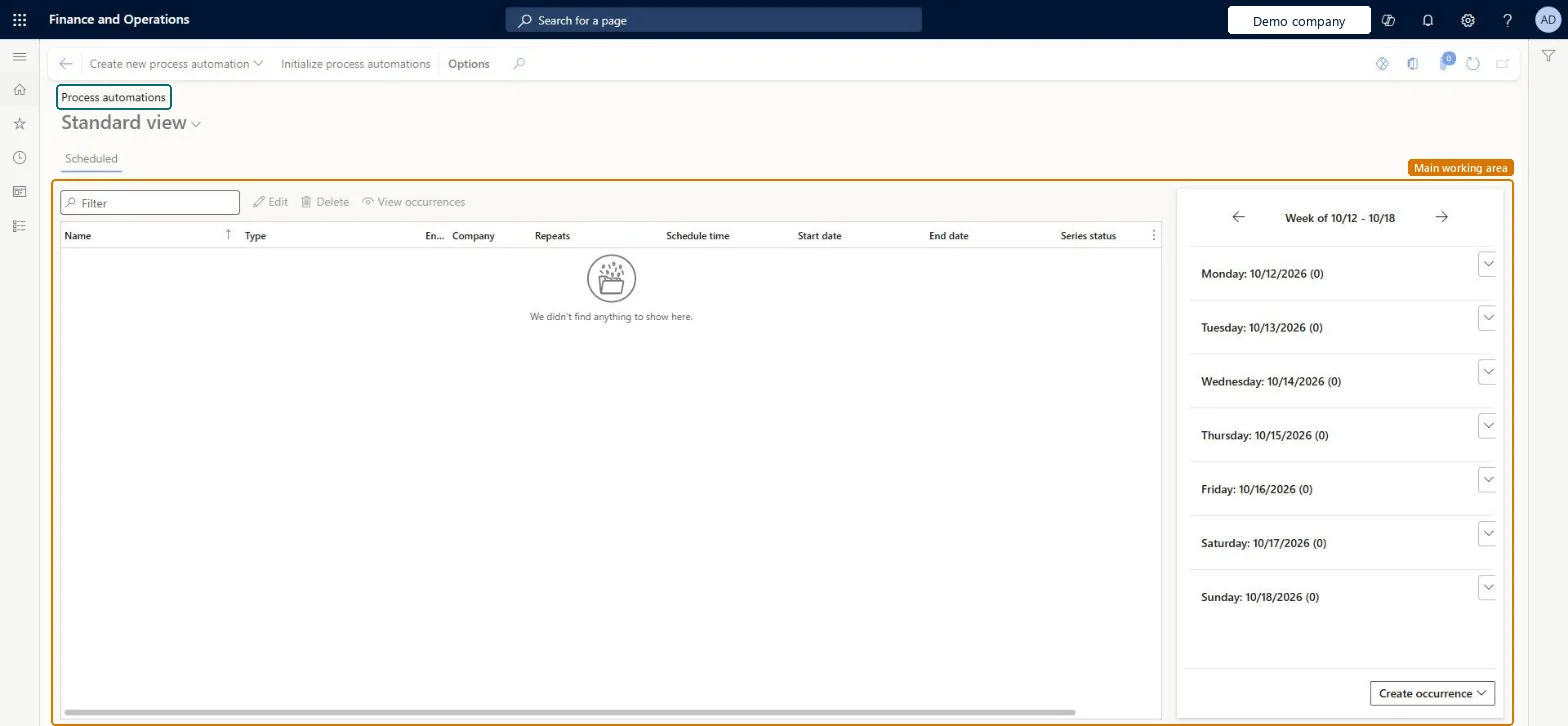
Used to create and manage scheduled series and to administer background processes, including editing their schedules and viewing recent results.
- Used by
- Accountant, Accounting manager, Accounting supervisor
- Business process
- Define posting policies
- Menu item
LedgerSettlementsProcessScheduleSeries- Main table
ProcessScheduleSeries- Data entity
- —
- Setup steps
- 1 on this page
Show what matters for
Everyone
1What it is and why
| What it is | The central page for process automation, which schedules processes that the batch server runs and shows them in a calendar view. |
|---|---|
| What you do here | Used to create and manage scheduled series and to administer background processes, including editing their schedules and viewing recent results. |
| Example | Edit a background process to add a sleep time period that pauses it for a specified period each day. |
Functional consultant · Solution architect
2Where it fits
| Business process | Define accounting policies › Define posting policies |
|---|---|
| Menu path | General ledger › Ledger setup › Process automations |
| Set up first | General ledger parameters Microsoft Learn ↗ |
| Used next by | Ledger settlements Microsoft Learn ↗ |
| Related pages | — |
| In this process | ← Set up Default descriptions |
End user · Functional consultant
3How to do it
Setup steps on this page
Set up Process automationsNo screenshots yet
Used to create and manage scheduled series and to administer background processes, including editing their schedules and viewing recent results.
Microsoft's steps
- Go to General ledger > Ledger setup > Process automations.
- Select Create new process automation, and then select Ledger settlements.
- On the General page, enter a name for the automation and set when it recurs, ideally outside working hours.
- On the Ledger settlements match criteria page, select the main accounts to include.
- Choose the match criteria, such as Date with an Allowed date difference, Posting type, Financial dimensions or Financial tags.
Source: Microsoft Learn ↗
Field guide
| Field | What it means | Worked example | Table column |
|---|---|---|---|
| Name | The name of the ledger settlement automation, shown in the Automation rule column on the Ledger settlements page.Microsoft Learn ↗ | — | — |
| Allowed date difference | How many days apart a debit and a credit can be and still match; 0 means the dates must be the same.Microsoft Learn ↗ | — | — |
| Posting type | When selected, a debit and credit match only if they have the same posting type.Microsoft Learn ↗ | — | — |
| Financial dimensions | When selected, a debit and credit match only if the chosen dimension values are the same.Microsoft Learn ↗ | — | — |
| Financial tags | When selected, a debit and credit match only if the chosen financial tag values are the same.Microsoft Learn ↗ | — | — |
Functional consultant
4Setup decisions
| Setup step | Recommended value and why | Decision · common mistake · test |
|---|---|---|
| Set up Process automations | — | — |
Solution architect
5Design impact
| Shared or per company | — |
|---|---|
| Can it be undone | — |
| Feature or country | — |
| If you change it later | When a series is edited, you choose whether the change applies to all existing occurrences or only new ones; occurrences that already completed or ended in error don't change. Microsoft Learn ↗ |
Technical architect
6Technical
| Menu item | LedgerSettlementsProcessScheduleSeries Checked in Dynamics 365 |
|---|---|
| Form | ProcessScheduleSeries Checked in Dynamics 365 |
| Table | ProcessScheduleSeriesShown as “Schedule series” in Record infoChecked in Dynamics 365 |
| Data entities | — |
| Who can open it | PrivilegesMaintain ledger settlements automation series settings LedgerSettlementsAutomationCriteriaSeriesMaintainView ledger settlements automation series settings LedgerSettlementsAutomationCriteriaSeriesViewDutiesMaintain ledger settlements automation series settings LedgerSettlementsAutomationCriteriaSeriesMaintainView ledger settlements automation series settings LedgerSettlementsAutomationCriteriaSeriesView3 security rolesAccountantLedgerAccountantAccounting manager LedgerAccountingManagerAccounting supervisor LedgerAccountingSupervisor |
| Actions on the page | Buttons: Create new process automation, Initialize process automationsChecked in Dynamics 365 |
Developer
7Developer
| Open it directly | https://<your-environment>/?mi=LedgerSettlementsProcessScheduleSeries |
|---|---|
| Integrate with | — |
| Table definition | — |
Everyone
8Sources and checks
- learn.microsoft.com/dynamics365/fin-ops-core/fin-ops/sysadmin/process-automation
- learn.microsoft.com/dynamics365/finance/general-ledger/auto-settle
- Checked in a working Dynamics 365 system, version 10.0.49: the menu item, form, table and security, the page.
GL-SETUP-070 — Set up Process automations. Beyond ERP Atlas Hub, snapshot 2026-10-16, partly verified. https://www.beyonderp.cloud/atlas/step/GL-SETUP-070