Setup page · General ledger
General ledger parameters
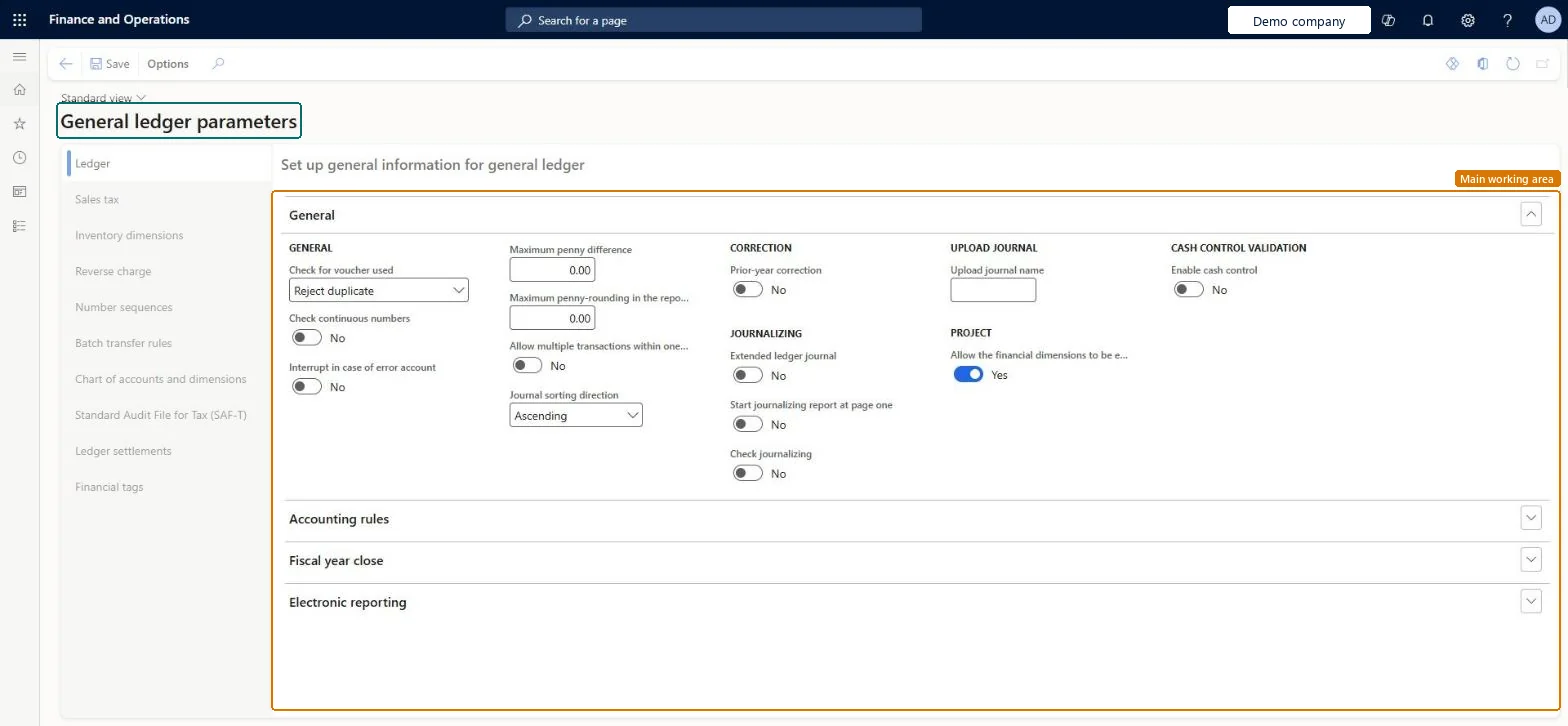
The parameters page of the General ledger module.
- Used by
- Accountant, Accounting manager, Accounting supervisor and 13 more roles
- Business process
- Set up general journal parameters in Dynamics 365 Finance
- Menu item
LedgerParameters- Main table
LedgerParameters- Data entity
LedgerParametersEntity- Setup steps
- 1 on this page
Show what matters for
Everyone
1What it is and why
| What it is | The parameters page of the General ledger module. |
|---|---|
| What you do here | Used to set module options such as how the fiscal year close is handled, the maximum penny difference for rounding, and the number sequences. |
| Example | For example, setting the Check for voucher used field to Reject duplicate stops the same voucher number from being used with different transaction dates. |
Functional consultant · Solution architect
2Where it fits
| Business process | Define accounting policies › Define posting policies › Set up general journal parameters in Dynamics 365 Finance |
|---|---|
| Menu path | General ledger › Ledger setup › General ledger parameters |
| Set up first | — |
| Used next by | General journals Microsoft Learn ↗Year end close Microsoft Learn ↗Financial tags Microsoft Learn ↗Process automations Microsoft Learn ↗ |
| Related pages | — |
End user · Functional consultant
3How to do it
Step by step, with screenshots
Set up General ledger parameters1 screen
Screen 1
Review the general ledger parameters
Go to General ledger > Ledger setup > General ledger parameters, Ledger tab
- Open the Ledger tab
- Check the voucher, penny difference and journal sorting settings
- Change them only if your process needs it, then select Save
1Check for voucher used Reject duplicate 2Maximum penny difference 0.00 3Journal sorting direction Ascending 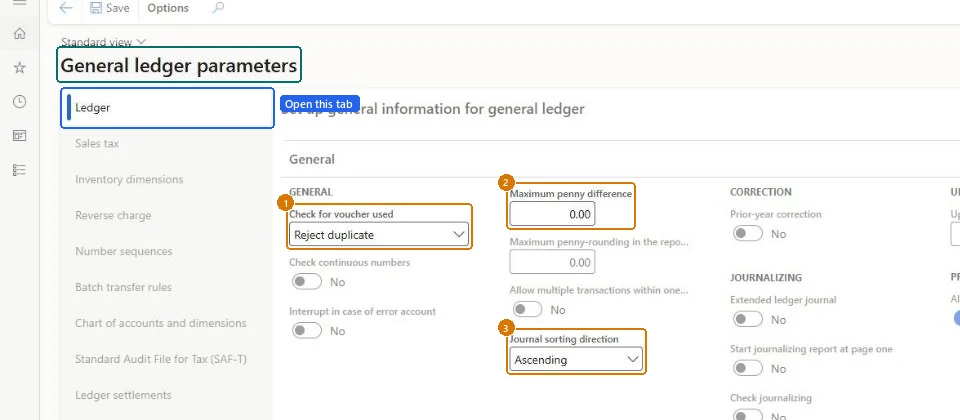
Show the full screen
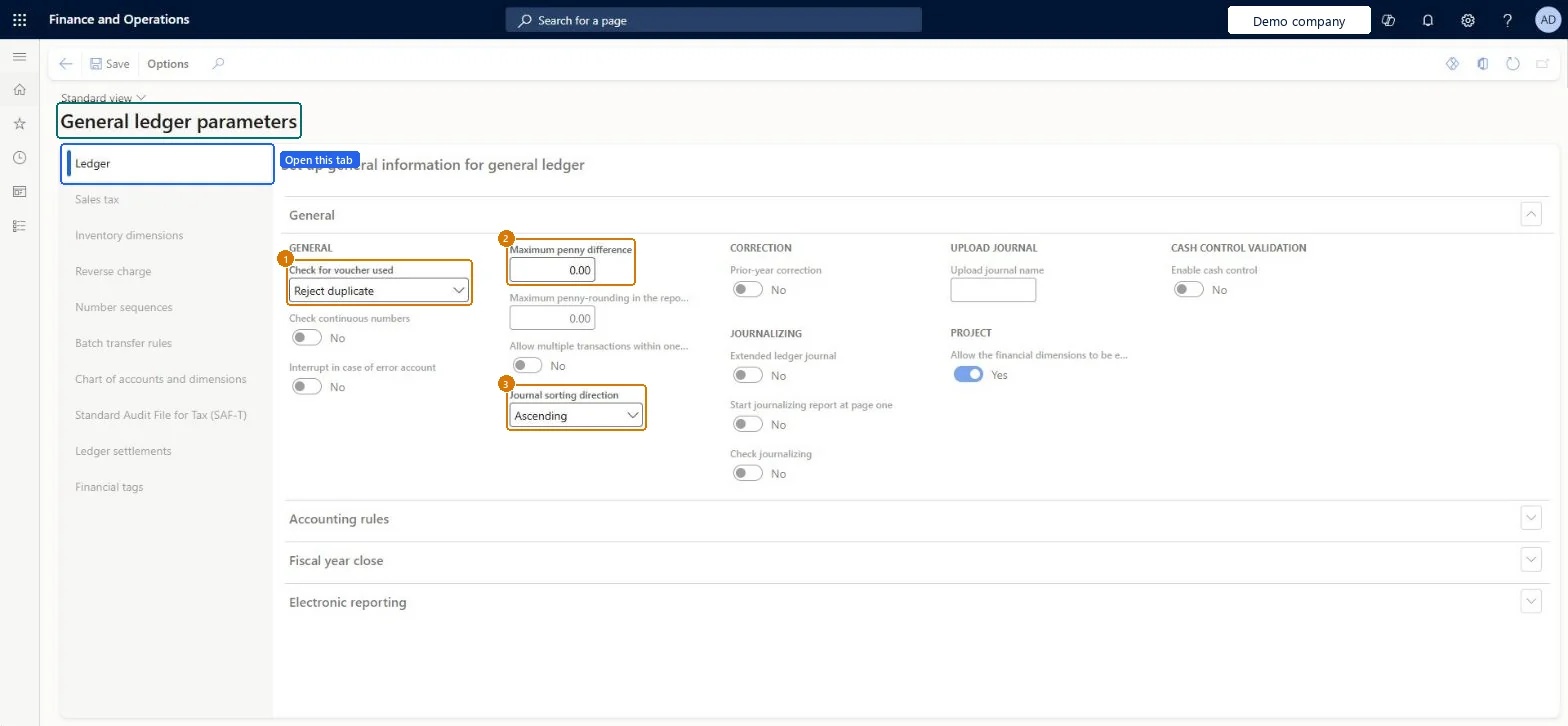
page title tab to open what to set or check
Microsoft's steps
- Go to General ledger > Ledger setup > General ledger parameters.
- Expand the Fiscal year close section.
- Choose whether earlier year-end entries are deleted when the year-end close is run again.
- Choose whether closing transactions are created during transfer.
- Choose whether the fiscal year status is set to permanently closed; No is the recommended setting.
- Close the page.
Source: Microsoft Learn ↗
Field guide
| Field | What it means | Worked example | Table column |
|---|---|---|---|
| Check for Voucher used | How the same voucher number with different transaction dates is treated: rejected, rejected within a fiscal year, accepted, or warned about.Microsoft Learn ↗ | — | — |
| Delete existing year-end entries when re-closing the year | Whether a rerun of the year-end close deletes the earlier opening and closing entries and creates new ones.Microsoft Learn ↗ | — | — |
| Create closing transactions during transfer | Whether the year-end close also brings account balances to zero in the closing year, not just opening balances in the new year.Microsoft Learn ↗ | — | — |
| Set fiscal year status to permanently closed | Permanently closes all periods of the year at year-end close; they can't be reopened, so No is recommended.Microsoft Learn ↗ | — | — |
| Check journalizing | Checks that periods are journalized before they are put on hold or permanently closed.Microsoft Learn ↗ | — | CheckJournalizing |
| Financial tags | Where the delimiter between financial tag values is set; it must not appear in tag values.Microsoft Learn ↗ | — | — |
| Use Fund dimension for year-end transactions | Turns on the public sector version of the Opening transactions page.Microsoft Learn ↗ | — | — |
| Change delimiter | Changes the character that separates segments in the chart of accounts.Microsoft Learn ↗ | — | — |
| Maximum penny difference | — | 0.00 | MaxRoundingDifferenceMST |
| Journal sorting direction | — | Ascending | — |
Functional consultant
4Setup decisions
| Setup step | Recommended value and why | Decision · common mistake · test |
|---|---|---|
| Set up General ledger parameters | — | — |
Solution architect
5Design impact
| Shared or per company | Per company: each legal entity has its own records. Microsoft data model ↗ |
|---|---|
| Can it be undone | — |
| Feature or country | — |
| If you change it later | Changing the chart of accounts delimiter isn't immediate: it runs as a data maintenance action, and it is blocked if existing dimension values already contain the new character. Microsoft Learn ↗ |
Technical architect
6Technical
| Menu item | LedgerParameters Checked in Dynamics 365 |
|---|---|
| Form | LedgerParameters Checked in Dynamics 365 |
| Table | LedgerParametersShown as “Ledger parameters” in Record infoChecked in Dynamics 365 |
| Data entities | LedgerParametersEntityLedger parameters Microsoft data model ↗ |
| Who can open it | PrivilegesMaintain general ledger parameters LedgerParametersMaintainView general ledger parameters LedgerParametersViewDutiesInquire into budget control process policies BudgetBudgetCtrlProcPoliciesInquireInquire into budget process policies BudgetBudgetProcessPoliciesInquireInquire into general ledger policies LedgerGeneralLedgerPoliciesInquireEnable general ledger process LedgerGeneralLedgerProcessEnableMaintain general ledger parameters LedgerParametersMaintainInquire into purchase order to invoice policies PurchOrderToInvoicePoliciesInquireInquire into general ledger policies RentalLedgerGeneralLedgerPolicieInquireEnable general ledger process RentalLedgerGeneralLedgerProcessEnable16 security rolesAuditorAuditPolicyManagerBudget clerk BudgetBudgetClerkBudget contributor BudgetBudgetContributorBudget manager BudgetBudgetManagerChief financial officer CompanyChiefFinancialOfficerInventory accountant InventCostAccountantInventory accountant clerk InventCostCostClerkAccountant LedgerAccountantAccounting manager LedgerAccountingManagerAccounting supervisor LedgerAccountingSupervisorFinancial controller LedgerFinancialControllerRental coordinator agent RentalCoordinatorAgentRental manager RentalManagerRental purchasing manager RentalPurchasingManagerRental sales manager RentalSalesManagerAccounts payable manager VendInvoiceAccountsPayableManager |
| Actions on the page | Options: Personalize, Page options, Edit, ShareChecked in Dynamics 365 |
Developer
7Developer
| Open it directly | https://<your-environment>/?mi=LedgerParameters |
|---|---|
| Integrate with | LedgerParametersEntity data entity Microsoft data model ↗ |
| Table definition | LedgerParameters columns and relations Microsoft data model ↗ |
Everyone
8Sources and checks
- learn.microsoft.com/training/modules/configure-ledgers-journals-dyn365-finance/4-journals
- https://aka.ms/BusinessProcessCatalog
- learn.microsoft.com/dynamics365/finance/general-ledger/tasks/close-fiscal-year
- learn.microsoft.com/common-data-model/schema/core/operationscommon/tables/finance/ledger/parameter/ledgerparameters
- learn.microsoft.com/dynamics365/finance/general-ledger/plan-chart-of-accounts
- learn.microsoft.com/dynamics365/finance/general-ledger/year-end-close
- learn.microsoft.com/training/modules/configure-periodic-processes-dyn365-finance/05-end-year-close
- learn.microsoft.com/dynamics365/finance/general-ledger/financial-tag
- learn.microsoft.com/dynamics365/finance/public-sector/general-ledger-public-sector
- learn.microsoft.com/dynamics365/finance/general-ledger/auto-settle
- Checked in a working Dynamics 365 system, version 10.0.49: the menu item, form, table and security, the page, the demo records and the values in the screenshots.