BeyondERP.Newsletter
Menu

Setup step on the Update replacement costs and insured values page · Fixed assets

Index replacement costs and insured values

Raise replacement costs and insured values by the group factors.

Business process
Maintain fixed assets
Menu item
action:AssetPeriodicUpdate
Setup steps
1 on this page
Show what matters for
SETUP GUIDEHow to set it up8 sections. Choose a role to highlight what matters to you.
Everyone

1What it is and why

What it isA periodic task that recalculates the replacement cost and insured value of fixed assets, using the percentage factors on their fixed asset groups.
What you do hereUse this periodic task to raise or lower replacement costs and insured values for many assets at once, for all or only some assets in a group.
ExampleFor example, if inflation was 3 percent last year, you can increase the replacement cost of all fixed assets by 3 percent in one run.
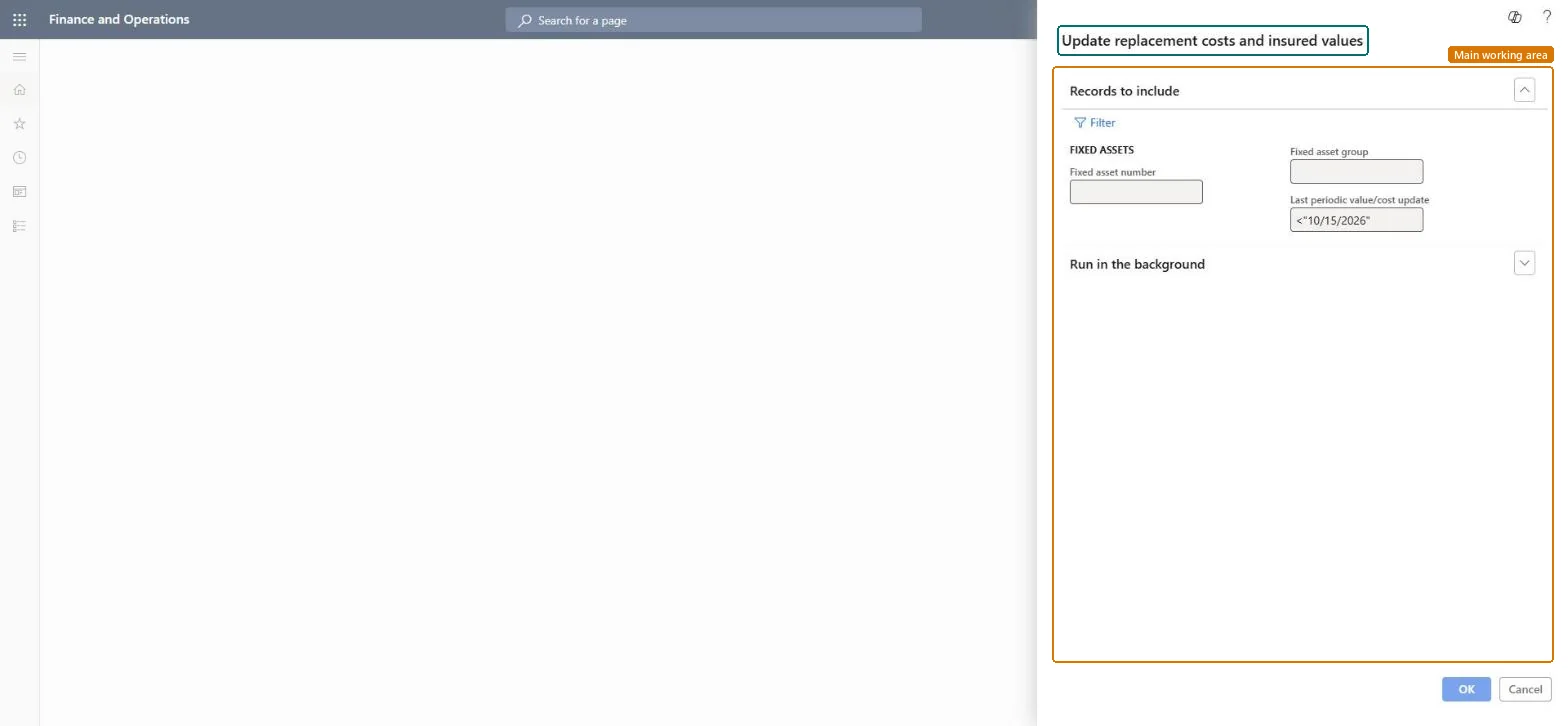
Update replacement costs and insured values page in Dynamics 365
The page in Dynamics 365. page title tab to open what to set or check
Functional consultant · Solution architect

2Where it fits

End user · Functional consultant

3How to do it

About the examples: Examples and screenshots in this guide use BEAT, a demo company in a Dynamics 365 test environment. Use your own company's codes and values instead of copying them.

When to run it

When to run itWhen you are told that replacement or insurance costs changed, for example after yearly inflation figures.
How oftenOn demand, usually once a year.
What the output showsUpdated Replacement cost and Insured value on the selected assets, and today's date in Last periodic value/cost update. A value that rose too much usually means the update ran twice, because each run builds on the last.

Source: Microsoft Learn

Setup steps on this page

Index replacement costs and insured values

Raise replacement costs and insured values by the group factors.

Steps from Microsoft

  1. Go to Fixed assets > Periodic tasks > Update replacement costs and insured values.
  2. Set the Replacement cost factor and Insured value factor on each fixed asset group first. A factor of 0 skips that value.
  3. Select Select to change the date criteria for Last periodic value/cost update; by default assets already updated today are skipped.
  4. Run it, then check the Replacement cost and Insured value of a few assets against the expected percentage.

Source: Microsoft Learn

Fields on the page

FieldWhat it means
Last periodic value/cost updateThe date criteria that decides which assets are updated, compared with each asset's last update date.Microsoft Learn

Common errors and fixes

MessageWhat to do
Values rose by twice the factorThe update ran twice; each run builds on the last. Correct the values by hand. Microsoft Learn

Test checklist

  1. Replacement cost and insured value changed by the group factor.
  2. Groups with a 0 factor kept their value.
  3. Last periodic value/cost update shows today's date.

Source: Microsoft Learn

Functional consultant

4Setup decisions

Setup stepRecommended value and whyDecision, common mistake and test
Index replacement costs and insured valuesSet the factors on the groups, run once a year, and keep the default date criteria so assets updated today are skipped.Each run builds on the last; book values aren't changed.Index values yearly?Running it twice for the same year.Test: Values up by 3 percent

Feature management and licence

Licence or add-inFixed assets is part of Dynamics 365 Finance. Fixed asset managers run it when insurers or indexes change. On this system the roles that open the page include Accounting supervisor, Accountant, Rental manager, Rental purchasing manager. No Feature management feature needs to be turned on for this page.

Checked in Dynamics 365

Solution architect

5Design impact

Shared or per companyPer company, using the factors of each fixed asset group. Microsoft Learn
Can it be undoneHard to reverse: Correct values by hand.
If you change it laterEach run builds on the last one, so updates add up; book value and net book value are not changed. Microsoft Learn
Technical architect

6Technical

Menu itemaction:AssetPeriodicUpdate Checked in Dynamics 365
FormDialog Checked in Dynamics 365
Roles to set it up and use itTo use itAccounting supervisor LedgerAccountingSupervisorAccountant LedgerAccountantRental manager RentalManagerRental purchasing manager RentalPurchasingManagerGive people one of these roles. On this system, 4 roles can run this page.Checked in Dynamics 365
Developer

7Developer

Open it by URLhttps://<your-environment>/?mi=action:AssetPeriodicUpdate
Data migrationLoad order: The update has no data entity in Data management, so it can't be loaded from a file or a configuration template. The report stores nothing of its own: it reads the posted fixed asset data, so migrate the assets, books and transactions and run it again in the new environment.Microsoft Learn
Everyone

8Sources

To cite this step: FA-PER-060, Index replacement costs and insured values. Beyond ERP Atlas Hub, 2026-11-11. https://www.beyonderp.cloud/atlas/step/FA-PER-060