Master data page · Fixed assets
Fixed assets
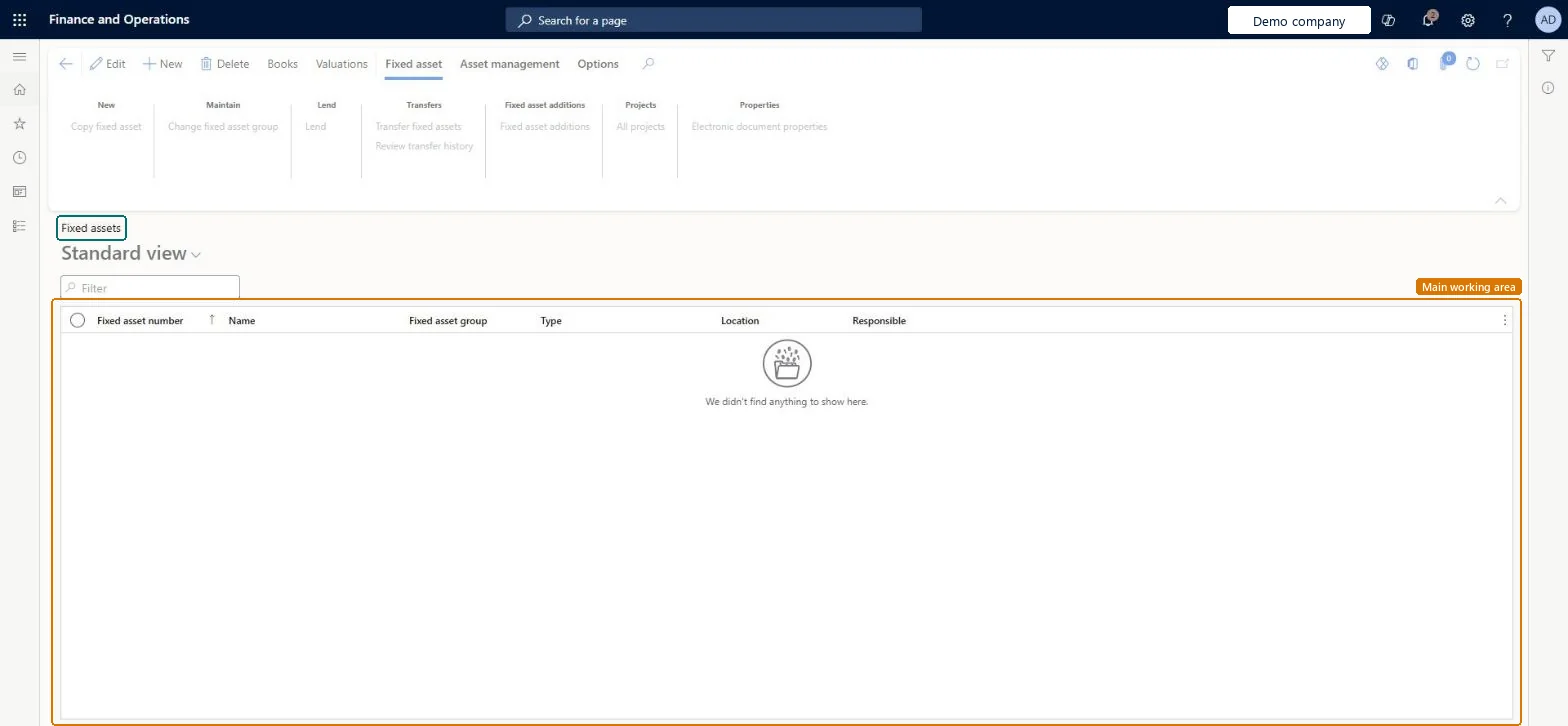
A list and details page where you record and manage each fixed asset, holding both its financial and non-financial information.
- Used by
- Accounts payable manager, Auditor, Business Performance Planning app role and 9 more roles
- Business process
- —
- Menu item
AssetTable- Main table
AssetTable- Data entity
AssetFixedAssetEntity- Setup steps
- —
Show what matters for
Everyone
1What it is and why
| What it is | A list and details page where you record and manage each fixed asset, holding both its financial and non-financial information. |
|---|---|
| What you do here | Used to create fixed assets, keep details such as location, insurance and bar code up to date, and open each asset's books, transactions and valuations. |
| Example | For example, instead of tracking one conference room chair, you can record 50 chairs bought together as a single asset and use the Quantity, Unit of measure and Unit cost fields. |
Functional consultant · Solution architect
2Where it fits
| Business process | — |
|---|---|
| Menu path | Fixed assets › Fixed assets › Fixed assets |
| Set up first | Fixed asset groups Microsoft Learn ↗Fixed assets parameters Microsoft Learn ↗ |
| Used next by | Fixed assets journal Microsoft Learn ↗Reclassification Microsoft Learn ↗ |
| Related pages | Fixed asset management Microsoft Learn ↗Update replacement costs and insured values Microsoft Learn ↗ |
End user · Functional consultant
3How to do it
Microsoft's steps
- Go to Fixed assets > Fixed assets > Fixed assets.
- On the Action Pane, select New.
- In the Fixed asset group field, select a group. The number fills in automatically if autonumbering is turned on; otherwise enter a unique number.
- In the Name field, enter a name and any other details your business needs.
- On the Action Pane, select Books.
- In the Acquisition date field, enter a date.
- In the Acquisition price field, enter an amount, and complete the other details for each book.
- Close the page.
Source: Microsoft Learn ↗
Field guide
| Field | What it means | Worked example | Table column |
|---|---|---|---|
| Fixed asset group | The only required field; it fills in default values and books for the new asset.Microsoft Learn ↗ | — | — |
| Property type | Says whether the record is a regular fixed asset, continuing property kept for inventory only, or other (intangible) assets.Microsoft Learn ↗ | — | PropertyType |
| Major type | A high-level grouping such as equipment, buildings or land, used for reporting.Microsoft Learn ↗ | — | MajorType |
| Quantity | Lets one asset record cover several similar low-cost items, together with Unit of measure and Unit cost.Microsoft Learn ↗ | — | Quantity |
| Structure | Shows whether the asset is a main asset with components or a component of another asset.Microsoft Learn ↗ | — | — |
| Insured value | The insured value of the asset, which you can edit here or update in bulk with the periodic update.Microsoft Learn ↗ | — | InsuredValue |
| Last periodic value/cost update | The date of the last successful bulk update of replacement cost or insured value; it is set automatically.Microsoft Learn ↗ | — | — |
Functional consultant
4Setup decisions
| Setup step | Recommended value and why | Decision · common mistake · test |
|---|---|---|
| — No setup is made on this page. | ||
Solution architect
5Design impact
| Shared or per company | Per company: each legal entity has its own records. Microsoft data model ↗ |
|---|---|
| Can it be undone | — |
| Feature or country | — |
| If you change it later | A fixed asset record can't be deleted once transactions are posted to one of its books, or while it is on an unposted journal line. Microsoft Learn ↗ |
Technical architect
6Technical
| Menu item | AssetTable Checked in Dynamics 365 |
|---|---|
| Form | AssetTable Checked in Dynamics 365 |
| Table | AssetTableShown as “Fixed assets” in Record infoKey field: AssetGroup, AssetIdChecked in Dynamics 365 |
| Data entities | AssetFixedAssetEntityFixed assets Microsoft data model ↗AssetFixedAssetV2EntityFixed assets V2 entity Microsoft data model ↗DimAttributeAssetTableEntityFixed assets Microsoft data model ↗DimAttributeRAssetTable_RUEntityFixed assets (Russia) Microsoft data model ↗ |
| Who can open it | PrivilegesMaintain fixed asset records AssetTableMaintainView fixed asset records AssetTableViewDutiesInquire into fixed assets AssetFixedAssetsInquireMaintain fixed assets AssetFixedAssetsMaintainMaintain Master entity data for data management DataManagementApplicationMasterEntitiesMaintainView Master entity data for data management DataManagementApplicationMasterEntitiesView12 security rolesAuditorAuditPolicyManagerBusiness Performance Planning app role BPPBudgetPlanningAppRoleBudget manager BudgetBudgetManagerChief financial officer CompanyChiefFinancialOfficerData management administrator DataManagementAdministratorData management migration user DataManagementMigrationUserAccountant LedgerAccountantAccounting manager LedgerAccountingManagerAccounting supervisor LedgerAccountingSupervisorDemand planning app role ScpDemandPlanningAppRoleInformation technology manager SysServerITManagerAccounts payable manager VendInvoiceAccountsPayableManager |
| Actions on the page | Fixed asset: New, Maintain, Lend, Transfers, Fixed asset additions, Projects, PropertiesAsset management: New, ViewOptions: Personalize, Page options, ShareChecked in Dynamics 365 |
Developer
7Developer
| Open it directly | https://<your-environment>/?mi=AssetTable |
|---|---|
| Integrate with | AssetFixedAssetEntity data entity Microsoft data model ↗ |
| Table definition | AssetTable columns and relations Microsoft data model ↗ |
Everyone
8Sources and checks
- learn.microsoft.com/training/modules/set-up-acquire-fixed-assets-finance/fixed-assets-page
- learn.microsoft.com/dynamics365/finance/fixed-assets/tasks/create-fixed-asset
- learn.microsoft.com/common-data-model/schema/core/operationscommon/tables/finance/fixedassets/main/assettable
- learn.microsoft.com/dynamics365/finance/fixed-assets/set-up-fixed-assets
- learn.microsoft.com/training/modules/set-up-acquire-fixed-assets-finance/create-fixed-asset
- learn.microsoft.com/training/modules/manage-fixed-assets-finance/recalculate-replacement-costs
- learn.microsoft.com/dynamics365/finance/fixed-assets/recalculate-replacement-costs-insured-values-fixed-asset-groups
- learn.microsoft.com/dynamics365/finance/fixed-assets/tasks/propose-fixed-asset-acquisitions
- learn.microsoft.com/dynamics365/finance/fixed-assets/tasks/reclassify-fixed-assets
- learn.microsoft.com/dynamics365/finance/fixed-assets/fixed-asset-management-workspace
- Checked in a working Dynamics 365 system, version 10.0.49: the menu item, form, table and security, the page.