SETUP GUIDEHow to set it up8 sections. Choose a role to highlight what matters to you.
Everyone
1What it is and why
What it is
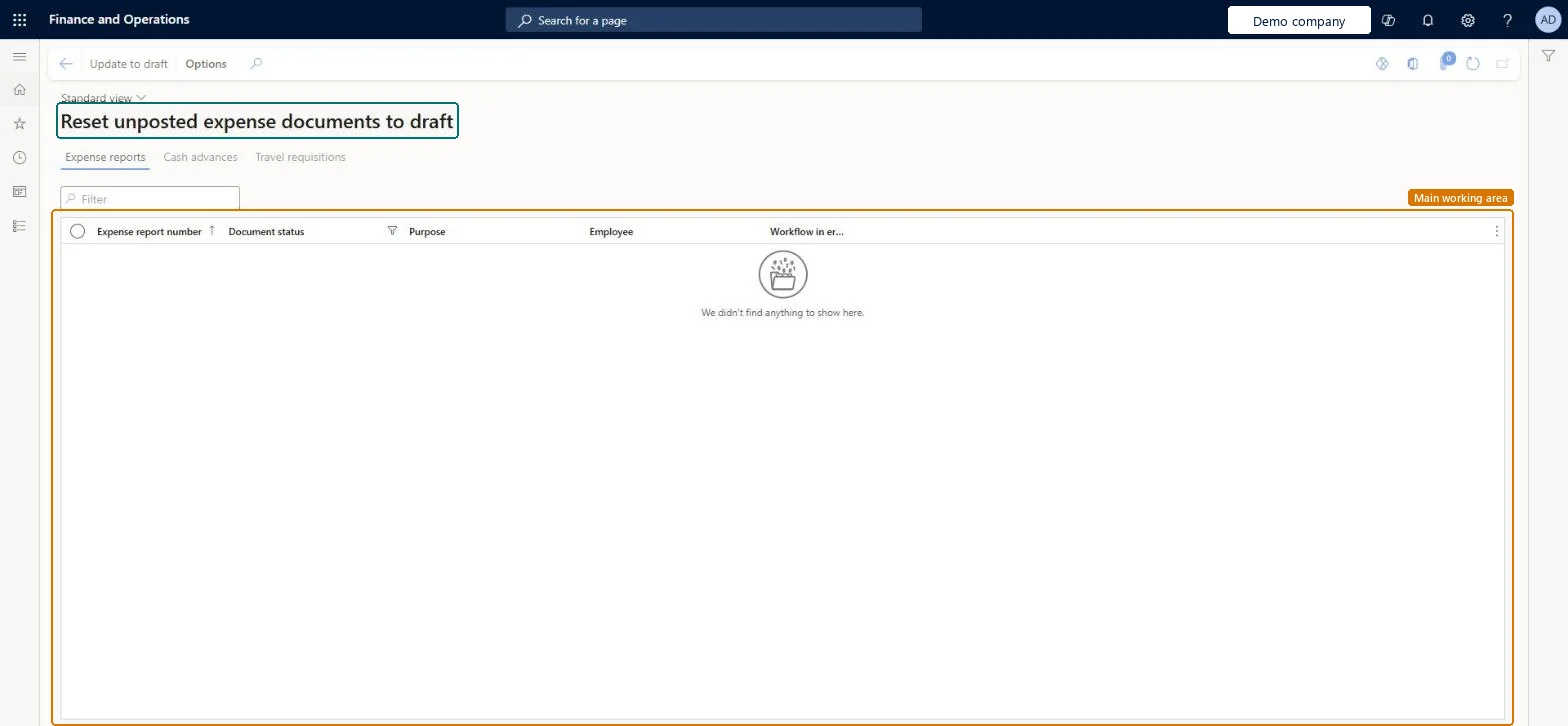
A periodic task page, titled Reset unposted expense documents to draft, that lists unposted expense reports, cash advances and travel requisitions on three tabs and sets the selected ones back to draft.
What you do here
Use this task as an expense administrator to free an unposted document that is stuck in workflow or must be corrected by the employee; it takes the document out of approval.
Example
For example, an expense report sits in review after its approver left the company and the workflow can't move; the administrator selects it on the Expense reports tab, selects Update to draft, and the employee resubmits it to the new manager.
The page in Dynamics 365. page title tab to open what to set or check
About the examples: Examples and screenshots in this guide use BEAT, a demo company in a Dynamics 365 test environment. Use your own company's codes and values instead of copying them.
When to run it
When to run it
When an unposted expense report, cash advance or travel requisition is stuck in workflow or must be corrected by the employee.
How often
On demand.
What the output shows
The selected unposted documents return to the status Draft, so the employee can edit and resubmit them. Posted documents are not listed and can't be reset.
Unposted expense reports that can be set back to draft.Checked in Dynamics 365
Cash advances (tab)
Unposted cash advance requests that can be set back to draft.Checked in Dynamics 365
Travel requisitions (tab)
Unposted travel requisitions that can be set back to draft.Checked in Dynamics 365
Update to draft (button)
Sets the selected documents back to Draft, out of the approval workflow.Checked in Dynamics 365
Common errors and fixes
Message
What to do
A document isn't listed
Only unposted documents are listed. A posted expense report can't be reset. Checked in Dynamics 365
Submit is not available on the document
No active workflow exists for this document type. Create and activate the matching workflow on Expense management > Setup > General > Expense management workflows. Microsoft Learn
Use it only when the workflow can't move (approver gone, workflow changed) and tell the employee to resubmit; keep the role that can run it to the expense administrator.Update to draft takes the document out of approval, so it must go through approval again; used freely it bypasses the approval control.
In this system Employee and Contractor enter their own expenses, and Expense administrator sets up the module and processes documents. The expense mobile app needs the Employee role, a company on the user account and a link to an employee with active employment. Only the Expense administrator role can open this page in this system. No Feature management feature is needed.
Hard to reverse: The document leaves its workflow; the employee must submit it again.
If you change it later
Sets unposted expense documents back to draft, which takes them out of the approval workflow. Microsoft Learn
Technical architect
6Technical
Menu item
TrvStatusResetChecked in Dynamics 365
Form
TrvStatusResetChecked in Dynamics 365
Table
TrvExpTableShown as “Expense reports” in Record infoChecked in Dynamics 365
Data entities
TrvExpTableMobileEntityExpense reports (the expense report header; the reset itself has no entity) Microsoft data model
Who can open it
PrivilegesReset expense document status TrvStatusResetMaintainDutiesMaintain expense management process TrvTravelAndExpenseProcessMaintain1 security roleExpense administrator ExpenseAdministratorChecked in Dynamics 365
Roles to set it up and use it
To set it up or change itExpense administrator ExpenseAdministratorGive people one of these roles. On this system, 1 role can open this page.Checked in Dynamics 365
Actions on the page
Options: Personalize, Page options, ShareChecked in Dynamics 365
Developer
7Developer
Open it by URL
https://<your-environment>/?mi=TrvStatusReset
Data migration
Load order: The reset task has no data entity in Data management, so it can't be loaded from a file or a configuration template. It changes the status of existing documents; nothing to migrate.Microsoft Learn