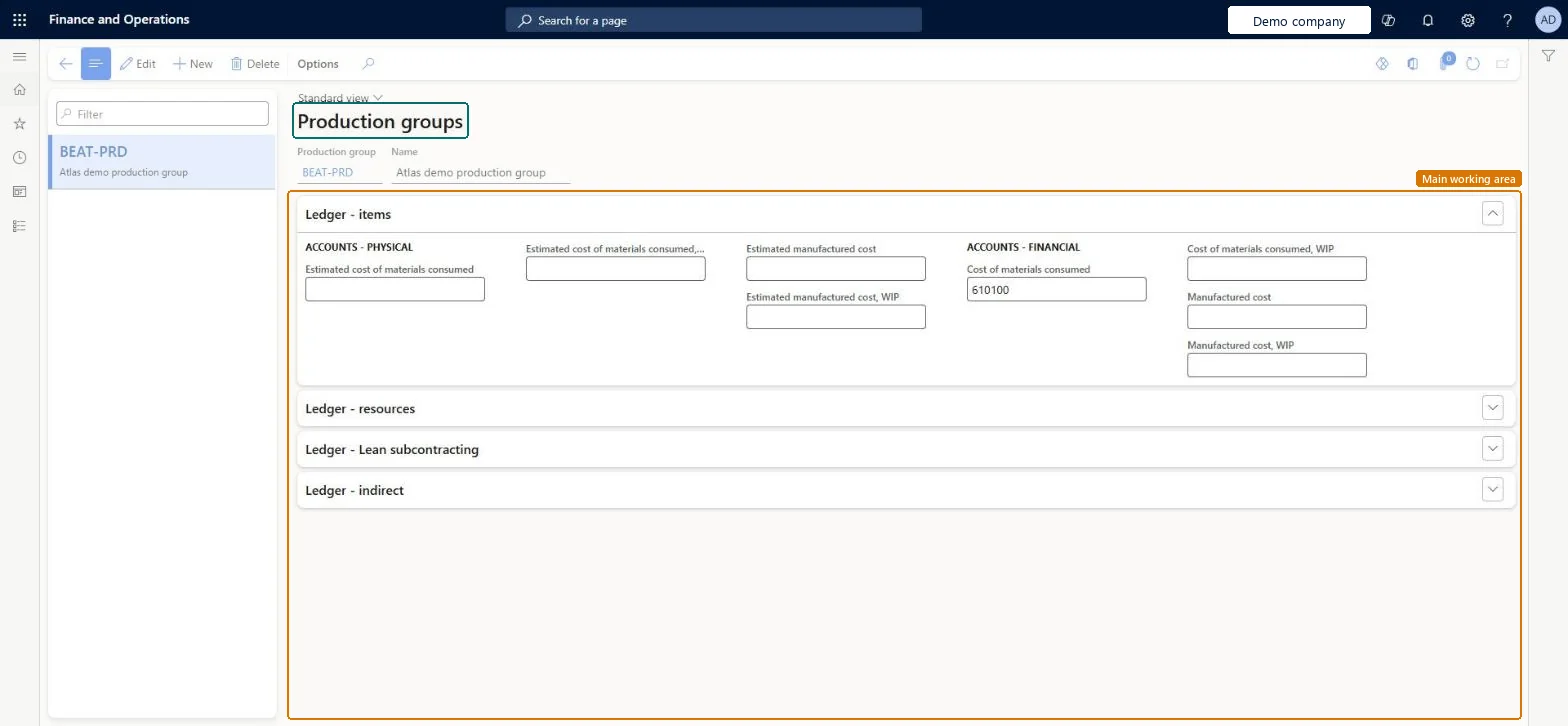
Setup step on the Production groups page · Cost management
Set up Production groups
Use this page to set the main accounts for items, resources, Lean subcontracting and indirect costs that production orders post to when the Ledger posting parameter is set to Production groups.
Inventory accountant, Inventory accountant clerk, Accounting manager and 3 more roles
Business process
Define costing policies
Menu item
ProdGroup
Main table
ProdGroup
Data entity
CostProductionGroupEntity
Setup steps
1 on this page
Show what matters for
SETUP GUIDEHow to set it up8 sections. Choose a role to highlight what matters to you.
Everyone
1What it is and why
What it is
A setup page where you define production groups, which link production orders to the ledger accounts that are used to post or group the orders for reporting.
What you do here
Use this page to set the main accounts for items, resources, Lean subcontracting and indirect costs that production orders post to when the Ledger posting parameter is set to Production groups.
Example
For example, you can use production groups when more than one production line runs similar products or has similar equipment, and then compare the costs between the groups.
The page in Dynamics 365. page title tab to open what to set or check
About the examples: Examples and screenshots in this guide use BEAT, a demo company in a Dynamics 365 test environment. Use your own company's codes and values instead of copying them.
Setup steps on this page
Set up Production groups
Use this page to set the main accounts for items, resources, Lean subcontracting and indirect costs that production orders post to when the Ledger posting parameter is set to Production groups.
How to use it
Go to Cost management > Ledger integration policies setup > Production groups.
Select New and enter a Production group and Name.
On the Ledger - items FastTab, select the physical and financial accounts, such as Estimated cost of materials consumed and Manufactured cost.
Complete the Ledger - resources, Ledger - Lean subcontracting and Ledger - indirect FastTabs.
Select Save.
Source: Checked in Dynamics 365
Fields on the page
Field
What it means
Table column
Estimated cost of materials consumed
Account used when a picking list journal is posted for a production order. The amount is reversed when the production order is ended.Microsoft Learn
PicklistLedgerDimension
Estimated cost of materials consumed, WIP
WIP account used when a picking list journal is posted for a production order, as the offset to Estimated cost of materials consumed.Microsoft Learn
PickListOffsetLedgerDimension
Estimated manufactured cost
Account used when a report as finished journal is posted for a production order. The amount is reversed when the production order is ended.Microsoft Learn
ReportLedgerDimension
Estimated manufactured cost, WIP
WIP account used when a report as finished journal is posted for a production order, as the offset to Estimated manufactured cost.Microsoft Learn
ReportOffsetLedgerDimension
Cost of materials consumed
Account that recognises the materials consumed in the production order during the ending process.Microsoft Learn
IssueLedgerDimension
Cost of materials consumed, WIP
WIP account that recognises the materials consumed in the production order during the ending process.Microsoft Learn
IssueOffsetLedgerDimension
Manufactured cost
Account that recognises the cost of the finished good when the production order is ended.Microsoft Learn
ReceiptLedgerDimension
Manufactured cost, WIP
WIP account that recognises the cost of the finished good when the production order is ended, as the offset to Manufactured cost.Microsoft Learn
ReceiptOffsetLedgerDimension
Test checklist
Set Ledger posting to Production groups and create a group with all eight Ledger-items accounts.
Assign the group to a production order and post the picking list and report as finished.
Check the vouchers use the group's Estimated accounts.
End the order and check the end voucher uses Cost of materials consumed and Manufactured cost accounts from the group.
Use production groups only when Ledger posting on Production control parameters is Production groups, typically to compare costs between production lines that run similar products; then fill all Ledger-items accounts.The accounts on this page are used only with the Production groups option; Learn positions it for comparing costs between groups.
PrivilegesMaintain production groups ProdGroupMaintainView production groups ProdGroupViewDutiesInquire into manufacturing costing policies CostProdPoliciesInquireMaintain manufacturing costing policies CostProdPoliciesMaintainEnable general ledger process LedgerGeneralLedgerProcessEnableInquire into production policies ProdProductionPoliciesInquireEnable production process ProdProductionProcessEnable6 security rolesInventory accountant InventCostAccountantInventory accountant clerk InventCostCostClerkAccounting manager LedgerAccountingManagerAccounting supervisor LedgerAccountingSupervisorProduction manager ProdProductionManagerProcess engineering manager RouteProcessEngineeringManagerChecked in Dynamics 365
Roles to set it up and use it
To set it up or change itAccounting manager LedgerAccountingManagerAccounting supervisor LedgerAccountingSupervisorProduction manager ProdProductionManagerProcess engineering manager RouteProcessEngineeringManagerTo use itInventory accountant InventCostAccountantInventory accountant clerk InventCostCostClerkGive people one of these roles. On this system, 6 roles can open this page.Checked in Dynamics 365