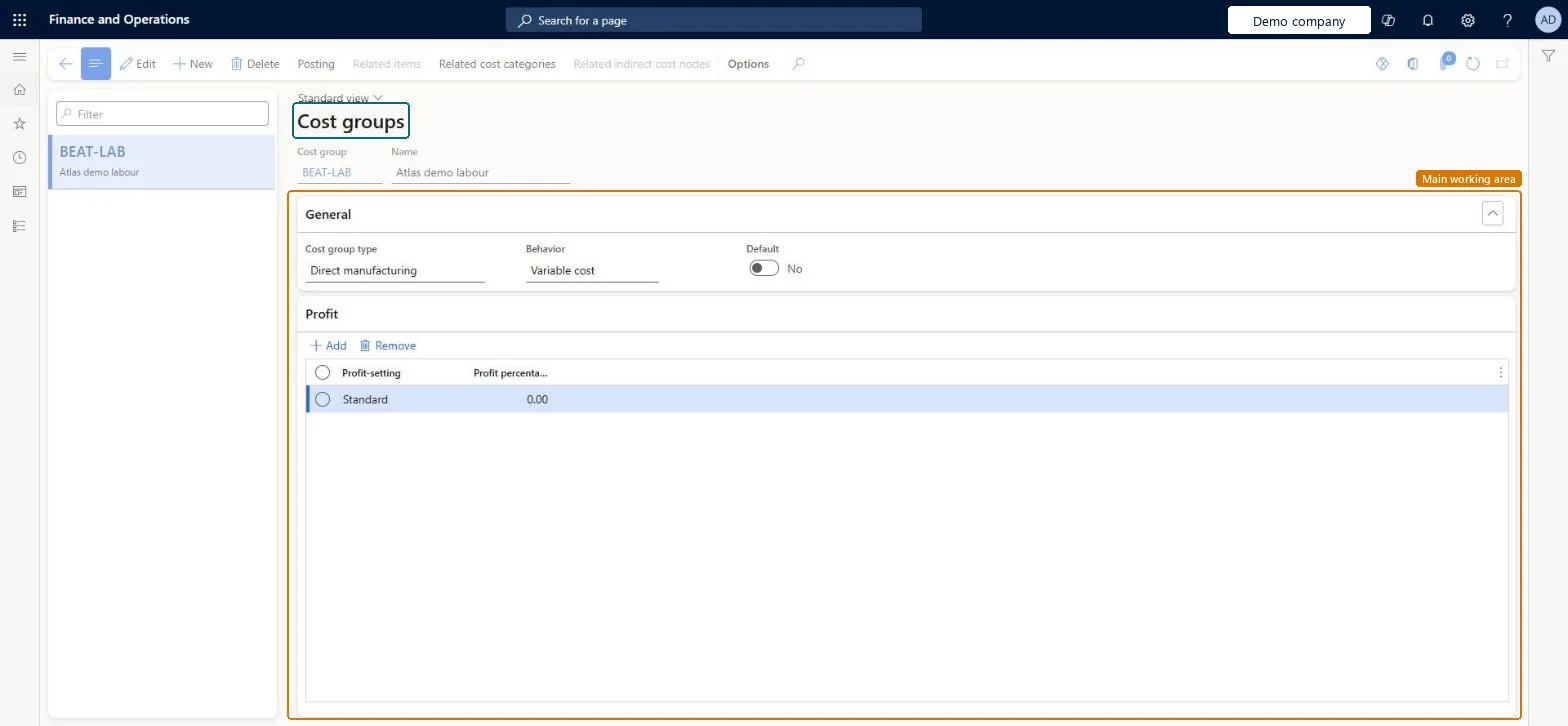
Setup step on the Cost groups page · Cost management
Set up Cost groups
Use this page to define cost groups, assign each one a Cost group type and an optional Behavior, and set the profit percentage that BOM calculations use to suggest a sales price.
Inventory accountant, Inventory accountant clerk, Accounting manager and 1 more role
Business process
Define costing policies
Menu item
BOMCostGroup
Main table
BOMCostGroup
Data entity
CostGroupEntity
Setup steps
1 on this page
Show what matters for
SETUP GUIDEHow to set it up8 sections. Choose a role to highlight what matters to you.
Everyone
1What it is and why
What it is
A setup page where you create the cost groups that segment and analyse the cost contributions, such as material, labour and overhead, in a manufactured item's calculated cost.
What you do here
Use this page to define cost groups, assign each one a Cost group type and an optional Behavior, and set the profit percentage that BOM calculations use to suggest a sales price.
Example
For example, a food manufacturer can create separate cost groups for dry material overhead and refrigerated material overhead because the two have different indirect costs.
The page in Dynamics 365. page title tab to open what to set or check
About the examples: Examples and screenshots in this guide use BEAT, a demo company in a Dynamics 365 test environment. Use your own company's codes and values instead of copying them.
Setup steps on this page
Set up Cost groups
Use this page to define cost groups, assign each one a Cost group type and an optional Behavior, and set the profit percentage that BOM calculations use to suggest a sales price.
Steps from Microsoft
Go to Cost management > Inventory accounting policies setup > Cost groups.
Select New to create a group.
In the Cost group field, enter a unique name for the cost group.
In the Name field, enter a description of the cost group.
In the Cost group type field, select the type, such as Indirect.
Optionally, in the Behavior field, select Fixed cost or Variable cost.
Indicates whether the cost group applies to direct material, direct manufacturing or direct outsourcing, or is indirect or undefined. The type controls where the cost group can be assigned and supports reporting and variance accounts.Microsoft Learn
CostGroupType
Behavior
Optionally marks the cost group as a fixed cost or a variable cost for reporting. A cost group without a behavior is treated as a variable cost.Microsoft Learn
CostGroupBehavior
Profit percentage
A profit setting percentage for the cost group that the BOM calculation uses to suggest a sales price on a cost-plus-markup basis.Microsoft Learn
ProfitPct
Test checklist
Create cost groups for material, labour and overhead with cost group types direct material, direct manufacturing and indirect, and set a Profit percentage.
Assign the material group to a component item and the labour group to a cost category.
Run a BOM calculation for a manufactured item.
On the Summary page check the cost is split by cost group, and check the suggested sales price uses the profit percentage.
One cost group per cost contribution you want to analyse (for example material, labour, machine, overhead), each with the matching Cost group type: direct material for items, direct manufacturing for cost categories, indirect for costing sheet surcharges and rates.The Cost group type controls where a group can be assigned and drives segmentation and variance accounts, so the type must match what the group is used for.
Leaving Behavior blank when fixed and variable costs must be shown separately: a blank Behavior is treated as variable. Also, a cost group with the wrong type won't appear in the lookups where it is needed.Test: Cost group segmentation in BOM calculation
Hard to reverse: Cost groups are stamped into calculated costs, cost rollups and variances. Changing them later only affects new calculations; existing standard costs and variances keep the old segmentation until recalculated.
Technical architect
6Technical
Menu item
BOMCostGroupChecked in Dynamics 365
Form
BOMCostGroupChecked in Dynamics 365
Table
BOMCostGroupShown as “COST GROUPS” in Record infoChecked in Dynamics 365
PrivilegesMaintain BOM cost groups BOMCostGroupMaintainView BOM cost groups BOMCostGroupViewMaintain the cost group profit settings BOMCostProfitMaintainDutiesInquire into BOM calculations BOMBillsOfMaterialsCalcStatusInquireEnable cost process InventCostCostProcessEnableMaintain activation of cost InventPriceActivationOfCostAuthorize4 security rolesInventory accountant InventCostAccountantInventory accountant clerk InventCostCostClerkAccounting manager LedgerAccountingManagerProduction manager ProdProductionManagerChecked in Dynamics 365
Roles to set it up and use it
To set it up or change itAccounting manager LedgerAccountingManagerTo use itInventory accountant InventCostAccountantInventory accountant clerk InventCostCostClerkProduction manager ProdProductionManagerGive people one of these roles. On this system, 4 roles can open this page.Checked in Dynamics 365
Actions on the page
(Action Pane without tabs): Posting, Related items, Related cost categories, Related indirect cost nodesChecked in Dynamics 365
CostGroupEntity (Cost groups): loaded for each company, in Microsoft's default template 310 - Product information management.Load order: Microsoft's default template 310 - Product information management loads Cost groups at execution unit 1, level 30, sequence 10. Lower levels load first, and entities at the same level load in sequence order.Load first: the default templates at lower levels (System setup to General ledger)Microsoft Learn