SETUP GUIDEHow to set it up8 sections. Choose a role to highlight what matters to you.
Everyone
1What it is and why
What it is
A workspace that shows information about the company's bank accounts, with a Summary view and an Analytics page.
What you do here
Use this workspace to see bank balances, bridged amounts and reconciliation status at a glance, import electronic bank files, and open the bank pages used most often.
Example
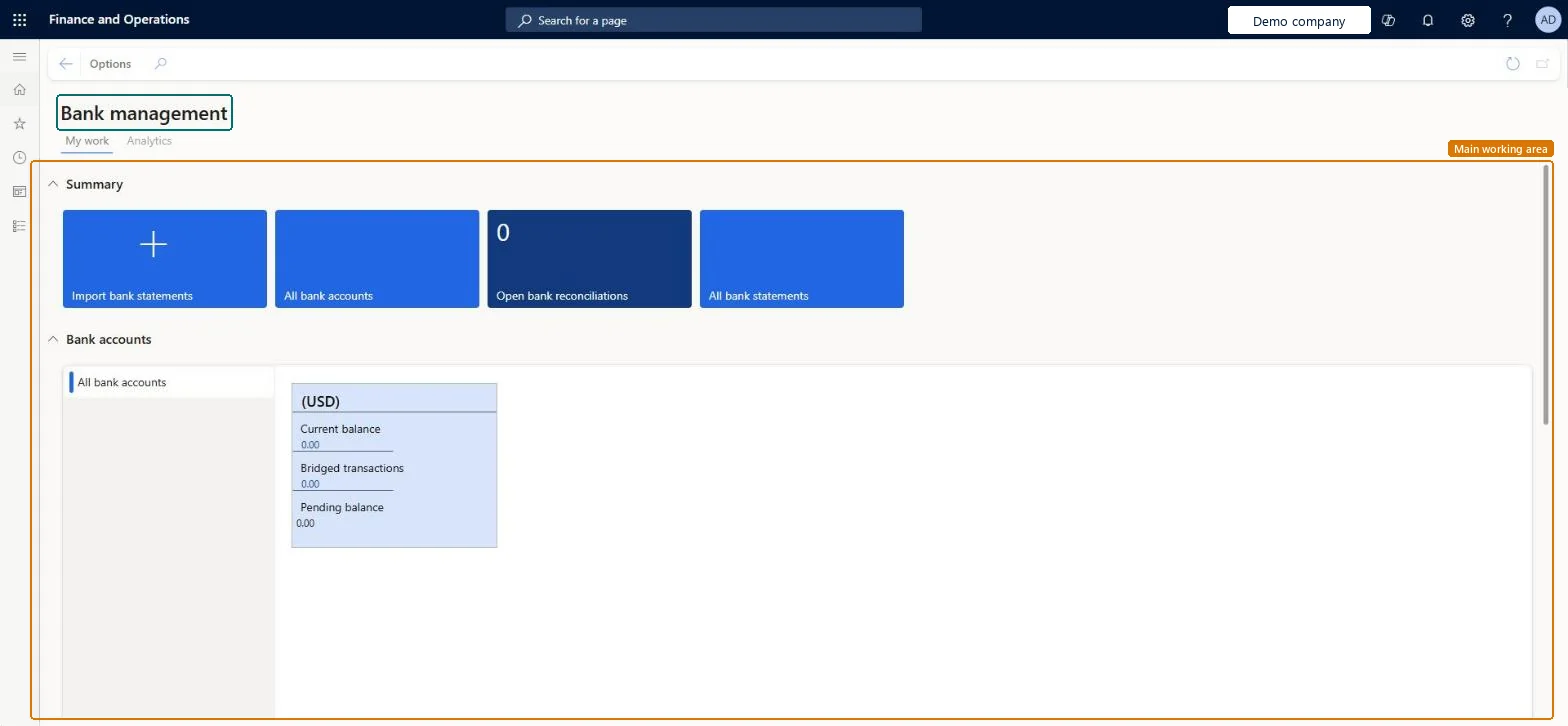
For example, BEAT's treasurer opens the workspace at 09:00: the card for the operating account shows a balance of 1,250,000.00, bridged transactions of 40,000.00 and a pending balance of 1,210,000.00, and the card says when the account was last reconciled.
The page in Dynamics 365. page title tab to open what to set or check
About the examples: Examples and screenshots in this guide use BEAT, a demo company in a Dynamics 365 test environment. Use your own company's codes and values instead of copying them.
Setup steps on this page
Use the Bank management workspace
Start the day in the Bank management workspace to see bank balances, bridged amounts and reconciliation status and to import bank files.
Steps from Microsoft
Go to Cash and bank management > Workspaces > Bank management.
In the Balance section, in Select bank account, choose All bank accounts, select All under the chart and refresh it with the icon next to Last update.
Read each bank account card: the current balance, the Bridged transactions amount and the Pending balance (current balance minus bridged transactions).
Use the Summary tiles to import electronic bank files for bank accounts across all legal entities.
From Related information, open Bank transactions, Bridged transactions or the General journal page to record a bank transfer.
Open the Analytics page for total bank balance, balance by legal entity, by bank account and by currency.
One card per bank account in the legal entity, with the current balance that you can drill into. When Advanced bank reconciliation is on for the account, the card also shows when it was last reconciled.Microsoft Learn
Bridged transactions
Pending transactions posted with bridging that aren't cleared yet; drill down to see them.Microsoft Learn
40,000.00
Pending balance
The current balance minus the bridged, or pending, transactions.Microsoft Learn
1,210,000.00
Balance
A chart of historic balances for the selected account (in the bank account currency) or for all accounts (in the accounting currency), for the current week, month, year, last five years or all periods.Microsoft Learn
Analytics
Power BI visuals: total bank balance in system currency, balance by legal entity, today's actual versus forecasted balance, balance by bank account and by currency.Microsoft Learn
Common errors and fixes
Message
What to do
The reconciliation tiles and the last reconciled date are empty for a bank account
The workspace shows reconciliation information only for bank accounts with Advanced bank reconciliation set to Yes on the Bank accounts page. Turn it on for the account, or reconcile it from Bank accounts > Reconcile instead. Microsoft Learn
The bank account balance on the card doesn't agree with the trial balance of its main account
They only agree when the main account is used by one bank account and every posting to it has posting type Bank. Give each bank account its own main account and post bank movements through the bank account. Microsoft Learn
Test checklist
Open the workspace and select All bank accounts in the Balance section; refresh the chart.
Check that the card of an account with Advanced bank reconciliation = Yes shows a last reconciled date, and one without doesn't.
Drill into Bridged transactions on a card and check the amount equals the open lines on the Bridged transactions page.
Check that Pending balance equals the current balance minus the bridged amount.
Give the Treasurer and Chief financial officer roles this workspace, and turn on Advanced bank reconciliation for every bank account whose status should show on the cards.The reconciliation tiles and the last reconciled date only show for bank accounts with Advanced bank reconciliation on; the cards show bridged amounts and the pending balance for every account.
In this system 2 roles can open this page, among them Chief financial officer and Treasurer.
Checked in Dynamics 365
Solution architect
5Design impact
Shared or per company
Per company: the cards, tiles and Balance chart show the bank accounts of the current legal entity. Bank files can be imported for bank accounts in all legal entities, and Cash overview - all companies shows balances across companies. Microsoft Learn
Can it be undone
Reversible: The workspace changes no data.
If you change it later
The workspace only reads data. What it shows depends on the bank account setup: turn on Advanced bank reconciliation for an account to see its reconciliation status, and keep bridged payments cleared so the pending balance is right. Microsoft Learn
Technical architect
6Technical
Menu item
BankTreasurerWorkspaceChecked in Dynamics 365
Form
BankTreasurerWorkspaceChecked in Dynamics 365
Who can open it
PrivilegesView manage bank accounts workspace BankTreasurerWorkspaceViewDutiesView manage bank accounts workspace BankTreasurerWorkspaceView2 security rolesChief financial officer CompanyChiefFinancialOfficerTreasurer PaymTreasurerChecked in Dynamics 365
Roles to set it up and use it
To use itTreasurer PaymTreasurerChief financial officer CompanyChiefFinancialOfficerGive people one of these roles. On this system, 2 roles can open this page.Checked in Dynamics 365
Actions on the page
Options: Personalize, Page options, ShareChecked in Dynamics 365
Load order: The Bank management workspace has no data entity in Data management, so it can't be loaded from a file or a configuration template. It shows data from bank accounts and bank transactions, which are loaded with the Bank accounts entity and through posted journals.Checked in Dynamics 365