Cash and bank managementPayment reversal approvals
LedgerJournalTable_BankChequeReversal
Used by
Chief financial officer, Accountant, Accounting manager and 5 more roles
Business process
Cancel supplier payments with Dynamics 365 Finance
Menu item
LedgerJournalTable_BankChequeReversal
Main table
LedgerJournalTable
Setup steps
1 on this page
Show what matters for
SETUP GUIDEHow to set it up8 sections. Choose a role to highlight what matters to you.
Everyone
1What it is and why
What it is
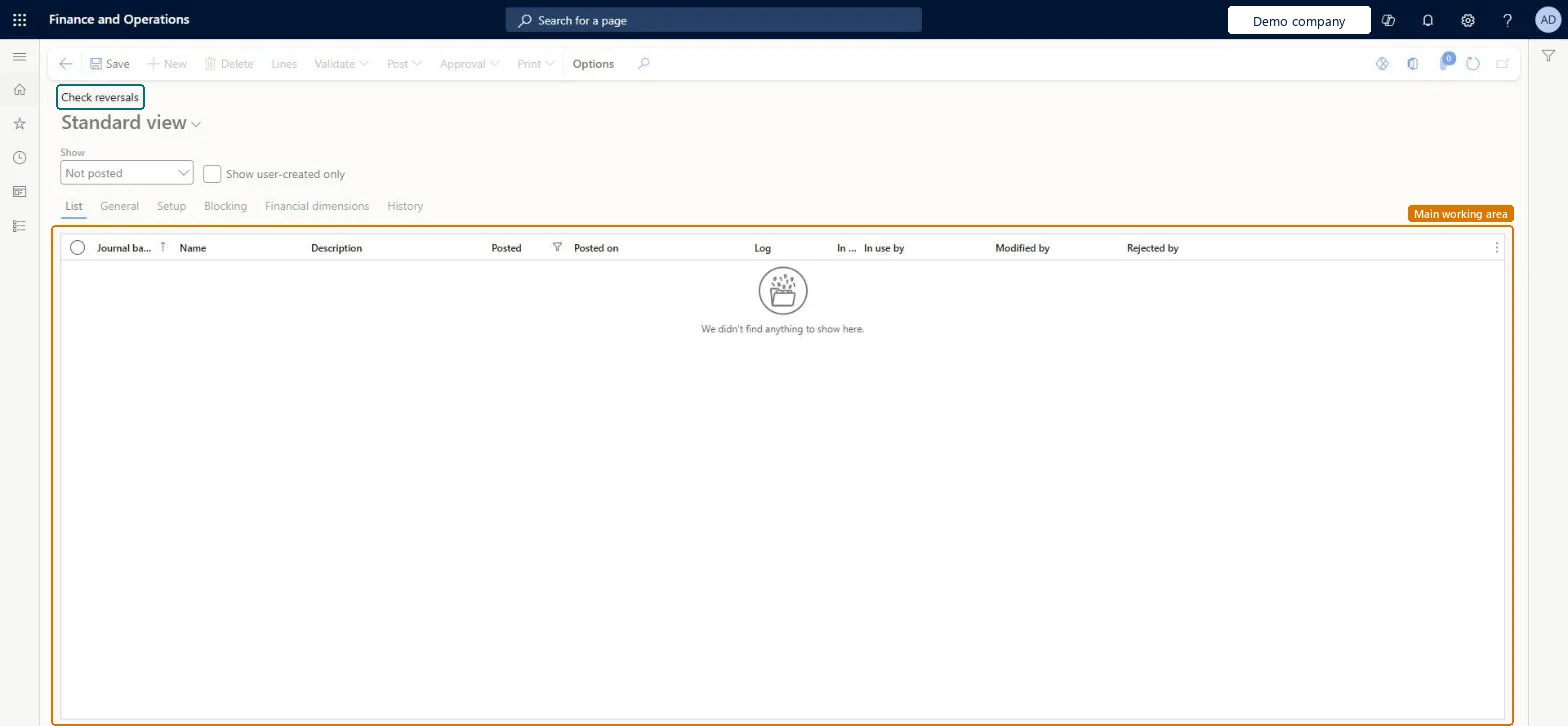
The journal list where check reversals wait for a reviewer, who posts them to approve or deletes them to reject.
What you do here
Use this page to approve check reversals by posting the check reversal journal, or reject them by deleting it, when the company reviews reversals before they post.
Example
For example, the payables clerk reverses check 1045 for 2,300.00 because it was lost. The reversal waits here as Pending cancellation; the treasurer reviews the line and selects Post, and the check status becomes Cancellation.
The page in Dynamics 365. page title tab to open what to set or check
About the examples: Examples and screenshots in this guide use BEAT, a demo company in a Dynamics 365 test environment. Use your own company's codes and values instead of copying them.
Setup steps on this page
Review check reversals
Approve (post) or reject (delete) check reversals that wait for review.
Steps from Microsoft
Go to Cash and bank management > Payment reversal approvals > Check reversals.
Select the reversal journal to review, and then select Lines.
Review the reversed check, its date, reason and default financial dimensions, which come from the original check's journal and can be changed.
To approve, select Post or Post and transfer.
To reject, delete the check reversal journal; the check stays on the Checks page and is no longer Pending cancellation.
The journal name of type Bank check reversal the reversal was created with.Microsoft Learn
Posted
Shows whether the reversal journal is posted (approved).Microsoft Learn
Rejected by
The user who rejected the journal.Checked in Dynamics 365
Common errors and fixes
Message
What to do
Ledger account %1 with record ID %2 doesn't match the current account and/or advanced rule structure associated with structure %3. You must update the account to reflect the active structures.
Delete the check reversal journal, set Use review process for payment reversals to No in Cash and bank management parameters, and reverse the check again. Microsoft Learn
Test checklist
Set Use review process for payment reversals to Yes and set up a financial reason for both Bank and Vendor.
On Checks, select a posted check and select Payment reversal with a date, reason and journal name.
Check that the check is Pending cancellation and a journal shows on this page.
Post the journal and check that the check status is Cancellation and the vendor payment is unsettled.
On a second test check, delete the journal and check that the status is no longer Pending cancellation.
Post reviewed reversals before the bank statement is reconciled, and don't change the account structure while reversals wait.With review on, the account combination is validated and fixed dimensions apply when the journal is posted; a structure change made while the journal waits makes posting fail.
Who reviews check reversals?Changing the account structure after reversals are created: the journal can't be posted and must be deleted and the check reversed again with review off.Test: Approve a check reversal
Feature management and licence
Licence or add-in
In this system 8 roles can open this page, among them Chief financial officer, Accountant, Accounting manager and Accounting supervisor.
Hard to reverse: A posted reversal can't be undone; deleting the journal before posting rejects it.
If you change it later
Deleting the journal removes the reversal, but the original check stays on the Checks page and is no longer Pending cancellation. Microsoft Learn
Technical architect
6Technical
Menu item
LedgerJournalTable_BankChequeReversalChecked in Dynamics 365
Form
LedgerJournalTableChecked in Dynamics 365
Table
LedgerJournalTableShown as “Ledger journal table” in Record infoKey field: JournalNumChecked in Dynamics 365
Who can open it
PrivilegesMaintain check reversal journals LedgerJournalTable_BankChequeReMaintainView check reversal journals LedgerJournalTable_BankChequeReveViewDutiesMaintain bank transactions BankBankTransactionsMaintainInquire into bank transaction status BankBankTransactionStatusInquireVendBankTransactionStatusInquire8 security rolesChief financial officer CompanyChiefFinancialOfficerAccountant LedgerAccountantAccounting manager LedgerAccountingManagerAccounting supervisor LedgerAccountingSupervisorFinancial controller LedgerFinancialControllerAccounts payable centralized payments clerk PaymAccountsPayableCentralPaymClerkAccounts payable payments clerk PaymAccountsPayablePaymentsClerkTreasurer PaymTreasurerChecked in Dynamics 365
Roles to set it up and use it
To set it up or change itTreasurer PaymTreasurerTo use itChief financial officer CompanyChiefFinancialOfficerAccounting manager LedgerAccountingManagerFinancial controller LedgerFinancialControllerAccountant LedgerAccountantAccounting supervisor LedgerAccountingSupervisorGive people one of these roles. On this system, 8 roles can open this page.Checked in Dynamics 365
Actions on the page
Options: Personalize, Page options, Edit, ShareChecked in Dynamics 365
Load order: A check reversal journal has no data entity in Data management, so it can't be loaded from a file or a configuration template. These journals are created only by Payment reversal on the Checks page, so there is nothing to load. Post or reject every pending reversal before cut-over.Checked in Dynamics 365