Accounts payable clerk, Accounts payable manager, Auditor and 15 more roles
Business process
Use netting agreements to settle customer balances with vendor balances in Dynamics 365 Finance
Menu item
CustVendNettingRule
Main table
CustVendNettingRule
Setup steps
1 on this page
Show what matters for
SETUP GUIDEHow to set it up8 sections. Choose a role to highlight what matters to you.
Everyone
1What it is and why
What it is
A setup page where you define a netting rule: the order invoices are netted in, which agreements are included and any extra criteria.
What you do here
Use this page to control which invoices automatic netting picks and in what order.
Example
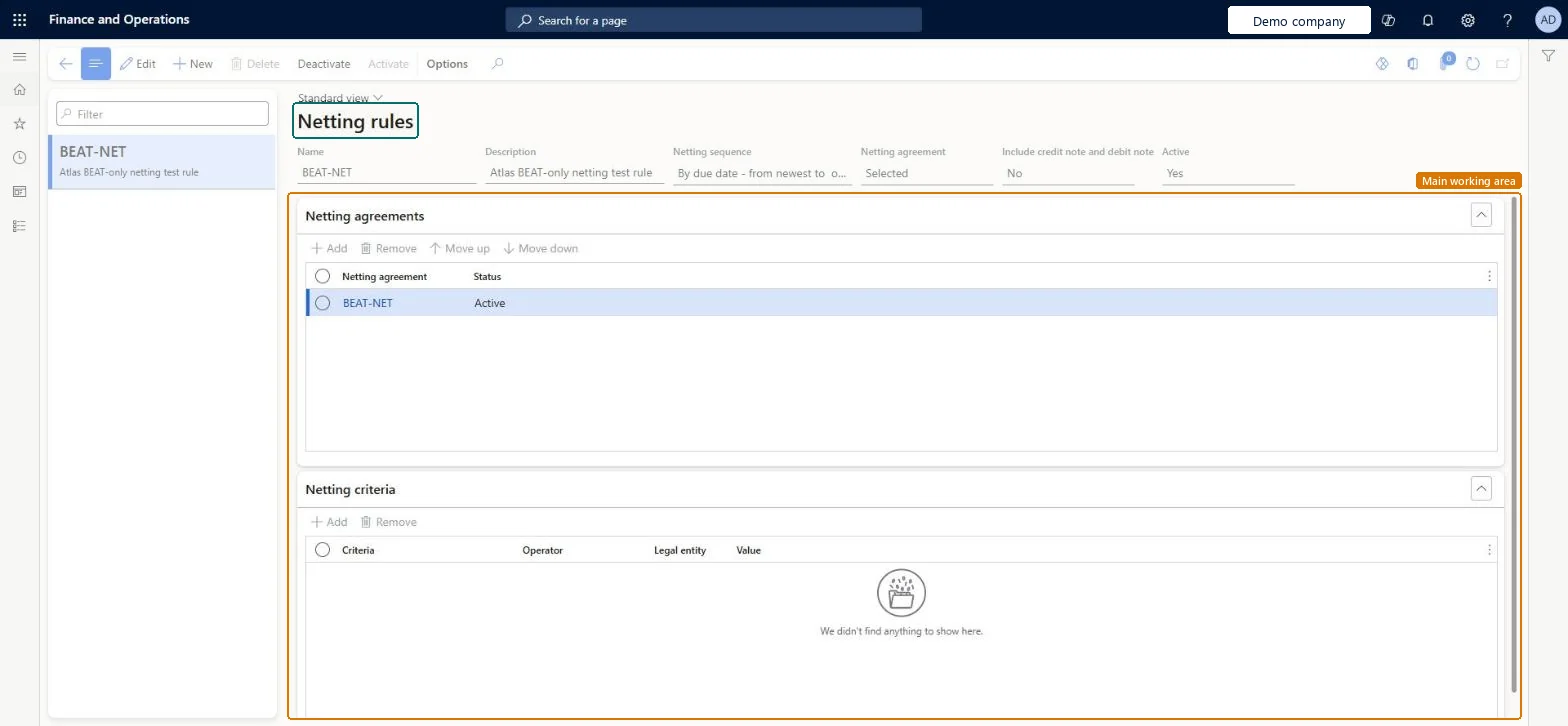
For example, BEAT's rule BEAT-NET nets invoices by due date from newest to oldest, includes only the selected agreement BEAT-NET and leaves credit notes and debit notes out; its preview netted the 100.00 customer and vendor pair and posted two vouchers.
The page in Dynamics 365. page title tab to open what to set or check
About the examples: Examples and screenshots in this guide use BEAT, a demo company in a Dynamics 365 test environment. Use your own company's codes and values instead of copying them.
Setup steps on this page
Set up netting rules
Use this page to decide the order and scope in which automatic netting settles invoices.
Steps from Microsoft
Go to Cash and bank management > Netting > Netting rules and create a record with a name and description.
Choose the netting sequence: by due date (oldest or newest first) or by invoice balance (largest or smallest first).
Set the netting agreement scope to All for every active agreement, or Selected and list the agreements.
Choose whether credit notes and debit notes are included, and on the Netting criteria FastTab limit the rule to vendor accounts, customer accounts or an invoice currency if needed.
Activate the rule, then run it from Automatic netting or schedule it in Process automations.
The order in which invoices are netted, by due date or by invoice balance.Microsoft Learn
By due date - From newest to oldest
Sequence
Netting agreement scope
All includes every active agreement; Selected uses a list you define.Microsoft Learn
Selected
Include credit note and debit note
Whether credit notes and debit notes are included in automatic netting.Microsoft Learn
No
IncludeCredDebtNote
Netting criteria
Optional limits on vendor accounts, customer accounts or invoice currency that the rule nets.Microsoft Learn
Active
Only an active rule can be chosen for automatic netting.Microsoft Learn
Yes
Common errors and fixes
Message
What to do
The rule isn't offered when you run automatic netting
Activate the rule. An inactive rule (Active No) can't be chosen. Microsoft Learn
An invoice you expected to net isn't offered for netting
Transactions already included in a payment journal aren't part of netting. Run netting before you create the payment journal, and use Accounts payable > Periodic tasks > All marked transaction details to see which transactions are already marked for settlement. Microsoft Learn
Test checklist
Create a rule with Netting sequence By due date - From oldest to newest and Netting agreement scope All, and activate it.
Create open customer and vendor invoices for a pair in an active netting agreement.
Run Automatic netting from the Netting menu.
On Netting history, check that the oldest invoices were netted first.
Repeat with Include credit note and debit note set to No and check that credit notes are left open.
Netting sequence By due date - From oldest to newest, agreement scope Selected with the agreements meant for automatic netting, credit and debit notes included only if the parties agree to it.Netting the oldest items first clears the most overdue balances; a Selected list keeps agreements that need manual review out of the automatic run.
A rule includes all active netting agreements (scope All) or only the agreements on its list (scope Selected); netting agreements are kept per legal entity. Microsoft Learn
Can it be undone
Reversible: A rule only selects invoices for later runs; posted netting is undone with Reverse netting.
If you change it later
The sequence and criteria decide which invoices are netted first when amounts on the two sides differ. A change applies to the next automatic netting run. Microsoft Learn
Technical architect
6Technical
Menu item
CustVendNettingRuleChecked in Dynamics 365
Form
CustVendNettingRuleFormChecked in Dynamics 365
Table
CustVendNettingRuleShown as “Netting rules” in Record infoKey field: RecIdChecked in Dynamics 365
Who can open it
PrivilegesMaintain netting rule CustVendNettingRuleMaintainView netting rule CustVendNettingRuleViewDutiesInquire into invoice and cash policies CustInvoiceInvoiceAndCashPoliciesInquirEnable invoice and cash process CustInvoiceInvoiceAndCashProcessEnableInquire into customer payments status PaymCustomerPaymentsStatusInquireInquire into vendor payment status PaymVendorPaymentStatusInquireInquire into invoice and payment policies VendInvoiceInvoicePaymentPoliciesInquirEnable invoice and payment process VendInvoiceInvoicePaymentProcessEnable18 security rolesAuditor AuditPolicyManagerCollections agent CollectionLetterCollectionsAgentCollections manager CollectionLetterCollectionsManagerChief financial officer CompanyChiefFinancialOfficerAccounts receivable clerk CustInvoiceAccountsReceivableClerkAccounts receivable manager CustInvoiceAccountsReceivableManagerAccountant LedgerAccountantAccounting manager LedgerAccountingManagerAccounting supervisor LedgerAccountingSupervisorFinancial controller LedgerFinancialControllerAccounts payable centralized payments clerk PaymAccountsPayableCentralPaymClerkAccounts payable payments clerk PaymAccountsPayablePaymentsClerkAccounts receivable centralized payments clerk PaymAccountsReceivableCentralPaymClerkAccounts receivable payments clerk PaymAccountsReceivablePaymentsClerkRental coordinator agent RentalCoordinatorAgentRental manager RentalManagerAccounts payable clerk VendInvoiceAccountsPayableClerkAccounts payable manager VendInvoiceAccountsPayableManagerChecked in Dynamics 365
Roles to set it up and use it
To set it up or change itAccounting supervisor LedgerAccountingSupervisorAccounting manager LedgerAccountingManagerAccounts payable manager VendInvoiceAccountsPayableManagerAccounts receivable manager CustInvoiceAccountsReceivableManagerRental manager RentalManagerTo use itChief financial officer CompanyChiefFinancialOfficerFinancial controller LedgerFinancialControllerAccountant LedgerAccountantAuditor AuditPolicyManagerAccounts receivable payments clerk PaymAccountsReceivablePaymentsClerkGive people one of these roles. On this system, 18 roles can open this page.Checked in Dynamics 365
Actions on the page
Options: Personalize, Page options, ShareChecked in Dynamics 365
Load order: A netting rule has no data entity in Data management, so it can't be loaded from a file or a configuration template. Create the rules by hand in each environment after the netting agreements are loaded, then activate them.Microsoft Learn